Your air bubbles are draining, the water ahead is pitch black, and everything you came down here for is still a swim away. A conduit fixes that for as long as you stay near it, turning the ocean from somewhere you quickly visit in-between breaths into somewhere you can settle for good.
Today, we will walk you through finding the conduit ingredients, building the frame, and switching it on in Java Edition, plus what changes in Bedrock Edition and a few mods that make the job easier.
What a Conduit Does
Harnessing the Conduit Power Effect
An active conduit gives the Conduit Power effect to every player in range who is touching water or standing in rain. Rain counts, so a player on dry land in a downpour still gets it. The effect rolls three perks into one:
- Water Breathing: your air bubbles stay full, and since Java Edition version 1.21.4, they also refill while you are underwater;
- Night Vision: you can see clearly underwater;
- Haste: you get a 20% mining speed bonus.
Tip: Conduit Power does not undo the usual underwater mining slowdown, so we recommend wearing a helmet with the Aqua Affinity enchantment and keeping your feet on the ground if you plan to mine. It also does not cancel the Mining Fatigue effect an elder guardian gives you.
Each boon lasts for 13 seconds and refreshes for as long as you stay in range and keep touching water or rain. Milk removes Conduit Power, but in Java Edition, it comes back after a few seconds.
Important: Conduit Power does not add to Water Breathing, Night Vision, or Haste effects you already have from other sources, such as potions or a beacon, so you will not get double the benefit. As for Haste, the game simply uses whichever level is highest.
Using the Conduit as a Weapon
A conduit with 42 frames also turns the conduit into a verified hunter.
It strikes one hostile mob at a time within 8 blocks, dealing 4 damage (two hearts) every 2 seconds, but only while that mob is touching water or rain. Guardians, elder guardians, drowned, and skeletons all count as targets, along with dozens of other hostile mobs, including ones that are only sometimes hostile, like endermen and spiders.
One hit every two seconds is a bit slow though, so it works best alongside your own weapons.
What You Need to Make a Conduit
A conduit takes only two ingredients, and neither one is easy to come by. Before you set out, make sure to gather the following:
- 1 Heart of the Sea;
- 8 nautilus shells;
- A crafting table.
Switching the conduit on takes a prismarine frame and some water as well, which we cover a bit further down in this guide.
How to Find a Heart of the Sea
The Heart of the Sea is the one ingredient you cannot farm, since it comes from exactly one place: buried treasure. Every buried treasure chest holds one, so a single successful dig covers this half of the recipe.
Buried treasure is essentially a tiny structure, and in Java Edition specifically, it only generates in Beach and Snowy Beach biomes. Wandering the shore without a plan rarely pays off here, so the smart route starts with a map.
Getting a Buried Treasure Map
No cartographer sells a buried treasure map by default, so you have to find one in a chest.
A Shipwreck's map chest is the best bet, and you will usually find it in the lower section of the stern. In Java Edition version 26.3 though, the map is discarded when no buried treasure is close enough to it, so some map chests may not contain one.
Ocean Ruins chests hold a map 41.7% of the time in small ruins and 43.5% in big ones, with the same catch applying here as well. If a chest comes up empty, simply try another Shipwreck or Ocean Ruins closer to a beach.
Tip: Feeding a dolphin some raw fish will lead you to the nearest one.
Finding and Digging at the "X" Spot
Once you have a map, open it and look for the red "X". While you are far away, a small white dot at the edge of the map shows which side of it you are on, and the dot gets bigger as you close in.
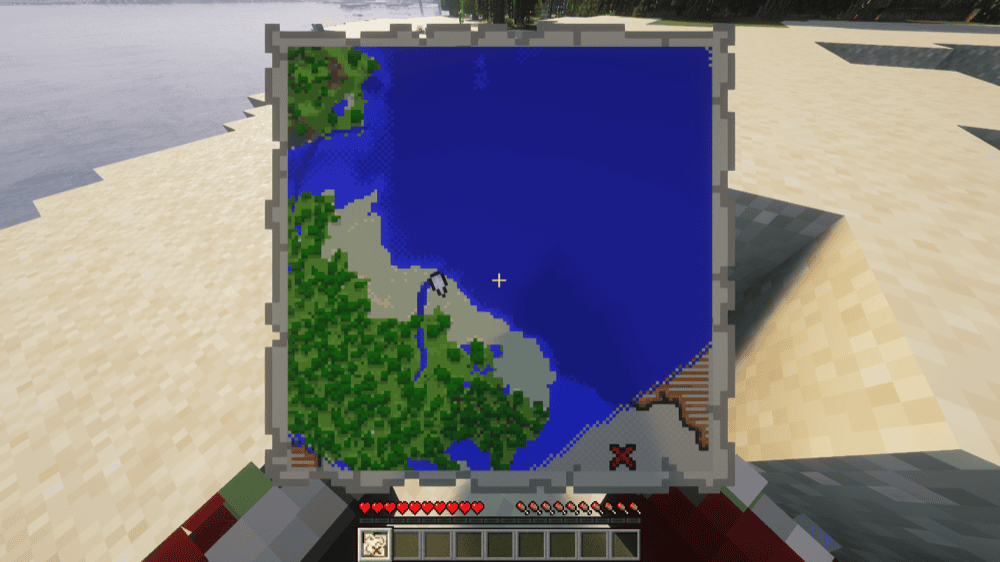
Rather than telling you the exact spot, the "X" marks the general area where the chest itself is buried. So, make sure to bring a shovel and dig a 2x2 or a 2x3 patch of ground around the "X". If the "X" sits out in the water, we also recommend bringing a Water Breathing potion or a helmet with Respiration too, since the chest can sit under the ocean floor.
Tip: there is a faster way to do this in Java Edition. The chest always sits at the same spot inside its chunk (a 16x16 square of the world), so you can find the exact spot to dig by:
- Walking to the "X" and pressing "F3" to open the debug screen.
- Finding the "Section-relative" line, which shows your "X", "Y", and "Z" numbers, then moving until the "X" and "Z" numbers both read "09", staying in the same chunk as the red "X".
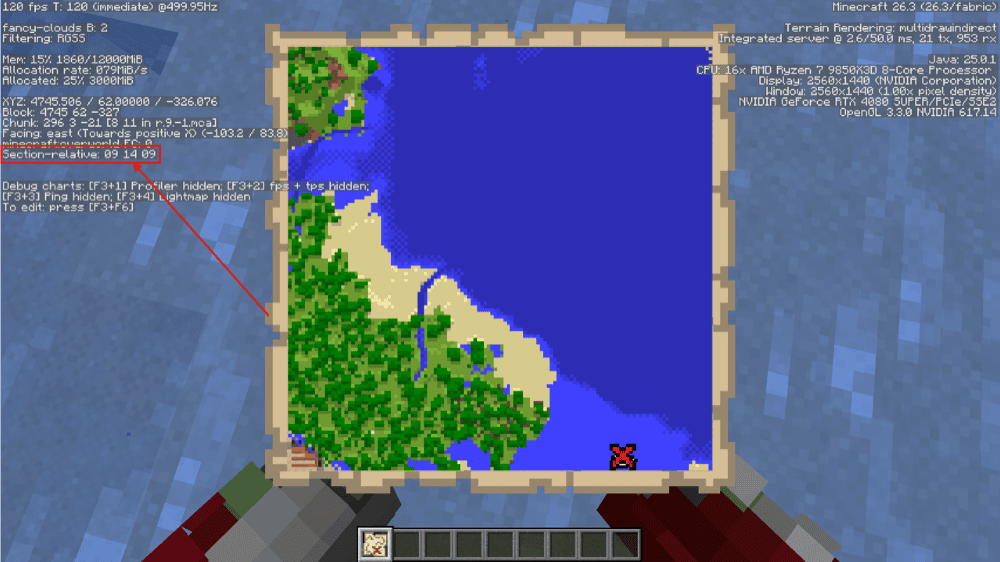
- Digging straight down.
Then, simply open the chest and your Heart of the Sea should be waiting inside.
How to Get Nautilus Shells
Collecting eight shells takes patience, because each source comes with low odds. In Java Edition, shells come from four places:
| Source | Chance | Good to Know |
|---|---|---|
| Drowned | 3% of naturally spawned drowned spawn holding one. | You can spot them by the shell in their off-hand, and a drowned that carries one always drops it when it dies. |
| Nautilus | 5% per kill, rising to 8% with Looting III. | They only drop shells when a player or a tamed wolf makes the kill. |
| Fishing | 0.83% per catch, or 1.89% with Luck of the Sea III. | The bobber needs open water: still water at least 5 blocks wide and 2 blocks deep, with no flowing water or solid blocks around it. |
| Wandering trader | 5 emeralds per shell. | A trader sells 5 at most and only about 6% of traders offer shells. |
One common trap to avoid in Java Edition is assuming that every drowned can carry a shell. Only drowned that spawn naturally can, and a zombie that turns into a drowned is never equipped with one, so the classic flooded-dungeon zombie farm gives you no shells at all.
If you want to build a drowned farm, ensure it focuses on naturally spawned drowned, such as the aerial design over a River biome.
How to Make a Conduit Step by Step
With a Heart of the Sea and eight shells in your inventory, the recipe itself takes seconds to complete. Here are the steps:
- Open a crafting table.
- Place the Heart of the Sea in the center slot.
- Fill the eight surrounding slots with nautilus shells.
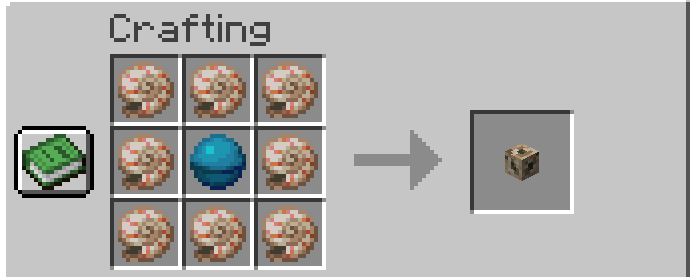
Note that this recipe fills up all nine slots, so your standard 2x 2 inventory grid cannot hold it. With that said, if you’ve followed all the steps so far, you should now have a single conduit… that you still can’t use since it still needs water and a frame.
How to Activate a Conduit
A conduit only switches on when it sits in the middle of a cube of water that is three blocks wide, long, and tall, with a frame of prismarine blocks wrapped around that water. It works in any biome and at any height or depth.
What You Will Need for the Frame
Making the frame takes the following:
- 16 to 42 frame blocks (prismarine, prismarine bricks, dark prismarine, or sea lanterns, in any mix);
- A water bucket.
Slabs, stairs, and walls made from prismarine do not count.
Where to Get Frame Blocks
Ocean Monuments are built from all four frame blocks, so mining them with a pickaxe is a handy way to collect some. Prismarine, prismarine bricks, and dark prismarine drop themselves when mined with a pickaxe, while sea lanterns only do so with the Silk Touch enchantment and otherwise give prismarine crystals.
Ideally, you’ll need to defeat all three elder guardians first, since their Mining Fatigue effect will slow down your mining. If you would rather make your own, four prismarine shards from guardians make one prismarine block, which puts a 16-block frame at 64 shards.
Building the Frame Step by Step
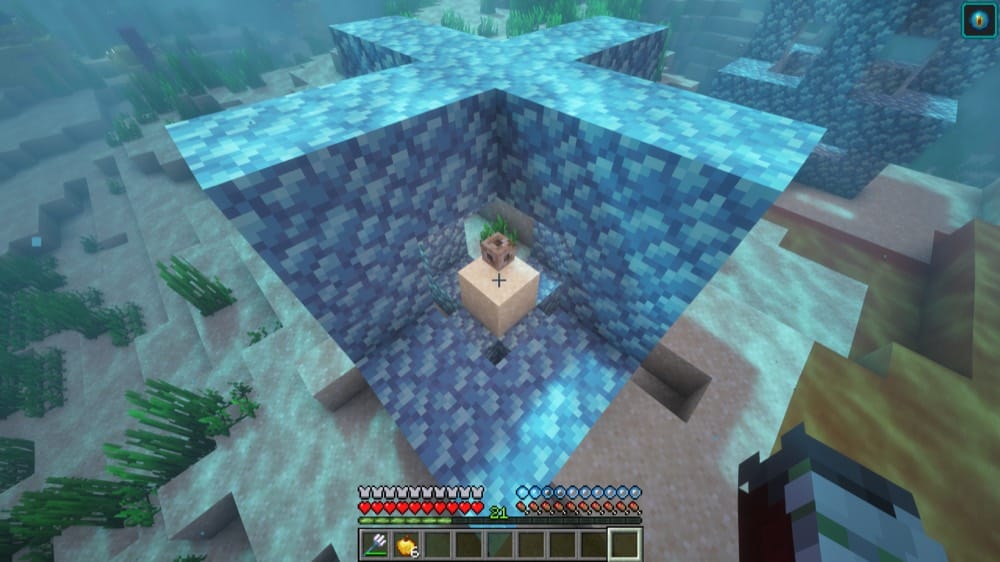
The frame is three hollow squares, each five blocks wide, centered on the conduit: one lying flat and two standing upright, crossing each other at right angles. Here is how to build it:
- Choose a spot underwater and place one frame block to mark the middle.
- Add two more blocks in a row to the north, east, south, and west of it, so they form a plus sign (nine blocks in total).
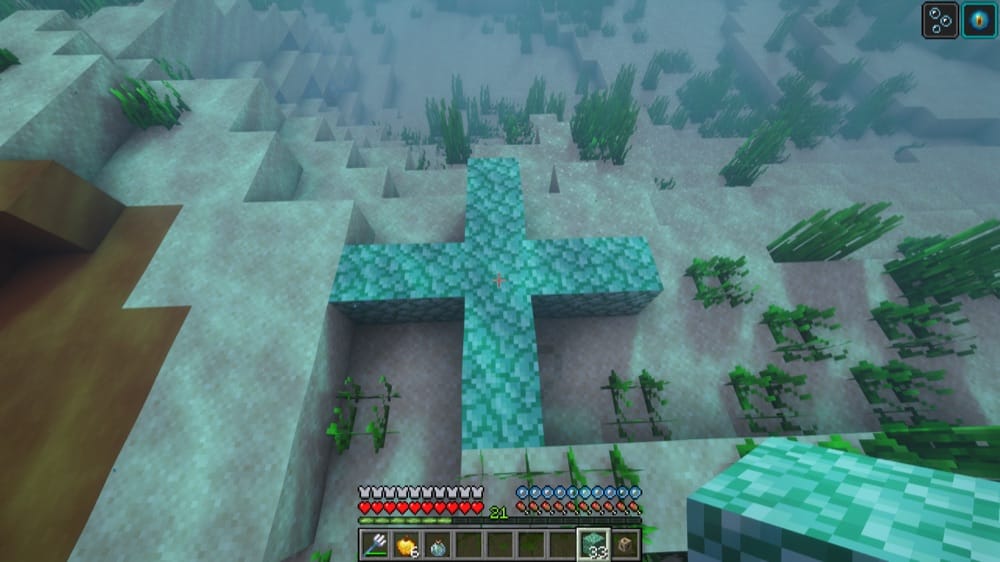
- Build a tower of four blocks on top of each of the four tips of the plus (sixteen blocks in total).
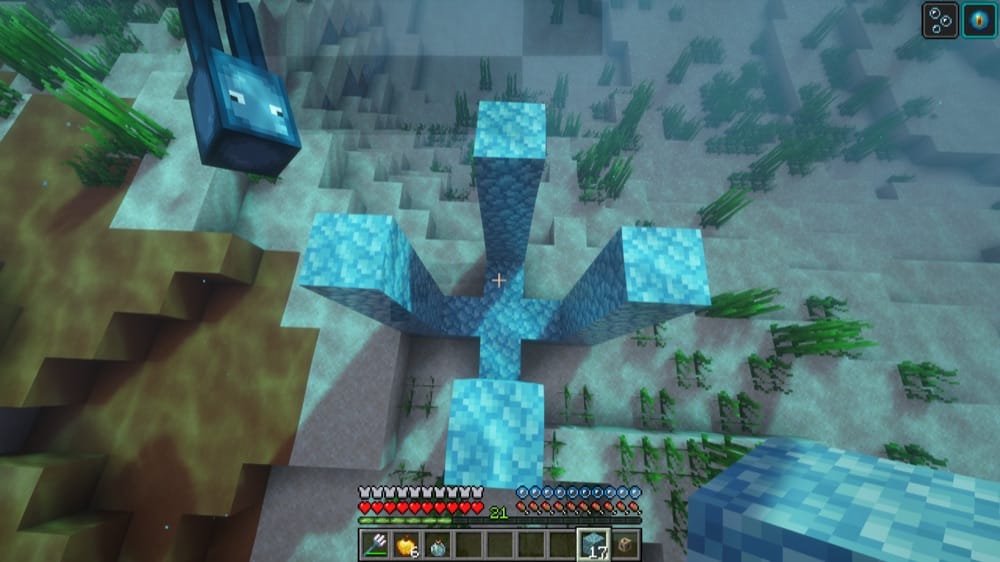
- Join the tops of the four towers with a second plus sign. That takes five more blocks: one in the middle and one between the middle and each tower.
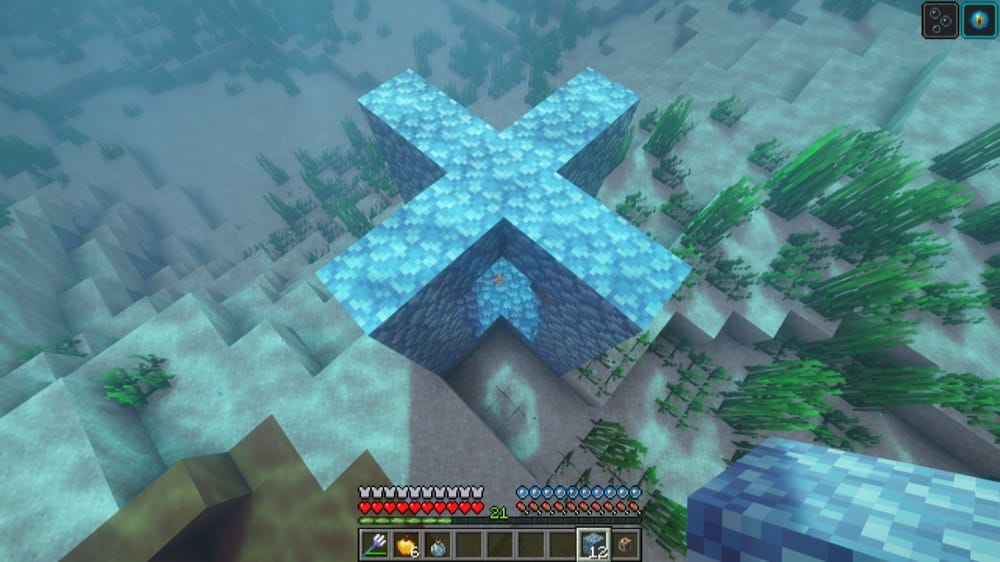
- Halfway up the frame, join the four towers into a square ring. That takes twelve more blocks, because each tower already supplies one block of the ring, and it brings the frame to the full 42.
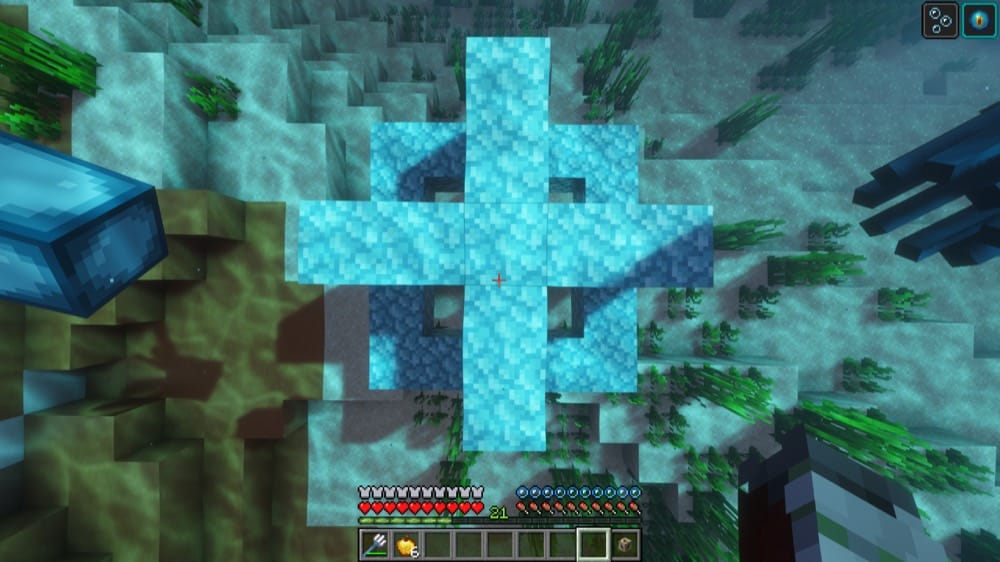
- Put a spare block on top of the middle block of the bottom plus sign, since a conduit needs something to be placed on. Then, place the conduit on top of that block, which puts it in the exact middle of the frame.
Switching the Conduit On
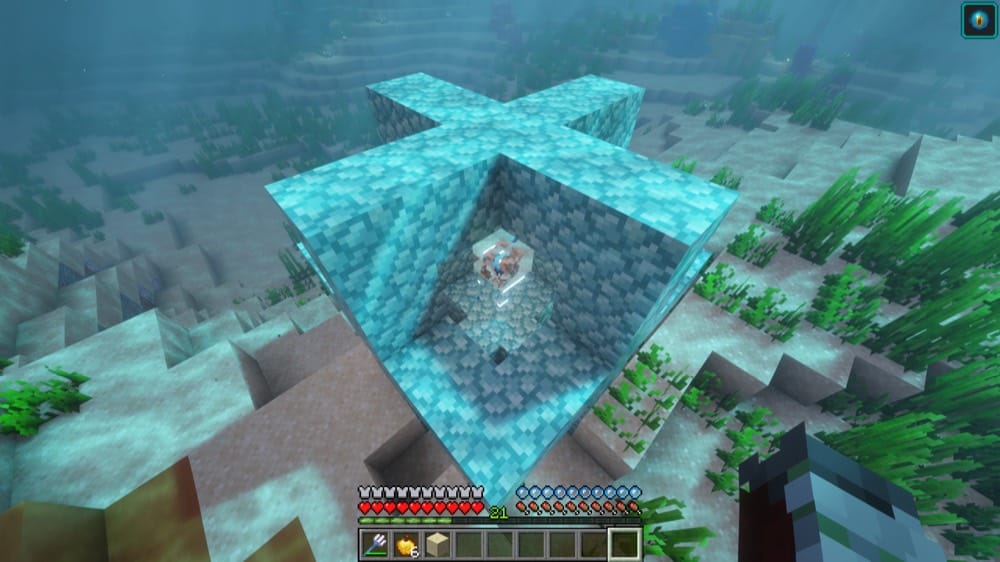
Once the frame is set up, break the spare block and let the water fill the gap. A conduit placed underwater fills with water on its own (this is called waterlogging), and if it ever ends up dry, you can use a water bucket on it.
When it activates, the Heart of the Sea appears in the center of the conduit, and a complete frame makes it open like an orange eye.
How Many Frame Blocks You Need
You do not need all 42 blocks to start. Any 16 of those spots will switch the conduit on, and you can mix the four block types freely, but the conduit stops working if you drop below 16.
More blocks mean extended range, too. Each seven frame blocks add 16 blocks of range, and the range reaches the same distance in every direction around the conduit, as outlined in the table below.
| Frame blocks | Range |
|---|---|
| 16 | 32 blocks |
| 21 | 48 blocks |
| 28 | 64 blocks |
| 35 | 80 blocks |
| 42 | 96 blocks |
Breaking and Moving a Conduit
Any tool, or even your bare hands, can break a conduit, which you can then pick up and place somewhere new. It also always drops when an explosion destroys it. In Java Edition, pistons cannot push a conduit, so breaking and replacing it is your only option.
Conduit Differences in Java vs Bedrock Edition
The frame, the range, and the attack follow the same rules in current versions of both editions. The differences come down to a few details:
- Drowned shells: drowned carry a nautilus shell 3% of the time in Java Edition and 8% of the time in Bedrock Edition. In Bedrock specifically, zombies that turn into drowned can carry shells too, so the flooded-dungeon farm works there.
- Pistons: Bedrock pistons can push a conduit, while Java pistons cannot.
- Milk: in Bedrock Edition, the effect returns almost immediately after milk instead of after a few seconds.
- Sleeping: In Bedrock Edition, Conduit Power also lets you sleep in a waterlogged bed.
Mods for Treasure Hunting and Faster Conduit Building
A working conduit takes plenty of effort, and these three mods ease the hardest stages: finding buried treasure, building the frame, and stopping any drowned from spawning around you while you have Conduit Power.
Explorer's Compass
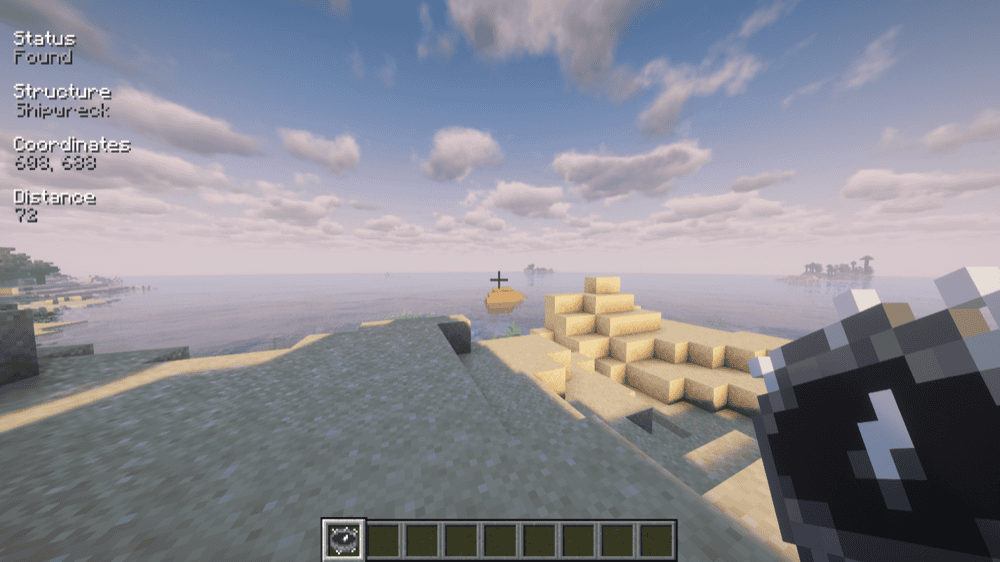
“Explorer's Compass” is the shortcut for the long stretches of beach between you and a buried chest. Right-click it to open a list of structures, pick one, and the compass now points the way. The list also includes buried treasure, which makes it a handy guide to your Heart of the Sea.
Information about your search appears on your screen, and whenever the compass is not locked onto a structure, it points toward the world spawn instead. You can also change the search radius and blacklist structures from the configuration file.
Better Conduit Placement
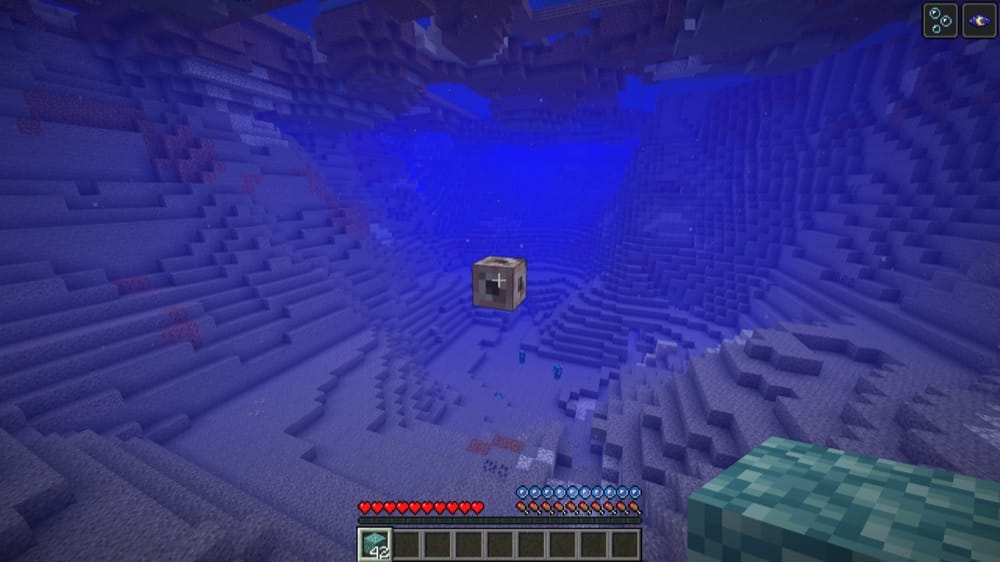
“Better Conduit Placement” is for anyone who has stared at a 42-block frame and wished it would build itself. With this mod enabled, you can now place a conduit in the water in front of you, then click it with a frame block to start filling in the frame.
Hold crouch while you click and the full frame goes up almost instantly. Breaking the conduit also drops its frame blocks by default, so you can pack up the whole setup by breaking just the conduit instead of every block around it.
Conduits Prevent Drowned
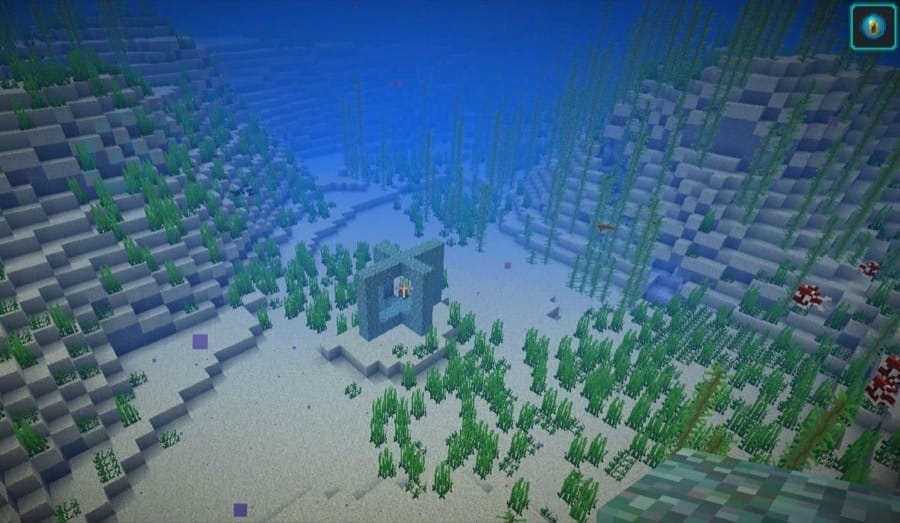
“Conduits Prevent Drowned” is for the day your finished underwater base finally feels quiet, until a drowned spawns right next to your front door. With this mod installed, drowned now stop spawning around you while you have Conduit Power, so you can build in peace.
You can shrink how far from you that protection reaches from the configuration file, since the default setting already covers the widest range the mod allows. Just keep in mind that if you farm drowned for nautilus shells, they will not spawn around you while you have Conduit Power – at least until you turn the mod off.
How to Install Minecraft Mods
You can install the above mods automatically using the CurseForge app or manually by placing the mod files within your game's mods folder. Both methods allow you to easily add custom features and enhancements into your Minecraft experience.
If you want to learn more, you can read our detailed guide on how to install Minecraft mods.
Common Issues and Quick Fixes
My conduit won't switch on
Water is the usual culprit here. The conduit has to sit in the middle of a 3x3x3 cube of water and be waterlogged itself, so one air pocket or solid block touching it, diagonals included, is enough to stop it.
To fix this, make sure to fill every gap and use a water bucket on the conduit. If the water is fine, we recommend counting your frame next. At least 16 blocks have to sit in the right spots, two spaces away from the conduit itself. Slabs, stairs, and walls do not count.
My conduit glows, but I get no effects
A conduit shines at the brightest light level whether it is active or not, so the glow proves nothing. Instead, make sure to look for the Heart of the Sea showing in its center instead.
Also, note that Conduit Power only reaches players who are touching water or standing in rain, and only within your frame's range, which is 32 blocks for a 16-block frame.
My conduit isn't attacking anything
The attack needs the full 42-block frame to work, so check that the eye in the center has opened. The target also has to be a hostile mob within 8 blocks that is touching water or rain.
Another reason might be the sighting of a creaking, which the conduit targets but cannot damage. The solution is to lead it out of range or, if it came from a creaking heart, to break that heart first.
I can't find any nautilus shells
In Java Edition, only naturally spawned drowned carry shells, so zombie farms never produce any. A tried and tested approach is to hunt drowned in the ocean or a River biome, or to kill nautiluses yourself, since they only drop shells for a player or a tamed wolf.
Wandering traders also make for a handy backup at 5 emeralds per shell.
My game crashes on startup after installing mods
A startup crash usually means one of three things:
- The mod file does not match your Minecraft version.
- The mod was made for a different loader.
- A required dependency is missing.
Check that you installed the correct Forge, Fabric, Quilt, or NeoForge file for your profile, then look at the mod page for any required files, especially for Fabric API on Fabric profiles and for Quilted Fabric API on Quilt profiles.