
After a decade of hopes, delays, and cancellations, we are proud to announce that you can now explore the wondrous world of Hytale through the CurseForge app! In this article, we will cover what Hytale mods are and how to seamlessly integrate them in-game for a survival sandbox RPG experience like no other.
What Are Hytale Mods?
These are mods and modpacks developed for Hytale – a Minecraft-inspired procedurally generated fantasy world developed by Hypixel Studios. Unlike Minecraft, however, Hytale handles modding differently as it does not use traditional mod loaders like Forge or Fabric.
Instead, the game features a server-side first architecture. In practice, this means that each time you casually jump into someone else’s modded server, the game automatically syncs all assets for you, saving you the often tedious process of installing mods manually and all the troubleshooting that comes with it.
However, if you’re not keen on playing with other people and want to keep your explorations private, then grabbing a licensed copy of Hytale and installing the dedicated CurseForge desktop app is one of the easiest ways to get started since you’ll get access to all the latest mods bundled together in one place.
Why Should You Mod Hytale?
While Hypixel Studios have made great efforts to deliver a polished experience from day one, the game is still in Early Access, so there is always room for improvement. If you find that you’re constantly hunting for information on all your items, are getting bored of the included weapons, have brave new furnishing ideas, or simply looking for a quick way to destroy items, then you’ve officially reached the Hytale modding stage.
Types of Hytale Mods
CurseForge currently offers close to 2000 mods divided into eleven categories:
- Blocks: Adds new decorative or functional building materials
- Food\Farming: Introduces new crops, livestock, cooking recipes, and more
- Furniture: Focuses on detailed, non-block decorative items
- Gameplay: Modifies or adds new core mechanics
- Library: Provides essential code frameworks and shared resources
- Miscellaneous: A "catch-all" category for unique mods that do not fit anywhere else
- Mobs\Characters: Adds new creatures, NPCs, bosses, and more
- Prefab: Contains pre-made structures and blueprints for creators to place within the game
- Quality of Life: Focuses on small improvements and interface tweaks
- Utility: Includes tools and commands for servers, performance tweaks, and more.
- World Gen: Alters how the game creates the in-game landscapes.
How to Install Hytale Mods
To begin modding the game, you first need to own an official copy of Hytale. Despite not needing a compatible mod loader, we recommend using the CurseForge desktop client to manage all things modding quickly and easily, so you can focus on enjoying the game.
All mods on CurseForge are also frequently scanned by malware and manually vetted by moderators to ensure you’re having the most secure Hytale experience possible.
So, before you embark on your new adventure, make sure you have:
- A legal copy of Hytale.
- An up-to-date version of the dedicated CurseForge desktop launcher.
That’s it! Here is the step-by-step guide in more detail.
STEP 1: Install the CurseForge Launcher
- Go to our download page and press "Get CurseForge App".
- Download either the standalone or the Overwolf version.
- Run the downloaded installer and complete the setup.
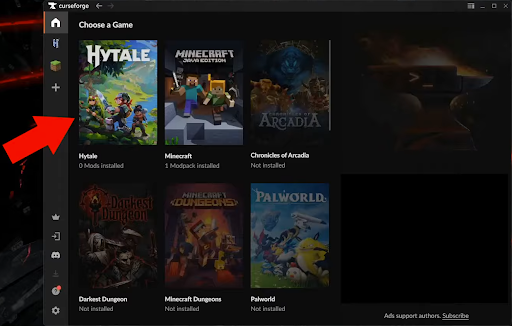
- Launch the CurseForge app and check to see that it auto‑detected Hytale.
- If Hytale is not auto-detected, check if you need to update the app, restart your PC, or reinstall the CurseForge app.
STEP 2: Install Mods for Hytale
- Click on Hytale from within CurseForge to open the mod browser.
- Click on either the "Discover" or "Browse" tabs to search for mods.
- Highlight a mod and click "Install" to add it to the core Hytale game.
- You can manage your installed Hytale mods from Hytale → "My Mods".

STEP 3: Launch Hytale
You can launch the game in one of two ways, depending on your preferences:
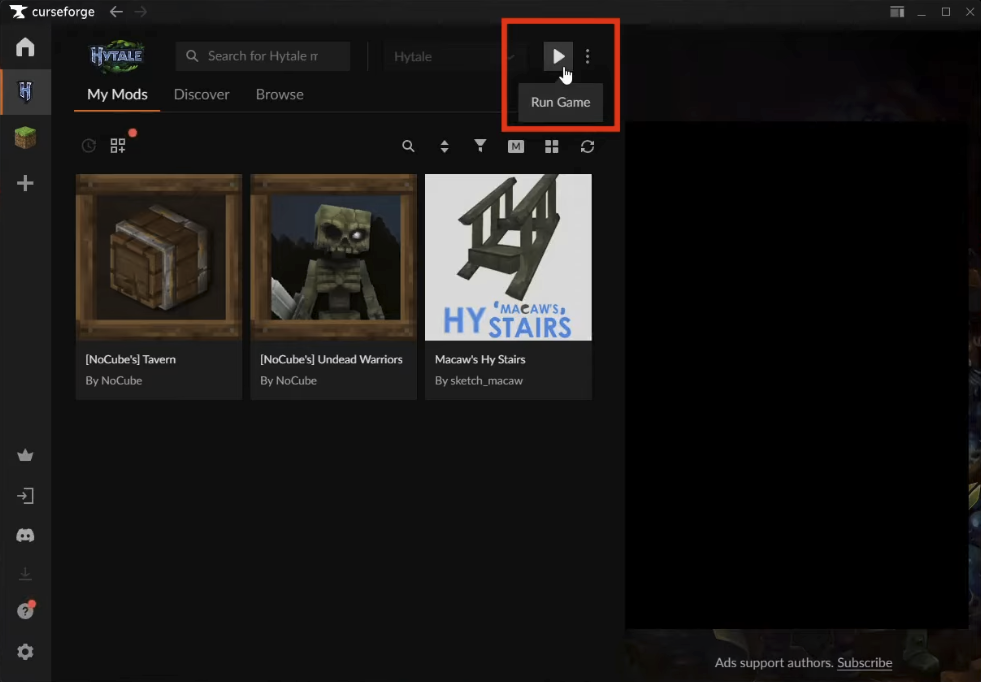
CurseForge app: Click on Hytale → "Run Game".
Official launcher: Double-click the "Hytale Launcher" desktop icon.
STEP 4: Enable Hytale Mods for Your World
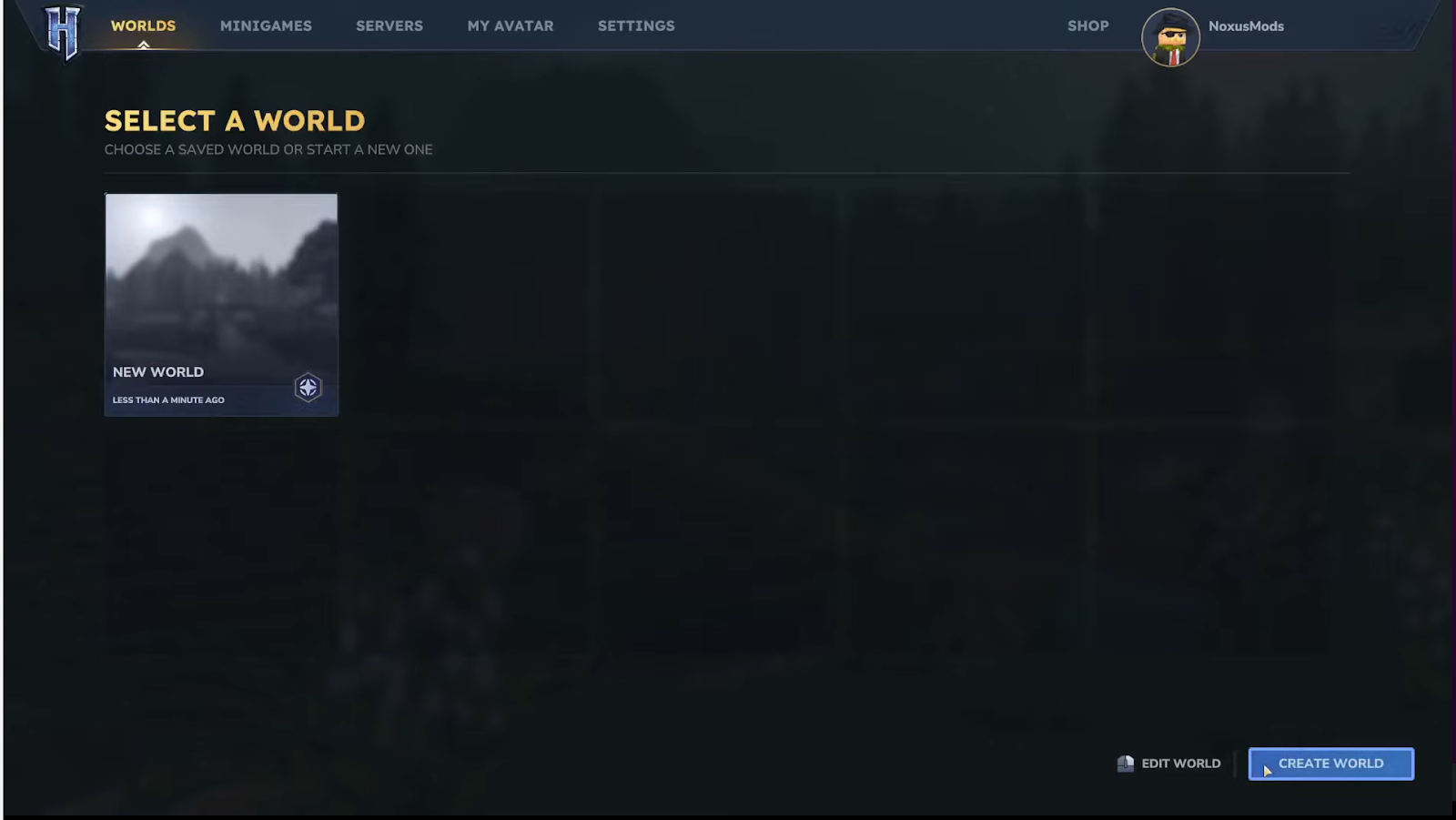
- From the Hytale home menu, click "Worlds".

- Next, click "Create World".
- Click the settings cog icon.
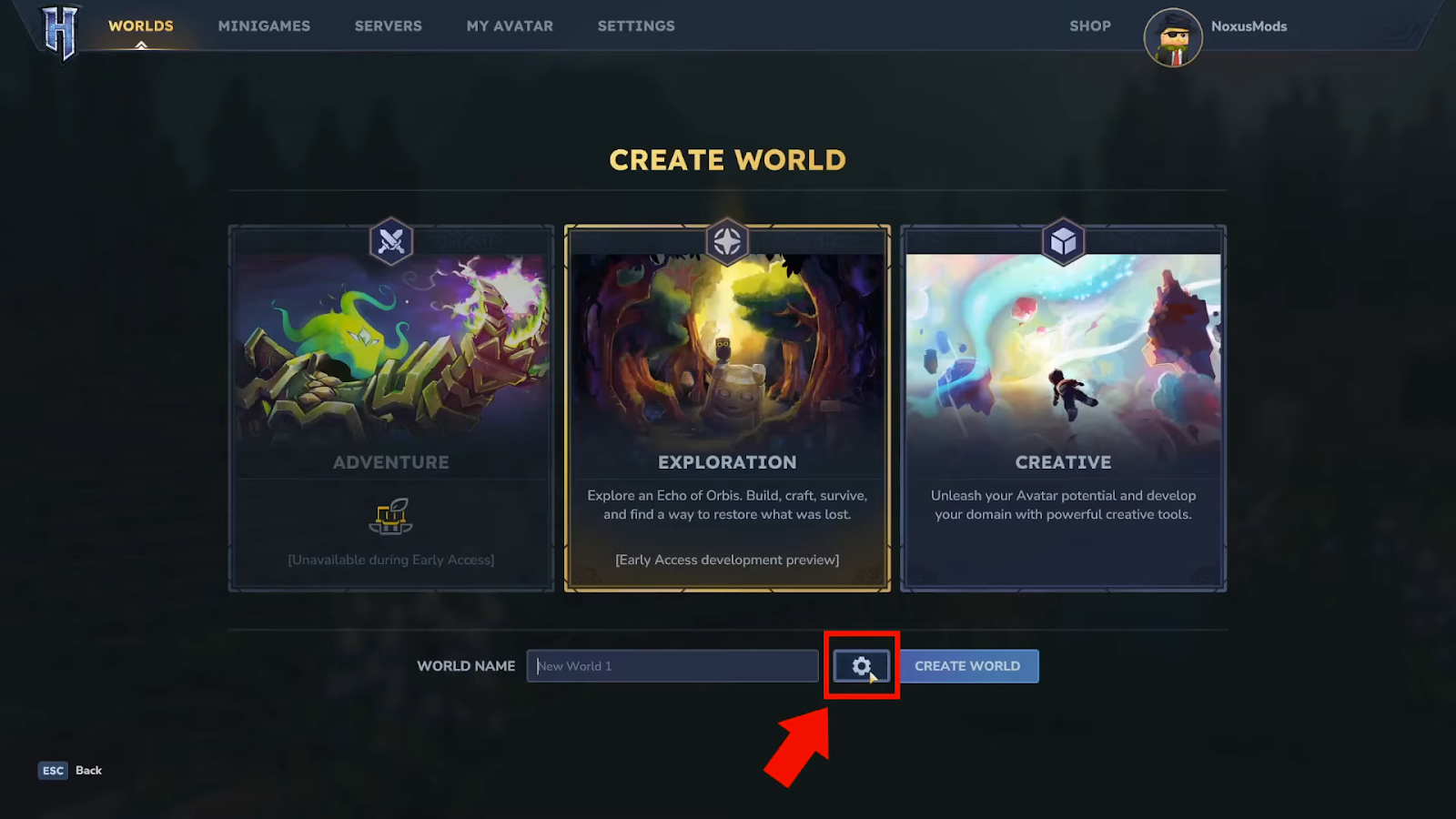
- Select the mods you want your new world to have.
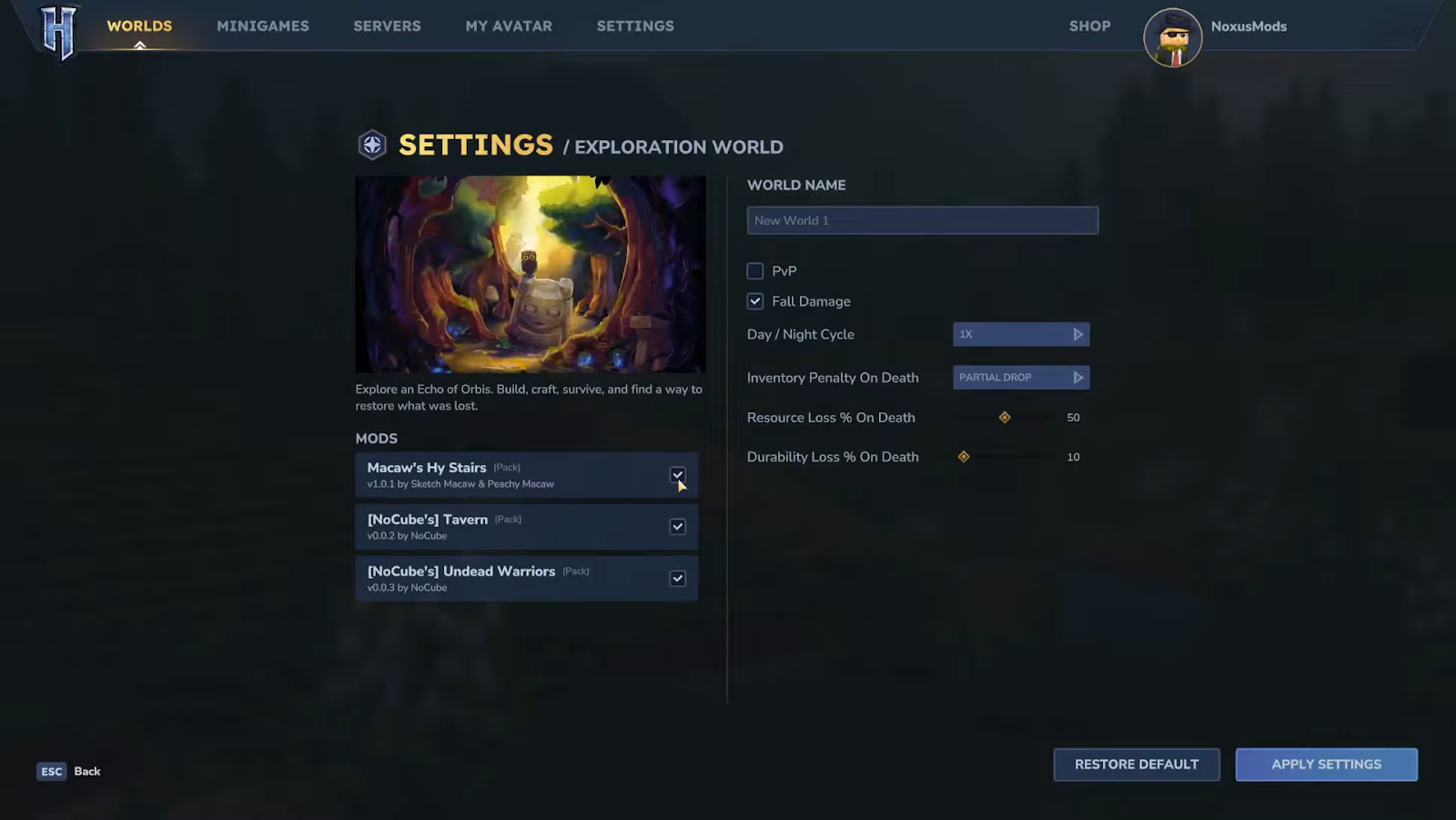
- Click "Apply Settings" → "Create World".
Adding Mods to an Existing Hytale World
- Right-click your world from the Hytale world selection menu.

- Choose the mods you want to apply to your existing world.
- Click "Save World Settings".

STEP 5: Check That Your Mods Work In-Game
- Install the Better Modlist mod for Hytale through the CurseForge app.
- Apply the mod to your new or existing world.
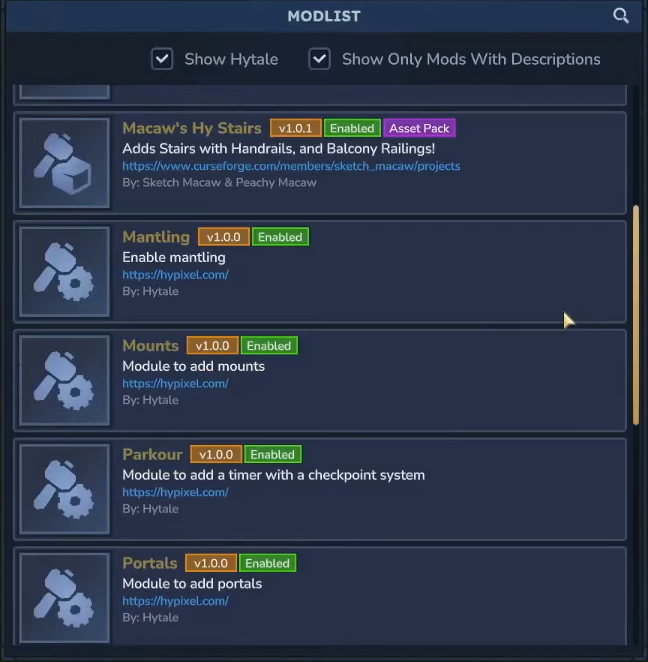
- Type the "/modlist" command in the chat to bring up a scrollable list of all installed mods for your current world.
Pro Tip: Make sure to save your world or server BEFORE using mods. That way, if a mod causes issues, you can simply uninstall it and resume your game from where you left off.
How to Install Hytale Mods Manually Without CurseForge
Since Hytale is built from the ground up to be moddable, installing the game will automatically create a local "Mods" folder for you where you can place your mod files. Here are the steps to install Hytale mods manually in case you don’t want to use CurseForge.
- Open your Hytale installation directory.
- Windows: %AppData%/Hytale
- Mac: ~/Application Support/Hytale
- Linux: $XDG_DATA_HOME/Hytale
- Navigate to the "UserData" directory, then the "Mods" directory.
- Place your mod files (.zip, .jar) into this directory.
Note: Placing mods in this directory will install mods for all your saves. If you want to apply them to a specific world, go to the individual world file and find the mods folder for world-specific mod installs.
Once you’ve placed your mods into the folder, the in-game mod activation process is the same as with using CurseForge – the only thing that differs here is the mod installation method (manual vs. automatic).
Top 10 Mods by Community Downloads
Now that you know how to install Hytale mods, which ones should you go for first? To get you started, here are the top 10 most downloaded mods by the community as of writing this article (for an updated list, please visit the official CurseForge Hytale Mods section instead.)

EyeSpy
Adds a HUD that displays information about what you're looking at!

Advanced Item Info
Adds a searchable GUI that displays all the items in the game and displays extra properties they have.

Wan's Wonder Weapons
A collection of unique weapons for Hytale, new "relics" blending elemental power, dark magic, and a touch of absurdity!

Violet's Furnishings
Expands on Hytale's existing furniture library.

Lucky Mining
Get more ores from mining, the more you mine in a row, the more ores you get.

Simply Trash
Adds a trash can to easily destroy items!

Hybrid
A Hytale mod library that contains common code for all of Serilum's mods.

Overstacked
Increases the maximum stack size of items.

Ymmersive Melodies
Upload and play MIDI files in-game on various instruments to annoy your friends with custom melodies!

Spellbook
Powering your favorite mods with clean, reusable helpers and utilities.