Enchanting in Minecraft isn't complicated once you know what each enchantment actually does and which ones you need to choose between. Most of the confusion comes from conflicting enchantments – where two good options can't go on the same item – and from not knowing whether to prioritize Mending or Infinity, Fortune or Silk Touch, and so on.
This guide covers the best enchantments for each item category, which combinations to avoid, and how to build a reliable survival set without overthinking it.
How Enchanting Works
There are three ways to put enchantments on an item in vanilla survival:
- Using an enchanting table;
- Combining enchanted books with items on an anvil;
- Combining two identical items on an anvil to merge their enchantments.
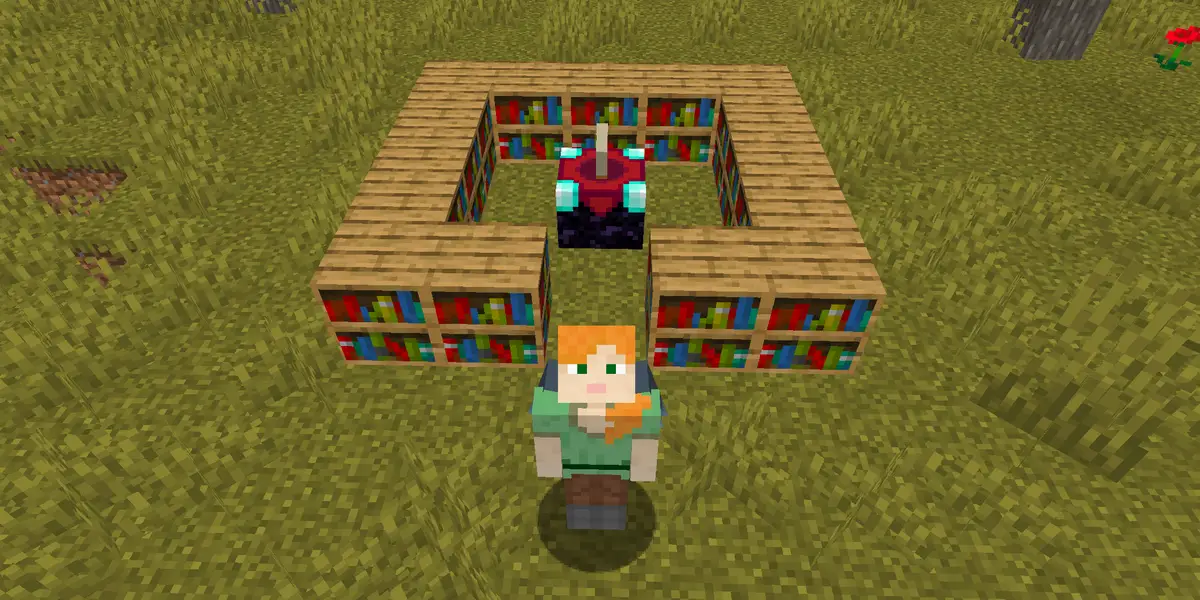
An enchanting table needs 15 bookshelves arranged around it to unlock level-30 rolls, which give you access to stronger enchantment options. Below that, you're essentially gambling on weaker results. The table gives you three random options at different XP costs – you don't fully control what you get, which is why enchanted books from trading with librarian villagers, fishing, or loot chests are often the more reliable path toward specific enchantments.
A Note on Minecraft Anvils
Anvils let you combine books with items or merge two enchanted items. They work well but have a cost limit: if an operation costs more than 39 levels, the anvil shows a "Too Expensive!" message and doesn’t do anything.
This usually happens when you've repaired the same item too many times or are stacking too many books at once. Build your gear in an efficient order – combine books in pairs first, then apply the merged book to your item, rather than adding books one at a time.
Tip: Using a grindstone can help you remove enchantments and returns some XP, but it can't remove Curse of Binding or Curse of Vanishing. Both curses are permanent until the item breaks or you die.
With all that said, let’s review which are some of the best in-game enchantments you can get as voted by the player community.
Best Sword Enchantments in Minecraft
- Sharpness is the go-to damage enchantment for general survival as it boosts damage against all mob types. A similar enchantment is Smite, but this one increases damage only to undead creatures like skeletons, zombies, and the Wither. Bane of Arthropods is another enchantment to increase damage toward arthropod creatures like spiders and endermite. These enchantments cannot be used together, so we recommend Sharpness to cover more ground and not just a limited mob variety.
- Looting is one of the most valuable enchantments in the game for any survival player. It increases item drops from mobs – more blaze rods from blazes, more gunpowder from creepers, more rare drops from everything. Make sure not to sleep on it.
- Unbreaking reduces how quickly the item loses durability. Pair it with Mending and your sword becomes essentially permanent as long as you're earning XP.
- Mending repairs the item using XP orbs you collect. One orb goes to repairing a Mending item instead of leveling your XP bar. With Unbreaking III and Mending used together, a well-used sword rarely needs conventional repairs.
- Sweeping Edge (Java Edition only) increases the damage of sweep attacks (a sweep attack is when you hit multiple mobs at once using a sword). It's a significant DPS boost in Java for mob farms and crowd situations, but it doesn't exist in Bedrock Edition.
- Fire Aspect sets mobs on fire, dealing extra damage over time and automatically cooking meat drops. It's optional but useful, especially for food farming.
A solid general sword enchantment example: Sharpness V, Looting III, Unbreaking III, Mending, Sweeping Edge III (Java), Fire Aspect II.
Best Bow Enchantments in Minecraft
- Power is the damage equivalent of Sharpness for bows – it's the first thing to go on any bow.
- Unbreaking applies the same durability benefit as on swords.
- Flame sets targets on fire on hit, so the same effect as Fire Aspect on swords.
- Infinity vs Mending is the most debated choice in bow enchanting. Infinity means a single arrow in your inventory will last you forever for regular shots. Mending means the bow repairs itself on XP. They can't both go on the same bow, however. For early and mid-game survival, Infinity is more convenient since you don't have to think about arrow supply. For late-game or endgame worlds where you use tipped or spectral arrows regularly (Infinity doesn't work on those), Mending makes more sense. Neither choice is wrong here – it all comes down to your playstyle.
- Punch knocks mobs back on hit. Optional, but useful for keeping creepers at a safe distance.
A reliable bow enchantment example: Power V, Unbreaking III, Flame, then either Infinity or Mending.
Best Crossbow Enchantments in Minecraft
- Quick Charge reduces reload time significantly. It's the most impactful crossbow enchantment and should always be (at least in our opinion) the first choice.
- Piercing makes arrows pass through multiple mobs and also bypasses shields in Java Edition PvP. It's often cited as the better pick for most situations.
- Multishot fires three arrows at once in a spread. It's more useful for crowd control or when using firework rockets. Piercing and Multishot conflict here – pick one based on how you prefer to use the crossbow.
A general crossbow enchantment example: Quick Charge III, Piercing IV, Unbreaking III, Mending.
Best Mace Enchantments in Minecraft
- Density is perhaps the best general mace damage enchantment there is. The mace deals extra damage when you hit a target while falling, and the higher you fall from, the harder the hit becomes. For example, striking after falling 10 blocks deals more smash damage than striking after falling 5 blocks. Density increases that extra fall-based damage, which makes it the natural pick for the mace's main smash-attack mechanic. Density conflicts with Breach, Smite, and Bane of Arthropods, so you have to choose one of those damage enchantments and forget the rest.
- Breach reduces your target’s armor rating. This makes it more useful against armored players or armored mobs than normal unarmored enemies. If you mostly play survival PvE, Density is usually the more practical pick; if you care about PvP, Breach is worth considering.
- Wind Burst launches you upward after landing a mace smash attack, letting you chain more smash attacks when you time it well. It is a rare enchantment and can only be obtained from ominous vaults in trial chambers, so it is more of a late-game upgrade than a first mace enchantment.
Tip: Fire Aspect, Unbreaking, and Mending can also be useful on a mace. Fire Aspect adds burn damage, Unbreaking slows durability loss, and Mending repairs the mace with XP.
A strong general mace enchantment example: Density V, Wind Burst III, Fire Aspect II, Unbreaking III, Mending.
A PvP-focused mace enchantment example: Breach IV, Wind Burst III, Fire Aspect II, Unbreaking III, Mending.
Best Armor Enchantments
- Protection is the default for all four armor slots. It reduces damage from most sources and is the safest broad choice for survival. Fire Protection, Blast Protection, and Projectile Protection each outperform it within their specific damage type, so if you know you're spending a lot of time fighting ranged or explosive creatures, a specialist piece makes sense. The key thing to know is that these four protection types conflict per armor piece but not across a set. You can have Blast Protection on a chestplate and Protection on boots – what you can't do is put both on the same piece.
- Unbreaking and Mending go on every armor piece, same as weapons and tools.
- Helmet additions: Respiration extends underwater breathing time significantly. Aqua Affinity lets you mine at normal speed underwater instead of the default five-times-slower rate. Both are worth adding as they don't conflict with anything.
- Boot additions: Feather Falling reduces fall damage and is one of the most important enchantments in the game for survival. Depth Strider increases movement speed in water. Soul Speed boosts movement on soul sand and soul soil in the Nether but adds extra wear to boots. Depth Strider and Frost Walker conflict – Frost Walker freezes water under you as you walk, which has niche uses but is generally less useful than the general water movement speed provided by Depth Strider.
- Leggings addition: Swift Sneak reduces the movement penalty while sneaking. It's useful for builders and for careful exploration, but it only comes from Ancient City loot chests, so it's a late-game addition.
- Thorns placed on the chestplate reflects a portion of the damage back to attackers. It's optional and adds extra durability cost when it lands, so it's a personal preference call rather than a must-have.
A solid full armor set enchantment example:
- Helmet: Protection IV, Unbreaking III, Mending, Respiration III, Aqua Affinity
- Chestplate: Protection IV, Unbreaking III, Mending
- Leggings: Protection IV, Unbreaking III, Mending, Swift Sneak III
- Boots: Protection IV, Feather Falling IV, Unbreaking III, Mending, Depth Strider III
Best Tool Enchantments
- Efficiency speeds up mining significantly. It's essential on any pickaxe, shovel, axe, or hoe you plan to use regularly.
- Unbreaking and Mending apply here the same as everywhere else.
- Fortune vs Silk Touch is the main choice for pickaxes, and the answer is: carry both. Fortune increases certain item drops – more diamonds from diamond ore, more flint from gravel, and more raw metal from ores like iron, copper, and gold. It does not increase XP drops, however. Silk Touch picks up blocks as themselves instead of their drops – handy for glass, ores you want to move, ender chests, and beehives. Both enchantments conflict, so it’s best that you keep two pickaxes: one Fortune, one Silk Touch.
Tip: For shovels, Silk Touch is usually the better pick for building and landscaping because it lets you collect blocks like grass blocks, mycelium, and podzol directly. Fortune on a shovel is still useful if you want flint from gravel.
Another tip: For hoes, the best enchantment depends on what you are using the hoe for. Silk Touch is useful for collecting leaves directly, while Fortune III is better for farming. Fortune increases drops from some crops and plants, including carrots, potatoes, Nether wart, wheat seeds, and beetroot seeds. It also improves drop chances for items from leaves, including saplings, sticks, and apples from oak or dark oak leaves.
Tool setups to build toward:
- Fortune pickaxe: Efficiency V, Fortune III, Unbreaking III, Mending
- Silk Touch pickaxe: Efficiency V, Silk Touch I, Unbreaking III, Mending
- Silk Touch shovel: Efficiency V, Silk Touch I, Unbreaking III, Mending
- Farming hoe: Efficiency V, Fortune III, Unbreaking III, Mending
- Building hoe: Efficiency V, Silk Touch I, Unbreaking III, Mending
Best Trident Enchantments
- Impaling increases damage. In Java Edition, it only applies to aquatic mobs, making it a specialist enchantment. In Bedrock Edition, it also boosts damage against any target that's in water or rain, making it much more broadly useful – this is also one of the bigger mechanical differences between editions.
- Loyalty makes the trident return to you after throwing. This is worth combining with Channeling, which summons a lightning strike when the trident hits a mob during a thunderstorm, these two work well together for a thrown combat trident playstyle.
- Riptide launches you with the trident when thrown while in water or rain, making it a fast travel tool in wet environments. It conflicts with Loyalty and Channeling, so you have to choose: a combat trident with Loyalty and Channeling, or a movement trident with Riptide.
Two strong tridents to build toward:
- A combat trident: Impaling V, Loyalty III, Channeling I, Unbreaking III, and Mending.
- A movement trident: Impaling V, Riptide III, Unbreaking III, and Mending.
Best Enchantments for Utility Items
- Elytra: Unbreaking III and Mending. That's it. Without Mending, you're constantly repairing with phantom membranes, which is tedious. With Mending, any Elytra that you actively use repairs itself on XP.
- Fishing rod: Luck of the Sea III increases the quality of what you fish up – more enchanted books, saddles, and name tags, fewer junk items. Lure III reduces the wait time between bites. Both go on the same rod and they complement each other rather than conflict. Add Unbreaking III and Mending and you have an essentially permanent rod that also helps fund Mending repairs on other gear.
- Shield: Unbreaking III and Mending. Same logic as Elytra – solid durability all around.
Mods That Work Well With Enchanting
Vanilla enchanting already covers the main survival needs, but mods can make the system easier to read and/or add more enchantment variety. The mods below either explain enchantments directly in-game or add new configurable enchantments for players who want more options beyond what’s present in the vanilla list.
Enchantment Descriptions
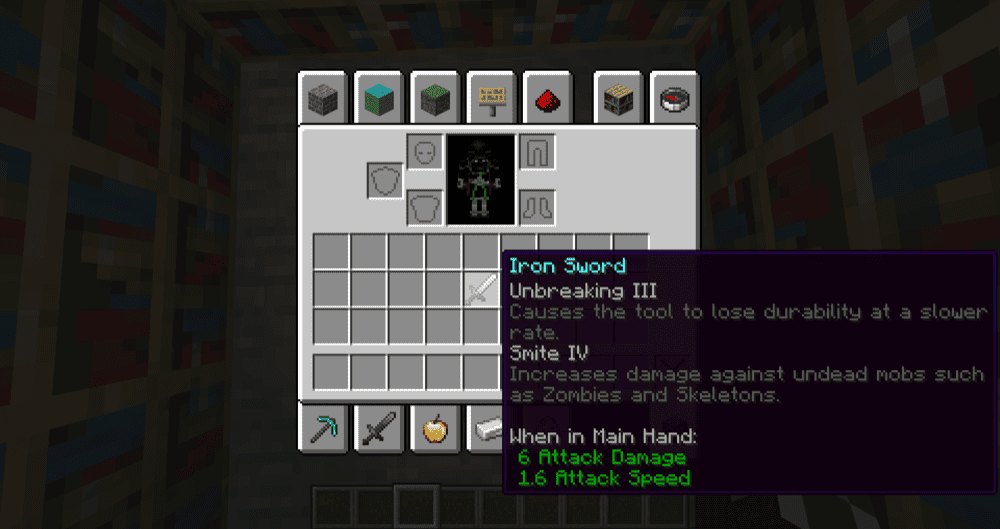
Enchantment Descriptions adds short in-game explanations to enchantment tooltips, so players can see what an enchantment does while looking at an enchanted item or book. It supports both vanilla enchantments and most modded enchantments.
Note that this mod does not change how enchanting works or add new enchantments by itself. It is mainly an information mod, with configuration options for adding or changing descriptions. Fabric and Quilt players may also want ToolTipFix, which helps prevent long tooltips from going off the edge of the screen, while Forge and NeoForge already include that fix.
Mo' Enchantments
These enchantments can also be configured or removed, so both players and modpack creators can adjust how much the mod changes the normal enchanting system.
Additional Enchantments
Additional Enchantments adds new enchantments across several item categories, including melee weapons, ranged weapons, tridents, armor, helmets, boots, and digging tools. Enchantments include Faster Attacks for increasing attack speed, Plague for applying poison-based magic damage, Voiding for removing certain terrain block drops, and Homing for making projectiles fly toward a selected target. The mod is configurable, so its enchantments can be adjusted depending on the world or modpack setup.
A quick note: some projectile-based trident enchantments are incompatible with Riptide because they only apply when the trident is thrown.
How to Install Minecraft Mods
You can install the above mod automatically using the CurseForge app or manually by placing the mod files within your game's mods folder. Both methods allow you to easily add custom features and enhancements into your vanilla Minecraft experience.
If you want to learn more, you can read our detailed guide on how to install Minecraft mods.
Common Issues and Quick Fixes
The anvil says "Too Expensive!" and won't let you apply an enchantment
The operation you’re going for costs more than 39 levels, which is the anvil's survival cap. This usually happens after multiple repairs or by stacking too many enchantment books in one go. To avoid this, combine books in pairs before applying them to the item – merging two books together first costs much less than applying them separately one after another. Also, Mending solves most durability issues once you have it, further reducing the need for manual anvil repairs.
Two enchantments won't go on the same item together
This means that they are conflicting with one another. The common ones to know: Sharpness, Smite, and Bane of Arthropods are mutually exclusive on swords and axes. Infinity and Mending can't go on the same bow. Fortune and Silk Touch conflict on tools. Depth Strider and Frost Walker conflict on boots. The four protection types conflict per armor piece. You will have to choose one from each conflicting pair and forgo the rest.
Mending doesn't seem to be repairing my item
Mending works by redirecting XP orbs you pick up to repair the item instead of adding them to your character level. If you have multiple Mending items equipped, each orb goes to repairing one of them at random. If a specific item isn't getting repaired, it might be because other Mending gear is intercepting the orbs first. Unequip the other Mending items temporarily if you want to prioritize one particular piece.
Sweeping Edge isn't available
Sweeping Edge is Java Edition only. It doesn't exist in Bedrock Edition and won't appear in any enchanting table or book in Bedrock worlds.
Impaling feels weak on tridents in Java
In Java Edition, Impaling only boosts damage against aquatic mobs: squid, guardians, drowned, axolotls, and similar. It won't boost damage against regular land mobs or players. In Bedrock Edition, it works differently and also applies to any mob that's standing in water or rain, which makes it last much stronger in those conditions.
Fortune isn't giving more drops from ore
Check which ore you're mining. Fortune increases drops from ores that drop items or raw materials, including diamond ore, emerald ore, coal ore, copper ore, iron ore, gold ore, lapis lazuli ore, redstone ore, nether quartz ore, and nether gold ore. It does not, however, increase XP drops. If you're not seeing a difference, make sure you're not using a Silk Touch pickaxe, since Silk Touch and Fortune conflict.
Game crashes at startup after adding a mod
A startup crash after adding a mod usually means something in the setup does not match. Check that the mod supports your exact Minecraft version and mod loader – Forge, Fabric, Quilt, or NeoForge – and make sure any required dependencies are installed too. If the game still crashes, try removing the newest mod you added, launching the game again, and then checking the mod page or crash report for a missing dependency or a version mismatch.