Minecraft has two different bookshelves and they do completely different things. The standard Bookshelf is the classic wood-and-books block. The main goal of this block is boosting an enchanting table. The Chiseled Bookshelf is the one that actually stores books and adds some redstone utility.
In this article, we’ll explain how to craft both, how the enchanting boost works, and what to know before you build your enchanting room.
How to Make a Standard Bookshelf
What You Will Need
- 6 wooden planks (any wood type – they can be mixed).
- 3 books.
Getting the Books
Each book takes 3 paper and 1 leather to craft. Paper comes from sugar cane – 3 cane in a row gives 3 paper. Leather comes from cows, horses, donkeys, llamas, or hoglins. If you need books in bulk, the reliable method is farming sugar cane and leather, then crafting the books yourself.
Crafting the Bookshelf
Open a crafting table and fill it in like this:
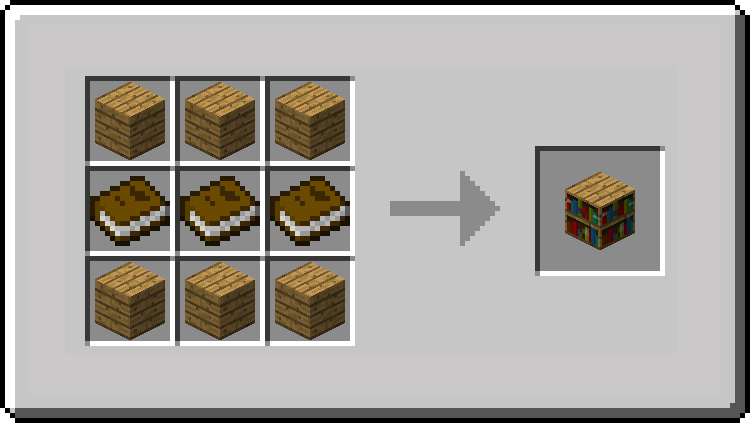
All three books in the middle, planks filling the top and bottom rows. One craft gives you one Bookshelf. Note that the wood type doesn't affect the end result – whether it’s oak, spruce, or jungle, any combination works the same way.
What a Standard Bookshelf Does
The standard Bookshelf has one main gameplay use: powering an Enchanting Table. When placed in the right spots around the table, bookshelves raise the enchantment levels you can access and improve the quality of the enchantments offered. You need 15 correctly placed bookshelves to reach level 30 enchantments.
It also has a couple of smaller uses outside enchanting. A Bookshelf is part of the lectern recipe, and it can be burned as furnace fuel if you really want to use it that way.
How to Make a Chiseled Bookshelf
What You Will Need
- 6 wooden planks (any type).
- 3 wooden slabs (any type).
Crafting the Chiseled Bookshelf
Open a crafting table and arrange it as follows:
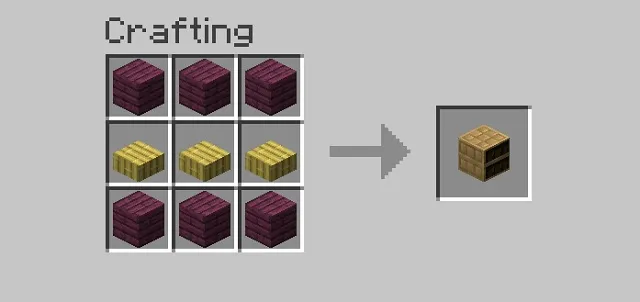
Besides needing to place slabs in the middle row instead of books, this recipe is pretty much the same as the standard bookshelf recipe shape.
What a Chiseled Bookshelf Does
Unlike the standard bookshelf, the Chiseled Bookshelf can actually hold items. It has 6 slots and accepts books, written books, enchanted books, and quills. Each slot is individually accessible.
It can also work with redstone through a comparator. In simple terms, the bookshelf can send out a different signal depending on which of its six book slots you used most recently. If you have not used any slot yet, it sends no signal. For example, you could use that to make a hidden door open only when you place or remove a book from one specific spot on the shelf. That makes it useful for redstone builds where a specific book position can trigger something.
Note: Chiseled Bookshelves do not boost an Enchanting Table in vanilla Minecraft. If you want enchanting power, you need to use standard Bookshelves instead.
How Bookshelves Power the Enchanting Table
A standard Enchanting Table on its own caps out at level 8 enchantments. To reach the maximum of level 30, you need 15 bookshelves placed in the right positions around it.
Placement Rules
- Bookshelves must be placed exactly 1 space away from the enchanting table. You must have just enough space to stand between the table and the bookshelf without any extra block space left.
- They must be on the same level as the enchanting table or one block higher.
- Keep the gap between the table and shelf clear. In Bedrock Edition, that space must be unoccupied. In Java Edition, some replaceable blocks can still work, but a clear gap is the safest setup.
- The table only benefits from 15 bookshelves total – adding more will not improve the enchanting power.
Each bookshelf that meets those rules raises the maximum enchantment tier available. At 15 correctly placed bookshelves, you unlock level 30 enchantments. A common setup is a 5x5 footprint with the Enchanting Table in the center and bookshelves around the outer ring.
Tip: Corners here do count, so most level 30 rooms use 15 of the 16 outer positions and leave a single opening to walk in.
Chiseled Bookshelves and Enchanting
Chiseled Bookshelves do not increase Enchanting Table power in vanilla. If you want to reach higher enchantment levels, you need standard Bookshelves placed in valid positions around the table.
Apothic Enchanting
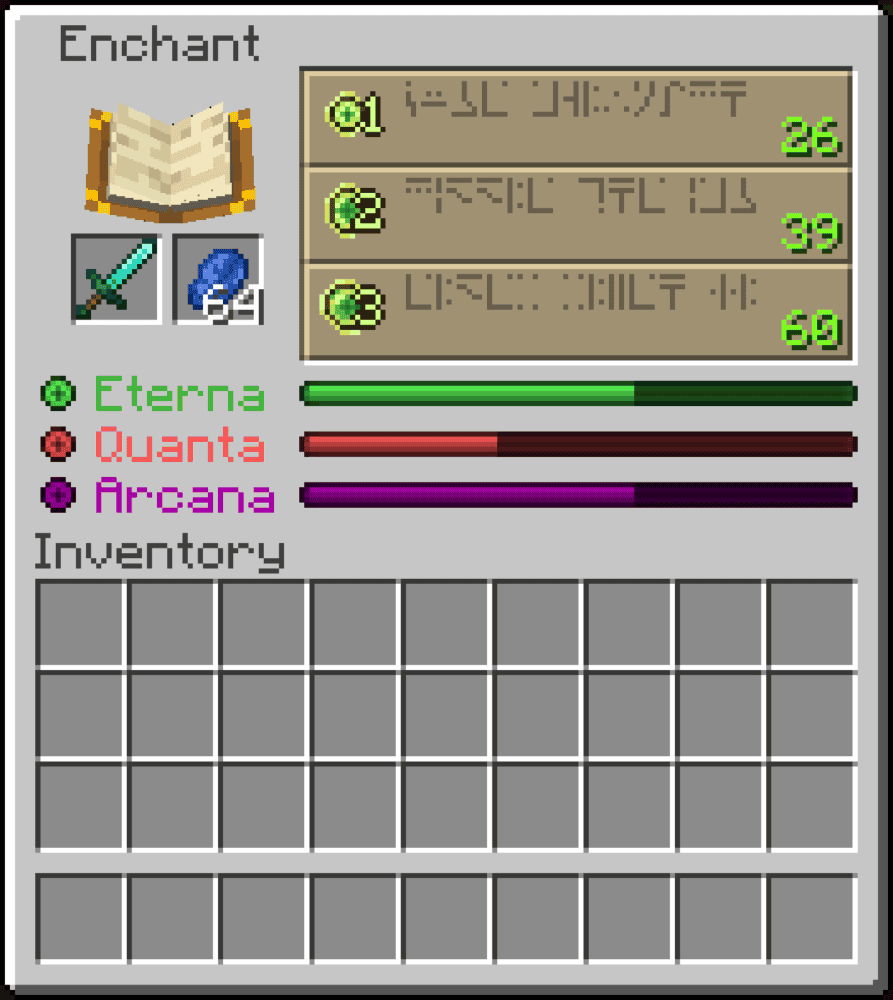
Apothic Enchanting is a full overhaul of Minecraft’s enchanting system that turns bookshelves into a deeper stat-based setup. It adds enchanting stats such as Eterna, Quanta, and Arcana, raises the Enchanting Table cap to 100, and lets different valid blocks around the table change how enchanting behaves. Bookshelves and other supported blocks must be placed in valid enchanting positions, and the mod expands those valid positions to 32 around the table.
It also adds extra utility around enchanting, including tomes, adjusted experience costs, an Enchantment Library for storing enchanted books, and new enchantments.
Bookshelf Extended Enchanting Reach
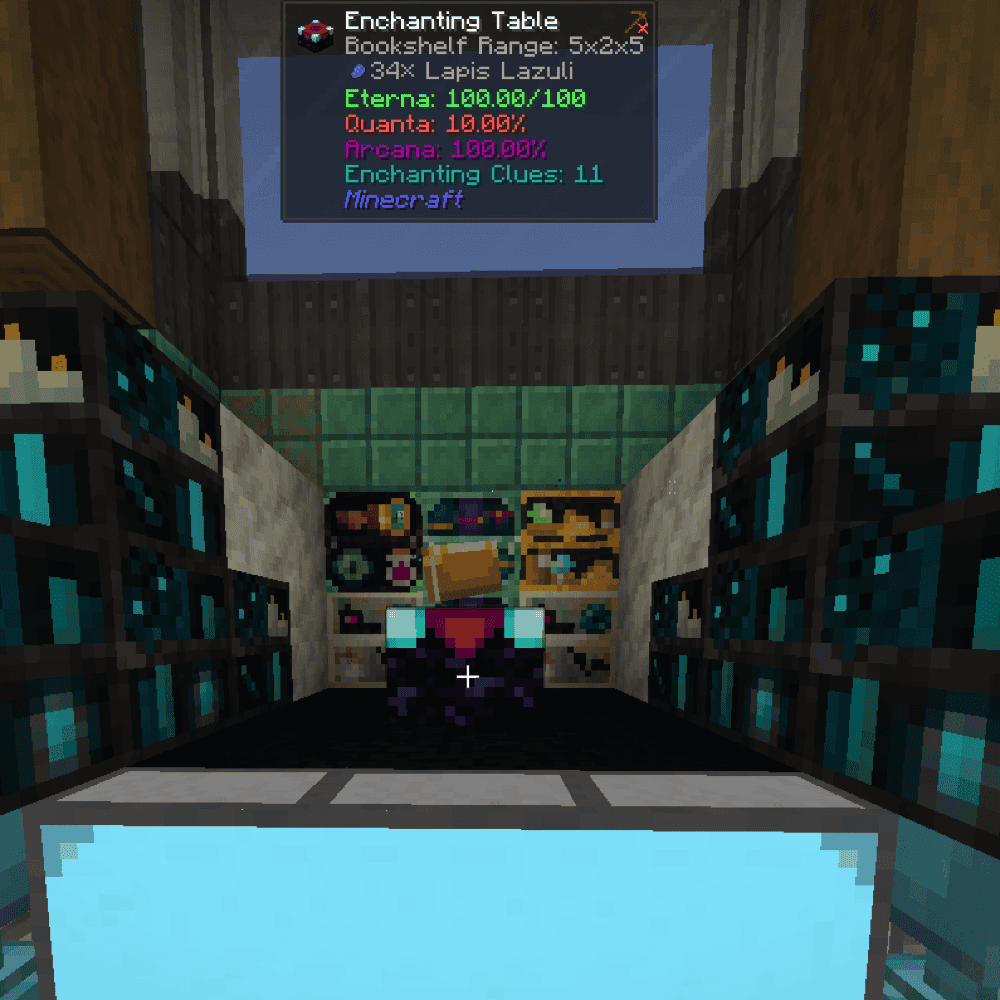
Bookshelf Extended Enchanting Reach is a small mod that expands how far away bookshelves can still count toward an Enchanting Table. Instead of being locked to vanilla’s tight 2-block range, it lets you extend bookshelf detection so larger library builds can still contribute to enchanting power.
From version 1.4 onward, the mod uses per-setup customization instead of a single global range setting. Each enchanting table can have its own bookshelf range through special modifier items, with configurable limits on how many modifiers can be used and an optional XP cost for applying them.
Enchants and Expeditions

Enchants and Expeditions is a broad overhaul of Minecraft’s enchanting and repairing systems. It reworks enchanting tables, anvils, bookshelves, enchanted books, and enchantments themselves through a new set of table attributes, while also allowing enchanting tables to re-enchant already enchanted items up to the mod’s limit. Vanilla bookshelves now slightly increase all main enchanting attributes, and the mod also adds Arcane, Glacial, and Infernal Bookshelves with different attribute focuses.
It also changes how enchanted books and anvils work, including book durability, new anvil behavior, and a redesigned enchantment system with blessings, curses, and configurable enchantment caps.
How to Install Minecraft Mods
You can install the above mods automatically using the CurseForge app or manually by placing the mod files within your game’s mods folder. Both methods allow you to easily add custom features and enhancements into your vanilla Minecraft experience.If you want to learn more, you can read our detailed guide on how to install Minecraft mods.
Common Issues and Quick Fixes
Enchanting Table is stuck at low-level enchantments
The most common cause is something blocking the gap between a bookshelf and the table. In Bedrock, that 2-block-high space must be vacant. In Java Edition, some replaceable blocks can still work, but extra blocks in the gap are still a common reason for shelves to stop counting. Make sure to also check the distance – bookshelves need to be exactly 2 blocks away (directly adjacent shelves do not count).
I placed 15 bookshelves but am not hitting level 30
Count the valid shelves again and check their positions. Corner bookshelves do count, but the full 5x5 outer ring has 16 possible spots, not 15. Most level 30 setups use 15 valid shelves and leave one opening, so a misplaced shelf or a blocked gap can drop the table below max power.
Chiseled Bookshelf is not outputting a redstone signal
Make sure you're reading the signal from a Chiseled Bookshelf and not a standard Bookshelf as these do not generate a comparator output. A Chiseled Bookshelf outputs 0 until a slot has been interacted with, then a comparator reads 1 through 6 based on the last slot used – not on how many books are stored overall.
Books disappeared when breaking a Chiseled Bookshelf
They did not disappear – the stored books simply dropped as separate item entities when the block broke. Check the ground around where the bookshelf was to see if you can still find them. Also note that while the Silk Touch enchantment can preserve the Chiseled Bookshelf block itself, it will not keep the stored books inside.
My installed mod is not loading or crashes at startup
If a mod does not load, crashes at startup, or does not appear in-game, the most likely cause is a version, loader, or dependency mismatch. Make sure the mod file matches your Minecraft version and mod loader exactly as listed on the official mod page, and check the mod’s CurseForge page for any required dependencies.