TNT is the fastest way to move terrain, set traps, blast mines, or run cannons in Minecraft. Once TNT is primed, the details matter – fuse timing, blast behavior, block drops, and water rules all change how useful it really is.
Knowing how it works in detail makes a big difference before you build anything serious around it, which is what we’ll talk about in this guide. Once you’ve learned the basics, we will also recommend some mods to bring the explosive fun up to eleven.
Let’s begin!
What You Will Need to Craft TNT
- A crafting table;
- 5 gunpowder;
- 4 sand (regular or red sand both work).
Getting Enough Gunpowder
Creepers are the main source for this. They drop 0-2 gunpowder by default, though a sword enchanted with Looting can raise the maximum drop rate up to 5. Ghasts and witches also drop gunpowder, and loot chests in places like Desert Pyramids and monster rooms can help as well if you need extra.
Getting Enough Sand
Deserts and beaches are arguably the fastest bulk sources. If you need renewable sand, wandering traders can sell 8 sand for 1 emerald, but this approach is much slower and overpriced compared to simply mining out a desert.
Learning the TNT Crafting Recipe
Open a crafting table and place the TNT ingredients in an alternating checkerboard pattern, like so:
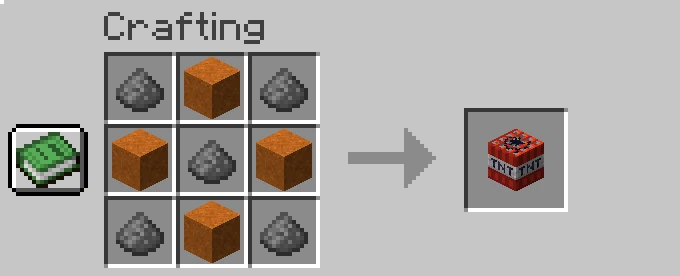
That’s it – you’ve got your first TNT!
How TNT Works in Minecraft
Priming and Fuse Timing
TNT can be primed by quite a few things: a powered redstone signal, flint and steel, fire charges, direct fire or lava contact, flaming projectiles, and nearby explosions. Once primed, it stops being a placed block and becomes a falling entity with a live fuse – you can't break it like a normal block at that point.
The standard fuse runs for 4 seconds when activated by redstone or fire. Chain reactions work differently – when a nearby explosion primes a second TNT block, its fuse is randomized to a much shorter window. That difference matters a lot for cannon designs and anything where the timing of each detonation needs to be predictable.
Blast Radius and Damage
TNT uses Minecraft’s standard Power 4 explosion. For extra context, a normal creeper explosion is categorized as Power 3, while beds and respawn anchors are Power 5, so a TNT charge sits in between those.
In open air, the effective block destruction radius works out to roughly 6.9 blocks, though the actual crater shape varies because block resistance and some randomness in the explosion calculation both play a role.
Entity damage has a wider reach – 8 blocks out from the center – with the actual damage to each entity scaled by distance and how much cover sits between them and the blast.
What TNT Breaks and What Drops
TNT has special drop behavior compared to most other explosions. In Java Edition, TNT and TNT minecarts both destroy blocks at a 100% item drop rate by default, which is what makes TNT mining actually viable for collecting ores rather than just deleting them.
This is controlled by the "tntExplosionDropDecay" gamerule, which defaults to false – meaning full drops are on. If you're on a server and your blasts aren't dropping items, that gamerule has likely been changed by an admin.
Bedrock Edition note: Bedrock also has TNT-related gamerules. If TNT is not exploding, run "/gamerule tntExplodes" with cheats enabled. "true" means TNT can explode, while "false" disables TNT explosions after activation. If blocks break but drops feel wrong, run "/gamerule tntExplosionDropDecay". "false" means TNT-destroyed blocks drop normally, while "true" makes drops random based on distance from the blast center.
For normal TNT behavior, you generally want "tntExplodes" set to "true" and "tntExplosionDropDecay" set to "false". Some Bedrock gamerules appear in the world’s "Game Settings" and "Cheats" menus, but commands are the safest way to confirm the exact values.
Water and Lava Rules
On Java Edition, TNT usually does not break blocks when it explodes underwater or fully inside lava, even though it can still damage nearby entities. There are some niche Java Edition setups that let TNT break blocks underwater, usually by using falling blocks like sand or gravel. That rule is the foundation of almost every serious TNT cannon: the water trench protects the cannon structure from its own propellant charge, so the build survives each firing cycle intact.
Bedrock Edition note: Regular TNT behavior can differ from Java Edition in some water, lava, and cannon setups. Bedrock also has a separate underwater TNT block, but only in Minecraft Education or Bedrock worlds with the Education option enabled.
Unlike regular TNT, underwater TNT is specifically meant to destroy blocks underwater. If you are building cannons or underwater blast setups, follow a Bedrock-specific design instead of copying a Java Edition one.
Tip: TNT is also flammable and can catch fire from lava contact before it detonates, so storing it near lava can trigger accidental explosions.
Redstone and TNT
TNT can be activated by a redstone signal from things like levers, buttons, pressure plates, redstone dust, repeaters, and observers. Dispensers are useful in TNT builds because they can place and ignite TNT directly, or ignite an already placed TNT block when loaded with flint and steel.
TNT fires on the rising edge of a redstone signal. A lever held in the "on" position primes it once when first switched – holding it there does nothing after that first activation. For repeated firing, you need a clock circuit delivering clean pulses.
Performance and Server Lag
Large TNT blasts can cause lag because the game has to process the explosion, the dropped items, and any water or lava flowing into the crater. The follow-up lag from hundreds of dropped item entities, liquid physics recalculating across the crater, and the new terrain loading in can easily be worse than the blast itself.
Using smaller TNT volleys, blasting away from your main base, and clearing dropped item piles with "/kill @e[type=item]" after a large explosion can all help reduce lag. For large excavation work where you just want the cleared space and not the explosion, the precision excavation mods below skip the lag problem entirely.
Mods That Work Well With TNT
Whether you want to automate TNT production at scale, run advanced explosives with more options than vanilla provides, or skip blasting entirely in favor of cleaner excavation, these are the mods worth checking out.
Create
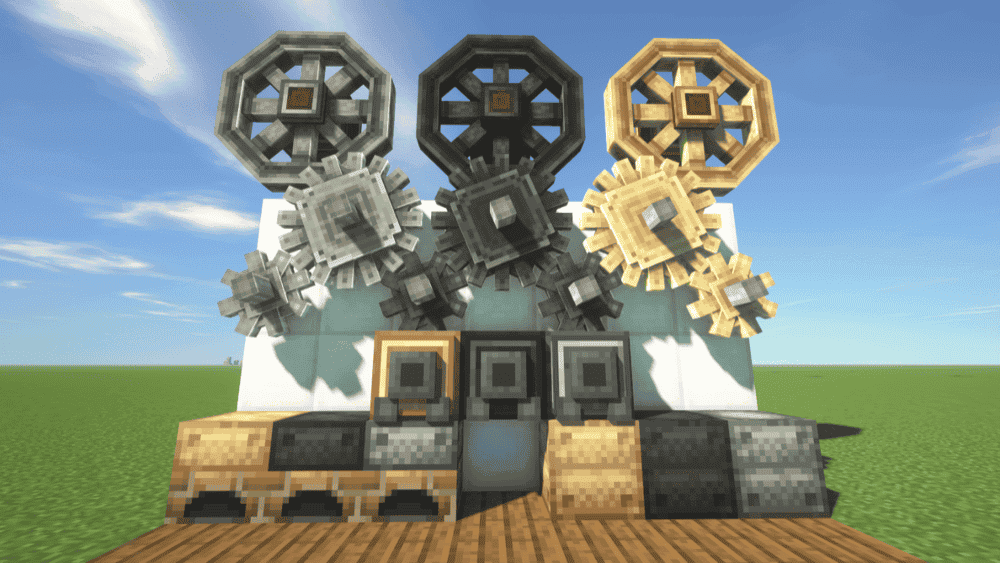
“Create” turns TNT production from a simple crafting recipe into a full automation project. “Create” is built around in-world machinery, rotating power, moving belts, and contraptions assembled directly in the world, which makes it a strong fit for building automated supply lines for sand, gunpowder, and TNT crafting at scale.
Its visual in-game documentation system, Ponder, helps explain the added mechanics and gadgets step by step, which makes the learning curve much easier to manage. Installing “JEI” is recommended if you want to browse “Create’s”’ recipes more clearly, since the vanilla recipe book does not cover the full experience by itself.
FTB Ultimine
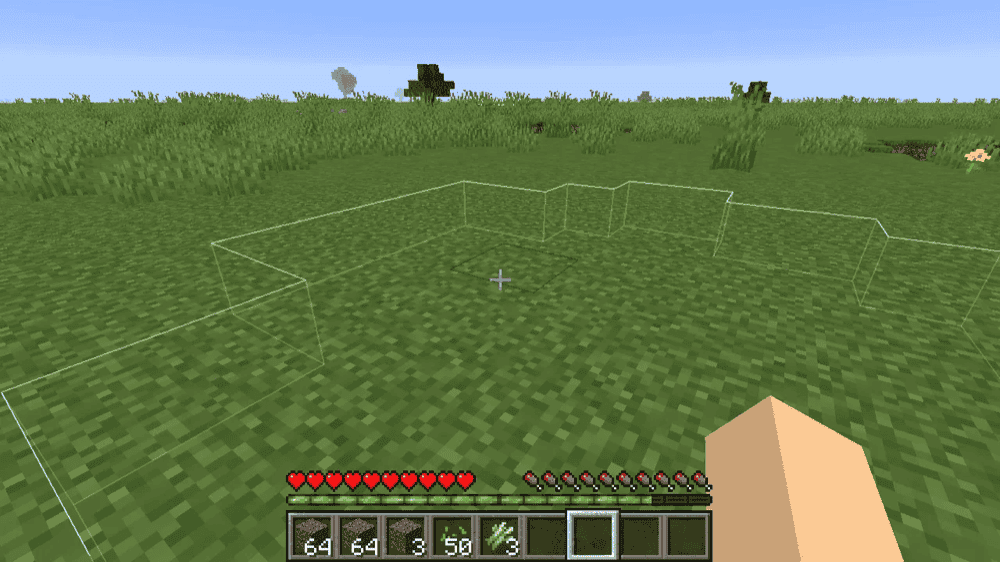
“FTB Ultimine” gives you a cleaner way to clear stone, ore veins, and tunnel paths without setting off TNT at all. The mod is built around harvesting multiple blocks at once with a configurable key, and the mined drops collect right below your feet, which makes it a practical alternative when the goal is fast excavation rather than explosions, craters, or item scatter.
The mod also adds white outline visuals for the blocks you are about to mine, plus extra utility for things like tilling grass with a hoe and harvesting crops, so it stays useful outside of mining, too. Its biggest advantage here is precision – you can clear space and dig tunnels much more cleanly than TNT while still keeping things fast and streamlined.
WorldEdit
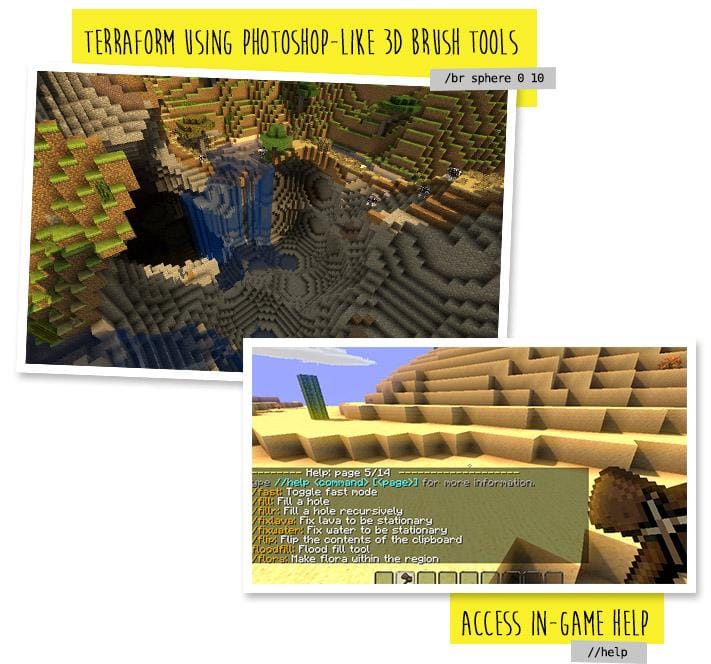
“WorldEdit” is the cleanest alternative here if you want to clear land, reshape terrain, or copy large sections without using TNT at all. “WorldEdit” runs in-game and gives you tools like selections, schematics, copy and paste, brushes, and scripting, which makes it much better suited to controlled excavation and fast building than explosive block clearing.
It can be used in creative, or temporarily in survival, and it is especially useful for jobs like removing thousands of blocks, fixing terrain, shaping large areas, or saving and pasting builds.
Big Explosives
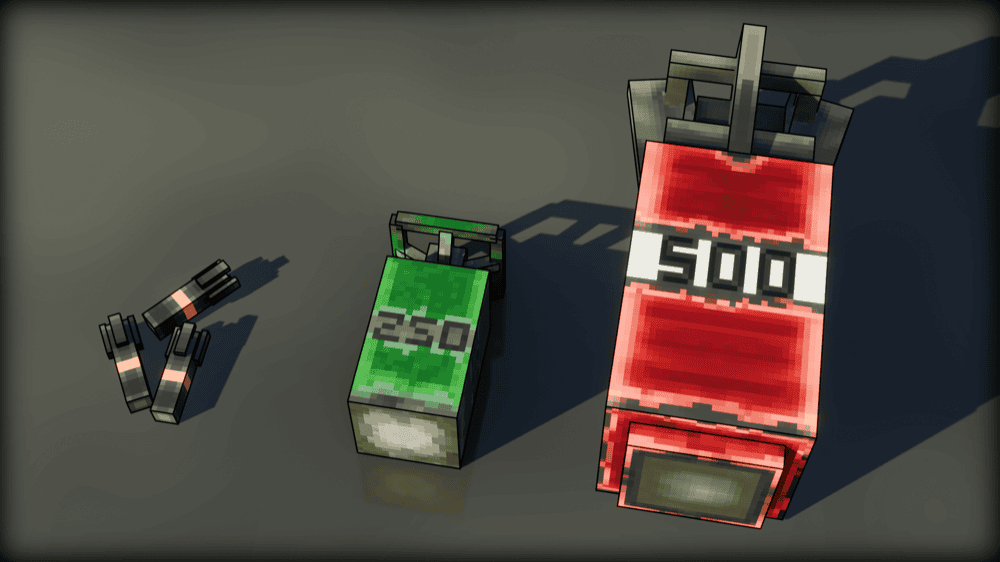
“Big Explosives” adds multiple bomb variants with a design goal of staying as vanilla-friendly as possible in feel and style. The result is a set of explosives that extend what TNT can do without pulling the visual style of your game in a different direction.
“GeckoLib” is the only required dependency and it's clearly listed on the CurseForge page. Because of this, make sure to check that your “GeckoLib” file matches both your Minecraft version and your mod loader before installing.
How to Install Minecraft Mods
You can install the above mods automatically using the CurseForge app or manually by placing the mod files within your game’s mods folder. Both methods allow you to easily add custom features and enhancements into your vanilla Minecraft experience.
If you want to learn more, you can read our detailed guide on how to install Minecraft mods.
Common Issues and Quick Fixes
Crafting TNT gives me nothing
Check two things: first, confirm you're using a crafting table and not the inventory grid – the 2x2 can't fit the pattern. Second, verify the alternating layout is correct with sand and gunpowder swapping positions in every slot. One misplaced item is enough to give you an empty output.
TNT detonated but nothing broke
If the blast happened underwater, that is usually working as intended on Java Edition – TNT normally will not break blocks underwater. We recommend draining or bypassing the water first if terrain clearing is the goal.
If it was in open air and still did not break blocks, check whether TNT explosions are disabled on the server or whether server protections are blocking block damage. The "tntExplosionDropDecay" command only affects whether destroyed blocks drop items and not whether the explosion breaks blocks.
My rapid-fire setup fires once, then stops
TNT responds to the rising edge of a signal, not a held signal. A lever primes it once when switched on and nothing happens after that. You need a clock circuit delivering repeated pulses for continuous firing.
If the setup fires once and then the cannon structure breaks, the clock is likely running faster than the 4-second fuse window – make sure to slow it down so live TNT never stacks inside the barrel.
I experience major in-game lag after a large blast
The lag usually comes from item entities and liquid physics, not the explosion itself. Clear dropped items with "/kill @e[type=item]", and for future builds keep blast areas away from heavily built sections of your base. Precision excavation mods like “WorldEdit” and “FTB Ultimine” avoid this problem entirely since they remove blocks without generating item entities in the same way.
My mod is not loading or crashes at startup
Make sure to match every file to your exact Minecraft version and mod loader and install any required dependencies listed on the mod's CurseForge page.