Bows are one of those Minecraft weapons that stay useful long after the early game. They help you deal with creepers from a safe distance, pick off mobs before they reach you, and fight flying or hard-to-reach enemies without getting too close.
Enchantments, on the other hand, are what turn a basic bow into something worth keeping. Some improve raw damage, some help with control, and others change how you manage arrows and durability.
In this guide, you will learn about the best bow enchantments in Minecraft, how each one works, and which setup makes the most sense depending on how you like to play.
The Core Bow Enchantments at a Glance
Depending on your playstyle, there are 4 main bow enchantments in vanilla Minecraft to consider:
- Power increases arrow damage and is the most important offensive enchantment for any bow. It is the bow equivalent of Sharpness for swords, so it’s typically every player’s first pick.
- Punch more than doubles the knockback on arrow hits, while Punch II quadruples it. While it doesn't really add extra damage, this enchantment is genuinely useful for controlling the fight as it makes it easy for you to knock mobs off ledges or into lava.
- Flame sets targets on fire when the arrow hits. The burn damage is useful against non-fire-immune mobs, and it has some practical utility beyond combat – flame arrows can ignite TNT and campfires when you hit them directly. Note that the burn effect does not hurt blazes and other fire-immune mobs, although the arrow will still deal its normal hit damage.
- Unbreaking gives each shot a chance not to consume durability. Bows are used constantly in combat, so Unbreaking III makes the bow last much longer before it needs repairs. It is especially important if you choose Infinity over Mending, since Infinity on its own does not repair the bow.
Best Bow Enchantment Setup
If you want one strong all-purpose bow, we suggest trying out the below setup:
- Power V
- Punch II
- Flame
- Unbreaking III
- Infinity or Mending
This setup covers damage, control, utility, and durability without overcomplicating the bow. If you go down this path, the only real choice is what to place in the final slot, which we’ll cover in more detail in the next section.
Infinity vs. Mending: Which One to Choose?
Infinity and Mending are mutually exclusive on bows, which means you have to pick one. This is the most meaningful enchanting decision when it comes to bows, and neither answer is wrong.
- Infinity prevents regular arrows from being consumed when fired. You still need one arrow in your inventory at all times, but that single arrow can fire indefinitely. For players who explore, travel, or fight extensively without easy XP income, Infinity removes the pressure of managing arrow stock entirely.
One important caveat: Infinity only works on regular arrows. Tipped arrows and spectral arrows in Java Edition are still consumed when fired even with Infinity, so if you use those regularly, Infinity doesn't help much.
- Mending repairs the bow using XP orbs you pick up during normal play. For players with reliable XP income – mob farms, villager trading, or another steady XP source – Mending can keep the bow repaired for long-term use. The trade-off is that you still need to manage arrow supply, either by crafting arrows, looting skeletons, or trading with fletchers.
Tip: if you have steady XP and easy access to arrows, pick Mending. If you want to stop thinking about regular arrows while exploring, choose Infinity instead.
A Quick Note on Curse of Vanishing
Curse of Vanishing makes the bow disappear on death instead of dropping, so avoid it on any bow you've invested enchantments in. It occasionally shows up on enchanted bows from loot chests and isn't worth keeping unless you specifically want it for a challenge run.
How to Get Bow Enchantments
Most bow enchantments can come from an enchanting table, especially once you have a full 15-bookshelf setup for level 30 enchantments.
Flame, Punch, Unbreaking, Power, and Infinity can all appear through normal enchanting or enchanted books, though you may still need an anvil to combine lower-level books or bows into the final version you want.
Mending is different: it is a treasure enchantment, so it will not appear directly from the enchanting table. Instead, look for it in loot chests or obtain it via fishing or librarian villager trades.
If you are after specific books, librarian villagers are usually the most reliable route. Before you trade with a new librarian, you can check the first trades, break and replace the lectern if the enchantment you got is not what you want, then trade once you see a book worth keeping.
Mods That Expand on Bow Gameplay
Vanilla bow enchantments cover the main combat basics, but they stop at damage, knockback, fire, durability, and the Infinity vs Mending choice. Mods can push archery further by adding new bow enchantments, custom arrow effects, and extra bow tiers that give ranged combat more variety.
The options below focus on mods that directly expand bow gameplay. Some add homing shots, explosions, fire effects, and mob-control enchantments, while others add new arrows or completely new bows to craft.
More Bows and Arrows
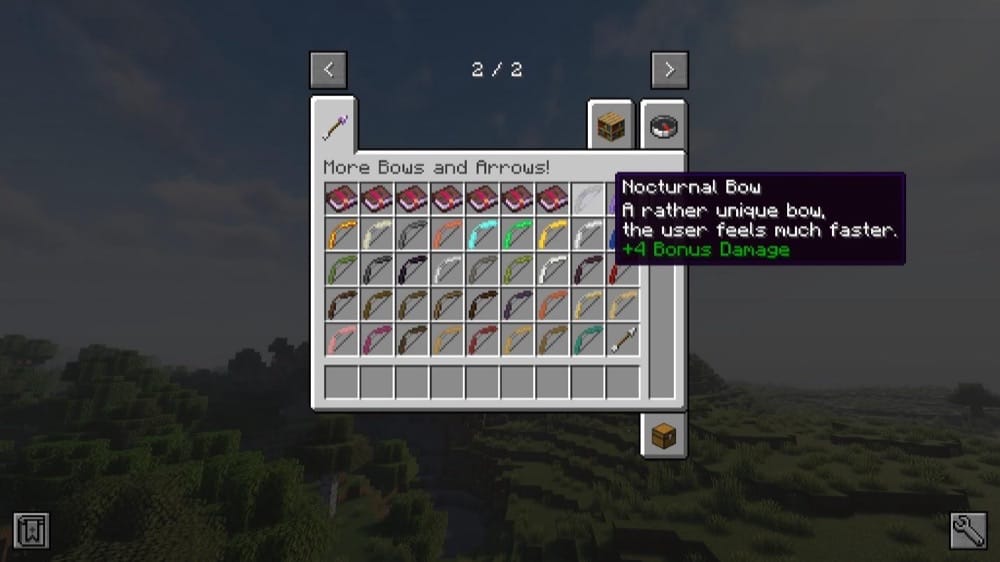
More Bows and Arrows adds around fifty new bows and arrows with new features, giving archery a deeper sense of progression than the single vanilla bow allows. The mod focuses on keeping the experience close to vanilla while adding stronger ranged options, including bows and arrows with more damage, TNT-based effects, and other special mechanics.
Instead of only changing the default bow through enchantments, this mod gives players more actual bow and arrow choices to craft and use. It also adds six additional enchantments with mechanics like faster bow loading and multiple arrow firing, which makes ranged combat feel more epic without moving too far away from Minecraft's regular combat style.
Dragon Enchants
Dragon Enchants adds a wide set of vanilla-friendly enchantments for weapons, tools, and armor, including three bow-focused options. For bows, Homing makes arrows track enemies, Detonate creates an explosion at the point of impact, and EndStep teleports the player to the arrow's landing spot.
These enchantments give bows more utility without removing the normal vanilla bow setup. Homing is useful when fighting moving targets, Detonate adds an area effect for groups of mobs or impact-based damage, and EndStep turns arrows into a movement tool by letting you reposition after a shot lands.
Tons Of Enchants

Tons Of Enchants adds a large collection of new enchantments across weapons, tools, armor, and bows. For bow users, it adds several ranged effects:
- Exploding Arrows creates an explosion on impact.
- Fire Splash creates a fire-based impact effect that ignites nearby entities.
- Gravity Well pulls nearby entities inward.
- Lifesteal heals you when you hit an enemy with an arrow.
- Withering Arrows applies the Wither effect in an area.
XP Bow Master gives a chance to gain bonus experience from bow hits.
These enchantments make bows feel more active in combat, especially when dealing with groups of mobs or enemies that need extra pressure from status effects. The stronger area-based effects have a short activation cooldown, and the configuration file lets players individually enable or disable enchantments, including options for destructive explosion effects, which makes it easier to adjust the mod for a single-player world or a modded server.
Xtra Arrows
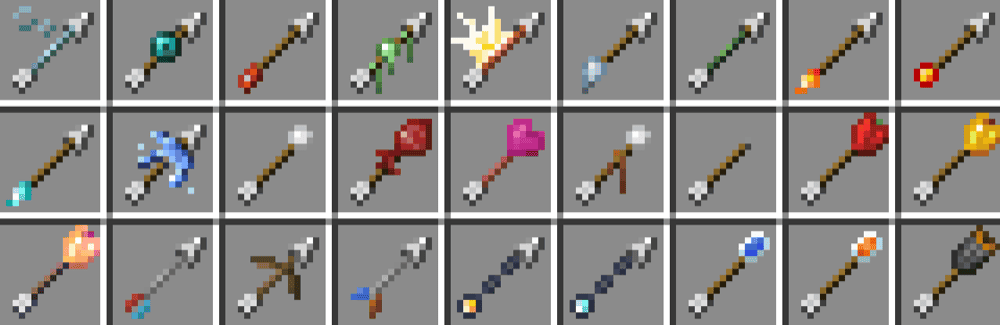
Xtra Arrows adds 95 new arrows across 27 types and 4 tiers, giving bows and crossbows far more options than standard arrows. Some arrows are built for combat, like Explosive Arrows, Lightning Arrows, Freezing Arrows, Magnetic Arrows, and Life Steal Arrows.
Others are more utility-focused, such as Torch Arrows, Lantern Arrows, Extinguishing Arrows, Scouting Arrows, and Ender Arrows.
It works well for players who want archery to feel more flexible without replacing bows entirely. Different arrow types can help with mob control, cave lighting, underwater fights, ranged support, movement tricks, and exploration, while the configuration file lets players disable specific arrow types or tiers if they do not fit a world or server's balance.
How to Install Minecraft Mods
You can install the above mods automatically using the CurseForge app or manually by placing the mod files within your game's mods folder. Both methods allow you to easily add custom features and enhancements into your vanilla Minecraft experience.
If you want to learn more, you can read our detailed guide on how to install Minecraft mods.
Common Issues and Quick Fixes
Infinity and Mending won't go on the same bow
They're mutually exclusive by design – you can only have one. This is one of vanilla's intentional trade-off decisions. We recommend making your choice based on your playstyle: Infinity for ammo freedom, Mending for self-repair. There's no way around this in vanilla, though some mods do remove or loosen this restriction.
Power doesn't seem to be doing much damage
Check that your bow has a high Power level and that you are fully drawing the bow before releasing. Partially drawn arrows deal much less damage, even with good enchantments.
Flame isn't working on a mob
The target is likely fire-immune. Blazes, magma cubes, and other fire-immune mobs take no burn damage from Flame. This is expected behavior and can't be changed without mods.
My bow breaks faster than expected with Infinity
Infinity prevents regular arrows from being consumed, but it does not repair the bow itself. For long-term use, add Unbreaking III to slow durability loss or choose Mending instead if you have a steady XP and arrow supply. An Infinity bow with Unbreaking III is still useful, but it will eventually need repairs.
My game crashes on startup after installing mods
A startup crash usually means one of three things:
- The mod file does not match your Minecraft version.
- The mod was made for a different loader.
- A required dependency is missing.
Check that you installed the correct Forge, Fabric, Quilt, or NeoForge file for your profile, then look at the mod page for any required files, especially if using Fabric API for Fabric profiles.
Minecraft mod loaders are separate systems, so a Fabric file will not work in a Forge profile, with the same also applying to NeoForge or Quilt builds.