Whether you're building the perfect automated base, breeding rare Pals, or just trying to carry one more stack of ore, every Palworld player eventually runs into something they wish worked a little differently.
That's where mods come in.
The Palworld community has created thousands of mods that smooth out rough edges, remove annoying limitations, and add new ways to play. Some make everyday tasks faster, others expand building and progression, and a few completely change how you manage your world.
In this list, we've rounded up 14 of the most downloaded mods that support the post Early Access release of Palworld and aim to solve real gameplay frustrations - from inventory limits and breeding times to building freedom, fast travel, and better quality-of-life features. So, whether you're starting a fresh adventure or upgrading an existing world, these are some of the best mods to enhance your Palworld experience right now.
1. Better Night Light

If you enjoy exploring Palworld after dark, “Better Night Light” gives the game's nighttime atmosphere a dramatic visual upgrade. Instead of the flatter vanilla lighting, this mod replaces the skylight with rich moonlight, making evenings feel more immersive without changing the gameplay.
Brighter stars, more vibrant dawn and sunset transitions, and a deeper blue night sky are sure to make every late-night adventure, base build, and exploration session look infinitely more cinematic. Just be sure to download the version that’s optimized for the latest game release before installing.
2. Fast travel from anywhere

“Fast Travel From Anywhere” removes one of Palworld's biggest player gripes by letting you teleport to any unlocked fast travel point without first visiting a statue. Whether you're hauling resources back to base, hopping between mining outposts, or responding to an event across the map, it cuts down on unnecessary travel time and keeps your focus on exploring and building.
3. Buy All Balls
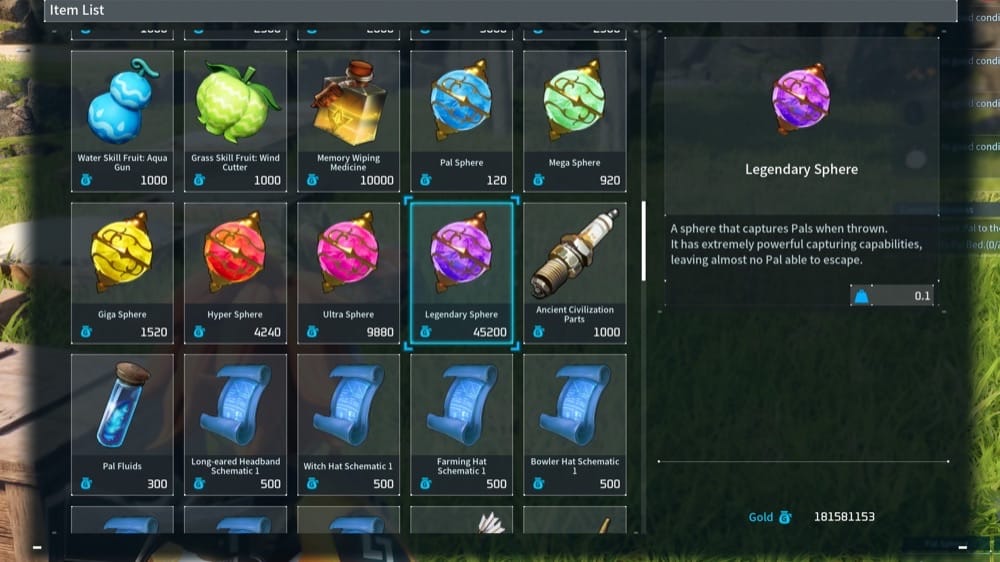
“Buy All Balls” makes it much easier to stock up on the items you actually need by expanding what Palworld's merchants have for sale. It adds every type of Pal Sphere to vendors, along with useful extras like Tree Holy Water, Disposable Implants, and Treasure Maps from their respective merchants.
If you'd rather spend less time farming rare items and more time catching Pals or exploring, this simple quality-of-life mod is a great addition – and it's fully compatible with the current 1.0 version of the game.
4. Less Restrictive Building

“Less Restrictive Building” is a must-have for players who currently feel limited by Palworld's base-building rules. It removes several of the game's biggest construction restrictions, letting you build floating foundations for bridges and cliffside bases, place structures on steep terrain (from ~30 degree up to ~90 degree angles), raise the building height limit, and create much larger and more ambitious designs.
So, whether you're crafting a sprawling fortress or a sky-high industrial base, this mod gives you far more creative freedom than what’s available in the vanilla version of the game.
5. Max Level Increased
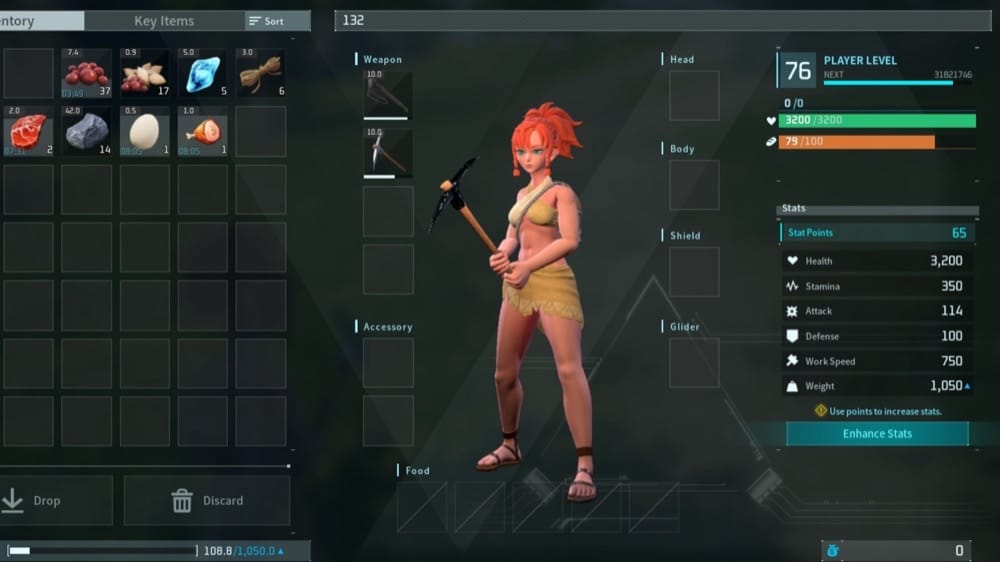
If reaching Palworld's level cap leaves you wanting more progression, “Max Level Increased” lets both your character and your Pals continue growing beyond the vanilla limit of 50. You can choose from level caps of 70, 79, or 98, making it a great option for long-term worlds, endgame challenges, or players using other progression-focused mods.
The mod author notes that “Max Level Increased” works with both new and existing saves, though you may need to restart the game once if the level cap remains unchanged or you no longer gain any experience after installation.
6. Extended Base Range
The premise of this mod is simple – what “Extended Base Range” does is give you more room to build by letting you increase the size of your base (up to a range of "200") far beyond Palworld's default boundary of "70". So, whether you're creating sprawling production hubs, massive ranches, or elaborate settlements, this mod makes it easier to keep everything within a single base area.
7. Cake Fast Breed Farm
If you're spending a lot of time breeding Pals, “Cake Fast Breed Farm” is your solution as it dramatically reduces the wait for eggs by speeding up breeding farm production. With this mod installed, you can set 1-second, 15-second, and 100-second timers, so you can decide on a pace that best fits your playstyle, regardless if you want to streamline breeding or remove the grind entirely.
As an added bonus, “Cake Fast Breed Farm” works in both single-player and on dedicated servers, making it a popular quality-of-life upgrade for players focused on collecting perfect Pals or experimenting with breeding combinations.
8. Creative Menu

“Creative Menu” is arguably one of the most powerful utility mods available for Palworld, giving you full control over your game world. You can open the in-game menu by pressing the "F1" key to access its extensive creation and editing tools – and be utterly amazed.
In essence, this mod lets you spawn Pals, NPCs, and nearly any item in the game, while also allowing you to customize a Pal's IVs, passive skills, abilities, and other stats before it even appears. That means you can create your ideal team then and there, without relying on hours of breeding or luck!
9. Infinite Weight In Camp
“Infinite Weight In Camp” removes one of the biggest annoyances of base management by eliminating carry weight limits while you're inside your base. With this one installed, you can effortlessly move thousands of resources between chests, production lines, and workstations without becoming encumbered or losing the ability to sprint.
As soon as you leave your camp though, your normal carry weight will be automatically restored, so try not to get all too used to it.
10. Bigger and Reorganized PalBox

If you ever went into the game with the goal to “Catch them all!”, this one’s for you. “Bigger and Reorganized PalBox” makes managing large Pal collections much easier by expanding and reorganizing your storage. Instead of being limited to the default layout, you can choose from several settings that either neatly reorganize the existing slots for you or increase your total capacity all the way up to 3,840 slots!
11. Better Sell Rates

“Better Sell Rates” makes trading far more rewarding by increasing the amount of gold you earn when selling items and Pals. Instead of accepting Palworld's default payouts, you can choose from several multipliers – including 2x, 4x, 8x, or even 100x – to quickly become one of the richest people to ever roam the Palpagos Islands. We find that it’s a great mod if you want to simply test stuff or just have a little bit of fun without worrying about the game’s farming loop all too much.
12. True Monster Rancher

“True Monster Rancher” turns your ranch into a much more rewarding source of materials by expanding what ranchable Pals can produce. Instead of farming only their standard drops, many Pals can now access valuable new resources – from Legendary Spheres with Vixy and Crude Oil with Kikit to Pal Metal Ingots, Polymer, Pure Quartz, and dozens of other useful crafting materials.
Better yet, condensing Pals (combining Pals of the same type into one stronger version) will also increase their drop rates, giving you yet another good use for your ranch.
13. Visible Pal Capture Counter

“Visible Pal Capture Counter” adds a small but incredibly useful UI improvement by displaying how many times you've already captured a Pal right next to its name. This makes it much easier to keep track of your capture progress without constantly juggling menus or relying on memory – especially useful when you're farming the capture bonuses tied to the Paldeck.
The mod supports all in-game languages, works in both single-player and multiplayer, and is entirely client-side, making it an excellent quality-of-life addition for completionists and anyone simply trying to optimize their Pal collection.
14. Berries Fast Breed Farm
“Berries Fast Breed Farm” speeds up one of Palworld's most time-consuming activities by letting you breed Pals with berries instead of cakes, dramatically reducing the resources needed to produce offspring. You can also choose between 1-second, 10-second, or 300-second breeding times, making it easy to match the experience to your preferred playstyle.
How to Install Any Palworld Mod
The simplest option for supported projects is the CurseForge app on the Windows Steam version of Palworld. Here are the exact steps:
- Close Palworld and back up your save.
- Install UE4SS if required (typically needed for some Lua and C++ projects).
- Open the Palworld profile in the CurseForge app, then select "Discover" or "Browse".

- Choose a project and check its supported game version, requirements, mod category, and installation notes.
- Select "Install" when app installation is available. For manual downloads, use the folder specified on the project page for its category: Patch Pak, Blueprint Code, Lua, or C++.

- Click "Play" to launch Palworld and test the mod before adding another one.
Common Issues and Quick Fixes
Your Palworld mods aren't working at all? Start here
Before diving into more specific issues, make sure to check if:
- Your mod supports your current version of Palworld.
- You’ve installed the correct dependencies, such as UE4SS.
- You’re not installing a mod that conflicts with another mod.
If all of these check out and you’re still experiencing problems, make sure to read the rest of this guide.
My mods broke or show as inactive after an update
Mods that worked during Early Access or on an older version of the game may sometimes stop working after an update. Mod popularity isn’t always indicative of compatibility, so always make sure to check the mod's "Files" page or release notes to confirm it supports your version of the game.
The mod is installed, but doesn't do anything
If the mod appears to be installed but has no effect in-game, double-check your installation and make sure it's in the correct folder depending on the type of mod you have (Blueprint Code, Lua Code, or something else).
Additionally, make sure to check if the mod is activated by pressing a specific hotkey in-game (such as the “Creative Menu” mod). Finally, some mods are also designed to run only on dedicated servers, so confirm you've downloaded the right version for your needs.
Palworld crashes before I can get to the title screen
A crash or an endless black screen before the main menu is often caused by an incompatible or incorrectly installed mod. Start by removing the most recently added mod, then update your UE4SS installation if you're using it.
Next, check that you haven’t accidentally unzipped any of the mod files into extra nested folders, restore the initial "Engine.ini" file in case you’ve made any changes, and make sure multiple mods aren't competing for the same game files.
Game crashes or gets stuck loading a save
If an existing world crashes or becomes stuck on an endless loading screen, the save may still contain data from a mod that has since been removed. Custom items, building pieces, blueprints, or other persistent world data can all cause loading issues when the original mod is missing.
To fix this, you can temporarily reinstall the exact version of that mod to allow the save to load before safely removing the affected content. If you're unsure whether the issue is save-specific, we recommend creating a new test world or restoring an earlier backup of your save.
I verified file integrity through Steam, but the mod is still there
Steam's "Verify integrity of game files" feature only restores official game files. It doesn't remove external content such as custom .pak files, Lua mods, UE4SS scripts, or injected files stored in the Win64 folder. If mods remain active after verification, those files must be either removed manually or through a trusted mod manager like the CurseForge app.
My Pals constantly get stuck around my modded base
While mods like “Less Restrictive Building” can certainly give you lots of creating freedom, they don’t change the game's core pathfinding system. Pals can still become trapped by narrow walkways, steep vertical layouts, or complex structures that they’re not “trained” to anticipate.
A good solution here is to leave plenty of open space for workers to move around, avoid unnecessary elevation changes, and test important routes before completing larger builds to save yourself the frustration.
A .pak or Lua mod won't load no matter what I try
If a mod refuses to load even though the files appear to be installed, start by checking that everything is in the correct location. Pak mods often require matching .utoc and .ucas files, and some mods that look like standard asset replacements may belong in a different directory.
For Lua-based mods, verify that the folder structure matches the author's instructions, and confirm that the mod is enabled inside "mods.txt" (it should have a value of "1" assigned next to it).
Performance mods made the game run worse
Performance tweaks don't always improve performance, especially when multiple rendering changes overlap. If you notice stuttering, visual artifacts, or lower frame rates, make sure to remove any conflicting graphics mods, restore "Engine.ini" to its default settings, and test configuration changes one at a time.
Generally, we find that prioritizing consistent frame pacing by capping the max frame rate your graphics card can output usually produces a smoother experience than simply chasing the highest average FPS.
CurseForge can't seem to find my Palworld copy
If CurseForge can't detect your installation or only shows "Download" instead of "Install" as an available option, simply point it to your main Palworld installation folder manually and it should appear within the app.