
Palworld gives you a huge world to conquer, and the right optimization mods let you spend more time doing exactly that. Whether you want to build a sprawling base, organize mountains of materials, travel faster, or keep every expedition running smoothly, these upgrades strip away the busywork and put you back in control.
Every mod in the main list has a Palworld 1.0.1 file on CurseForge and improves a different part of the adventure. From smarter storage and streamlined breeding to better navigation, freer construction, and lighter memory use, these picks can help turn your save into a faster, cleaner, and more satisfying experience.
1. Better Base Range

“Better Base Range” lets you enlarge your Palbox radius through a single configurable value. The build and AI area, Pal work range, wild-spawn suppression, combat range, neighboring-base distance, and visible base ring all scale together, allowing an expanded base to function across its full footprint. Existing bases update automatically too, so you do not need to destroy and rebuild the Palbox from scratch.
The mod also removes several construction restrictions. You can build at greater heights, on steep terrain, with floating or overlapping pieces, over water, and near bosses or special facilities. It also removes the per-player building limit. Most settings can be changed in "Scripts\main.lua", while optional UE4SS console commands let advanced users adjust the range immediately.
2. Better Base Building
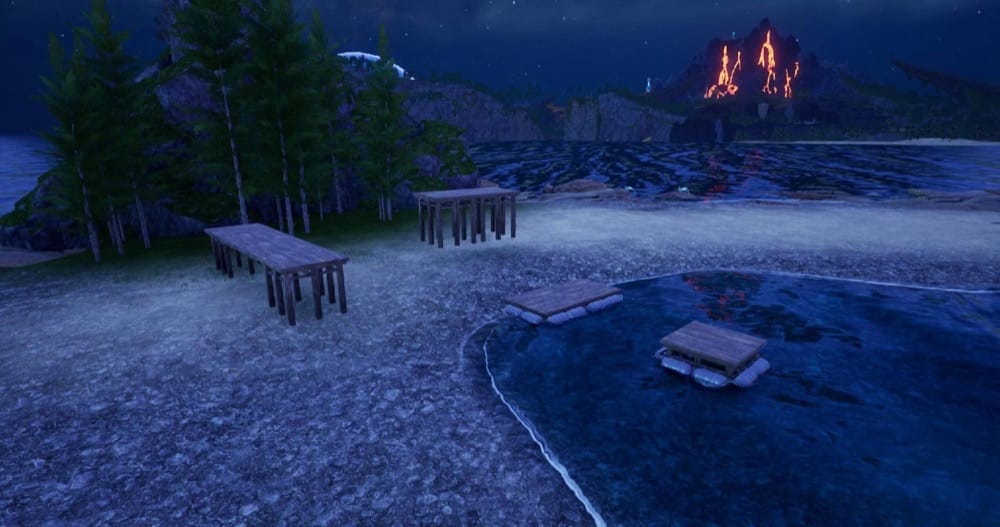
“Better Base Building” removes many of Palworld’s construction restrictions without expanding the base radius. You can build at any height, on slopes of up to 90 degrees, with floating or overlapping pieces, over water without the Aquatic Construction Kit, and near bosses, Towers, fast-travel points, and other special facilities. It also removes the per-player building limit the game immediately applies when you join and doesn’t require you to rebuild existing structures.
This is the building-only portion of “Better Base Range”, making it a better fit for players who want greater construction freedom without changing Pal work areas, combat ranges, spawn suppression, or neighboring-base distances. Each feature can be adjusted or returned to its vanilla value in the "main.lua" file.
Additionally, the mod is safe to add to or remove from an existing save and can run alongside “Better Base Range”, although please note that some settings will likely overlap.
3. Storage+

“Storage+” combines normal containers across every loaded guild base into one shared resource pool. Materials remain in their original chests, but Palworld can count and consume them when you craft, produce items, or place structures elsewhere.
It is one of the strongest all-round optimization mods because it reduces travel and inventory shuffling without replacing the familiar crafting interface. The project also uses cached resource checks designed to reduce building stutter, although we should note that this is more of a targeted improvement rather than a promise of higher FPS throughout the game.
4. Better Storage

“Better Storage” triples the slot capacity of every placeable storage container, including chests, barrels, shelves, cabinets, lockers, refrigerators, coolers, and feed boxes. Each container retains its relative size, so an Advanced Chest still holds more than a Wooden Chest and a Refrigerator remains larger than a Cooler Box.
With that said, this is a configuration mod rather than a shared-storage system. Every container remains independent, and the mod does not add scripts, background processes, or synchronization between chests. All it does is change the storage capacity, leaving crafting costs, building requirements, drop rates, and other gameplay systems untouched.
5. PalScope
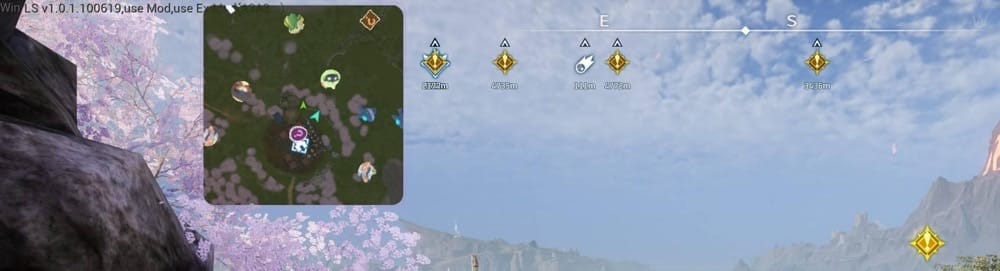
“PalScope” adds a customizable tactical minimap that tracks nearby Pals, players, bosses, camps, chests, dungeons, eggs, fast-travel points, effigies, skill-fruit trees, and other useful locations. Circular and square layouts are available, along with adjustable zoom, size, position, opacity, orientation, and render quality.
An in-game settings panel provides you with a handy live preview, while long-range mode makes unexplored journeys easier to plan. Additionally, collected markers can disappear automatically, your layout is preserved between sessions, and the mod does not alter world or character save data.
6. PalEggAuto

“PalEggAuto” adds two convenient buttons directly to the Egg Incubator menu. One fills available incubators at your current base with eggs from your inventory, while the other collects every Pal that has finished hatching.
This removes the repeated process of opening each incubator, inserting an egg, and returning later to collect its Pal individually. Incubation rules and timers remain unchanged – the mod simply makes managing a large collection of incubators much faster.
7. FastTravel Anywhere

“FastTravel Anywhere” allows you to travel from the open field whenever you open Palworld’s regular world map. It uses the native map, destination list, travel request, multiplayer permissions, and server validation, so only locations already discovered and unlocked by your character will be available here.
There is no separate interface or hotkey to manage, either. The mod simply expands when normal fast travel can be used, while keeping safe restrictions for states such as riding, swimming, flying, or exploring a dungeon. However, optional configuration settings let experienced players change those restrictions.
8. Actually Easy Bulk Storage

“Actually Easy Bulk Storage” turns Palworld’s normal Easy Bulk Storage command into an immediate action. While viewing your inventory at a base, press “R” to send eligible items to valid nearby containers without opening the standard confirmation interface.
The transfer still follows Palworld’s native storage rules and respects your Exclusion List. Pressing “X” opens the original Quick Stack configuration panel, allowing you to adjust that list without running a transfer.
9. RamTrim Mod

“RamTrim Mod” periodically trims Palworld’s working set, prompting Windows to release unused physical memory held by the game process. It runs automatically once per minute, making it most relevant during long sessions in which Palworld’s memory footprint has grown considerably.
Press “F10” to perform a manual trim at any time. The before-and-after memory values are recorded in the UE4SS console and log. RamTrim does not modify saves, game logic, or Blueprint state, and it should be treated as a RAM-management utility rather than a universal FPS booster.
10. No Pal Deposit
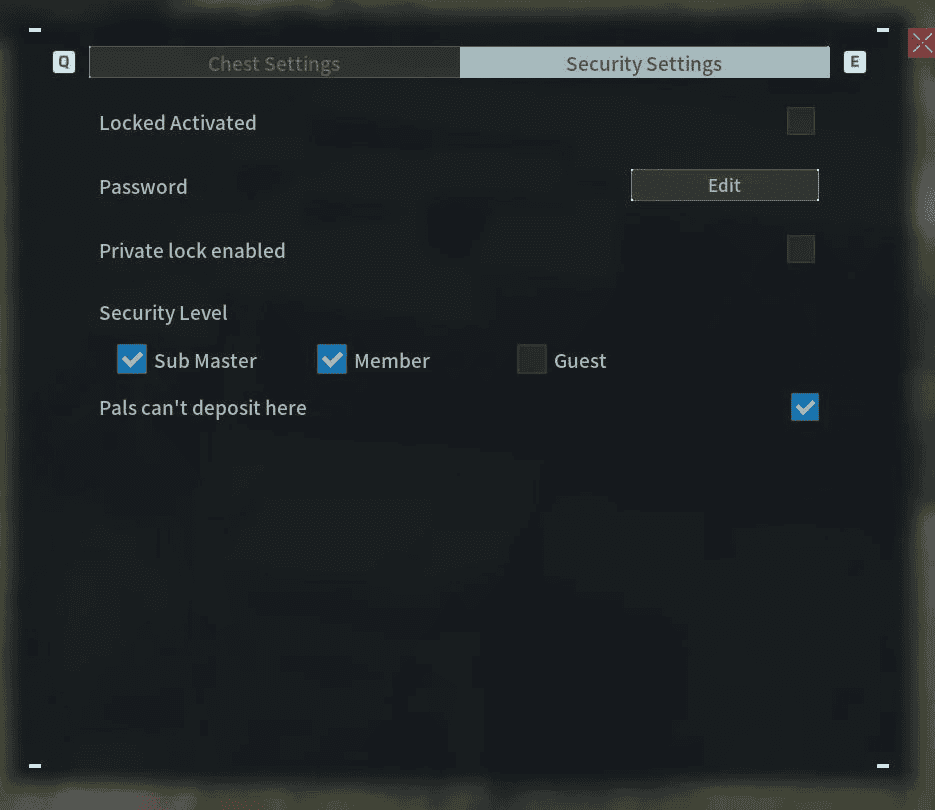
“No Pal Deposit” lets you prevent Pals from placing items inside selected storage containers. To use it, open a chest’s settings and enable the native-looking “Pals can’t deposit here” checkbox. The setting works with every chest tier, including guild chests, and is saved separately for each world.
Blocked chests remain fully usable by players and can still supply materials to workbenches, assembly lines, and other crafting stations. You can also protect individual containers or use the provided configuration file to block Pal deposits across every chest.
Notable Palworld Performance Mods for Version 1.0
Among the 1.0.1-compatible projects in this list, "RamTrim Mod" and "Storage+" are the two most directly related to performance. "RamTrim Mod" targets memory use, while "Storage+" uses cached resource checks intended to reduce building stutter.
However, please note that neither of these would likely fix any FPS drops that you may be experiencing in-game, so it’s best to use these alongside a mix of optimal graphic settings and/or targeted changes to the “Engine.ini” file.
Honorable Mentions: Legacy Palworld Performance Mods
Several popular performance projects were built for early-access releases, yet sadly do not list Palworld 1.0 compatibility. Still, we feel like they remain useful historical references, but we do not recommend them for a current save unless you’re playing on an older game version.
- PW - Stuttering and Performance Fix targets stuttering and low performance, but its listed versions stop at 0.3.6 and 0.2.0.6.
- Stutter Fix was designed around streaming and VRAM-related stutters in early 2024 builds.
- FSR2 or XeSS Upscaling adds alternative upscalers for version 0.1.2.0 and has not been updated for 1.0.
- Steam Deck Essentials (All Handhelds) offers low-spec presets, but its listed game version is 0.1.2.0.
We remain confident that the community will quickly post up new optimization mods that target version 1.0 specifically, so stay tuned!
Important: While it might be tempting to do so, do not attempt to force an old performance package into a 1.0 installation simply because its original description promises more FPS. Engine, file, and loader changes can make obsolete tweaks ineffective or unstable.
Additionally, please also keep in mind that some outdated mods can potentially do you more harm than good – at least until they get properly updated to your game version.
How to Install Palworld Optimization Mods
The simplest option for supported projects is the CurseForge app on the Windows Steam version of Palworld. Here are the exact steps:
- Close Palworld and back up your save.
- Install UE4SS if required (typically needed for some Lua and C++ projects).
- Open the Palworld profile in the CurseForge app, then select "Discover" or "Browse".
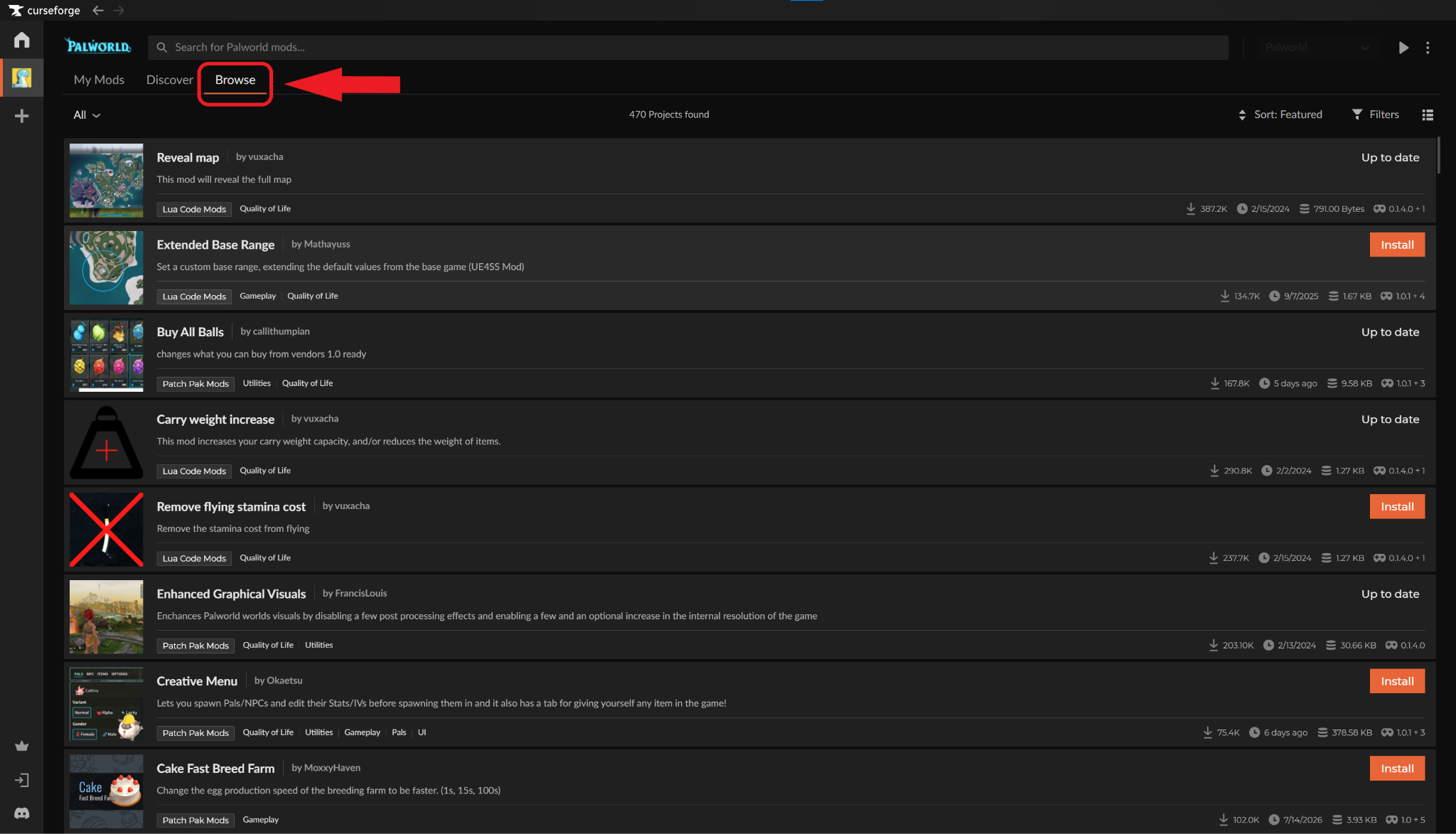
- Choose a project and check its supported game version, requirements, mod category, and installation notes.
- Select "Install" when app installation is available. For manual downloads, use the folder specified on the project page for its category: Patch Pak, Blueprint Code, Lua, or C++.
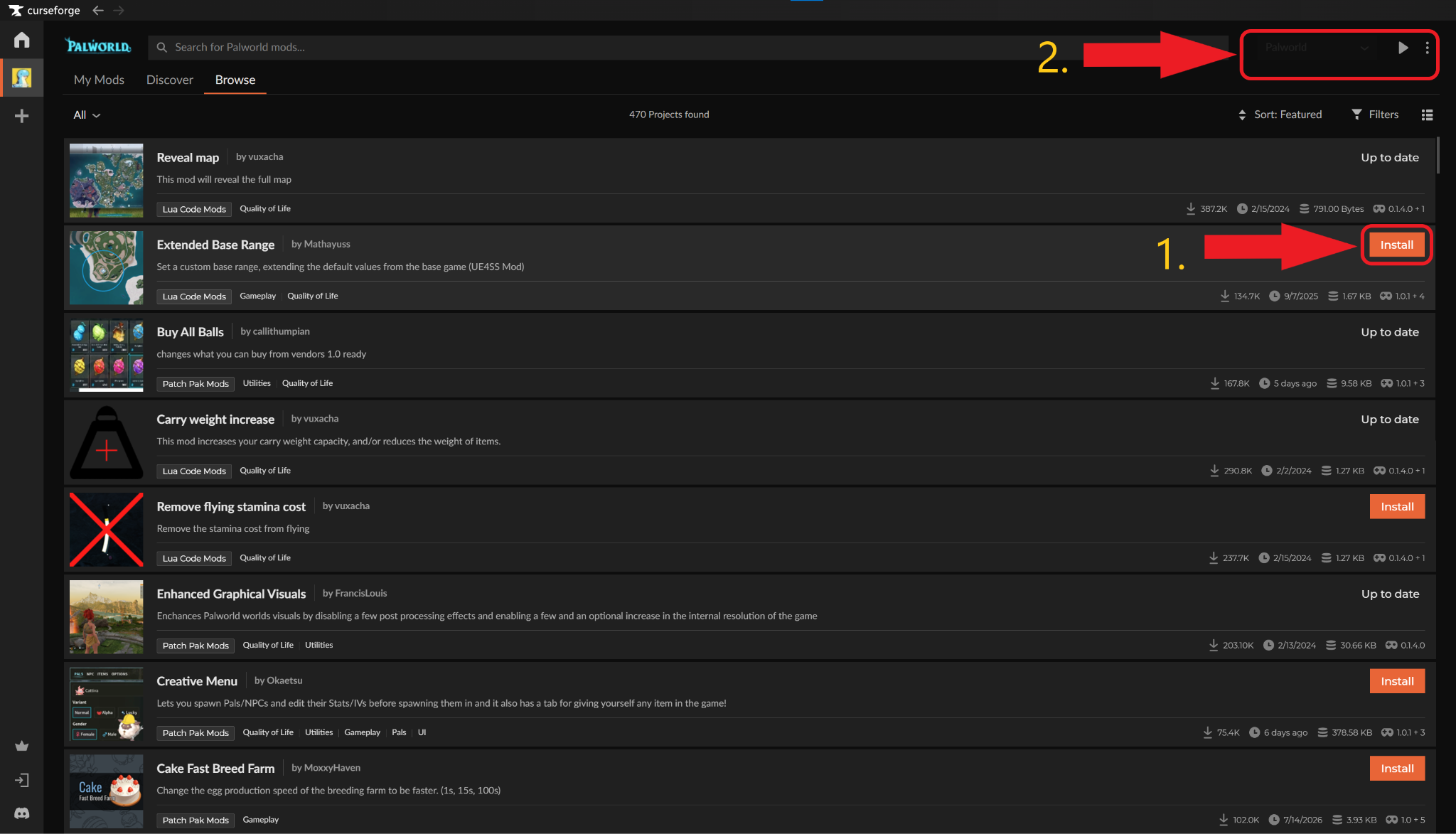
- Click "Play" to launch Palworld and test the mod before adding another one.
Common Issues and Quick Fixes
The mod appears in the folder, but does not work
Confirm that its file supports your exact Palworld version and that every required framework is installed. Several entries above require the Palworld-specific UE4SS build – a generic or outdated build may fail before the mod loads. Additionally, make sure to check whether the project must be installed on the server instead of only on your client.
The game crashes after adding a mod
To fix this, we recommend removing the newest project and testing the game again, then checking the project's requirements and known conflicts. As a rule of thumb, do not run two editions of the same mod through Steam Workshop, CurseForge, and a manual folder simultaneously as conflicts will occur.
Storage+ crashes or does not load
"Storage+" 2.2.2 requires the Palworld-specific UE4SS Experimental build. The standard RE-UE4SS 3.0.1 release is incompatible and may crash Palworld. Make sure to remove any previous "Storage+" edition and avoid installing the same mod manually or through Steam Workshop.
“Better Storage” shows the wrong number of slots
Expanded capacity is assigned when a container is constructed. If a container placed before installing the mod remains at its original size, pick it up and place it again. In multiplayer, make sure “Better Storage” is installed on the server – a client-only installation can display slots that the server does not recognize, leading to failed item interactions or desynchronization.
“Actually Easy Bulk Storage” does not move an item
Run the shortcut by pressing “R” while your inventory is open at a base. Palworld still determines which items and nearby containers are eligible, and anything on the Exclusion List remains in your inventory. The custom configuration key does not appear in Palworld’s bottom key guide, but it can still open the native configuration panel.
“PalScope” conflicts with another minimap
Do not enable “PalScope” alongside “Paldar” or “PalMiniMap” because their internal Blueprint paths may conflict. Confirm that “PalScope” and UE4SS Experimental are installed client-side, then press “F5” after entering a world to open its settings.
“FastTravel Anywhere” does not allow travel
Only destinations already discovered and unlocked by the current character can be selected. Field travel is blocked by default while mounted, airborne, swimming, dead, or inside a dungeon. Make sure to use only one copy of the mod, update to a matching Palworld-compatible UE4SS build after game updates, and check “UE4SS.log” for entries beginning with “[AlwaysFastTravel].”
The “No Pal Deposit” checkbox is missing
The checkbox cannot be selected with a controller. In multiplayer, the host needs the mod for the storage rules to work, while other players must install it if they want to see the checkbox or change a chest’s status. To fix this, check “UE4SS.log” for entries tagged “[NoPalDeposit]” if the option still fails to appear.