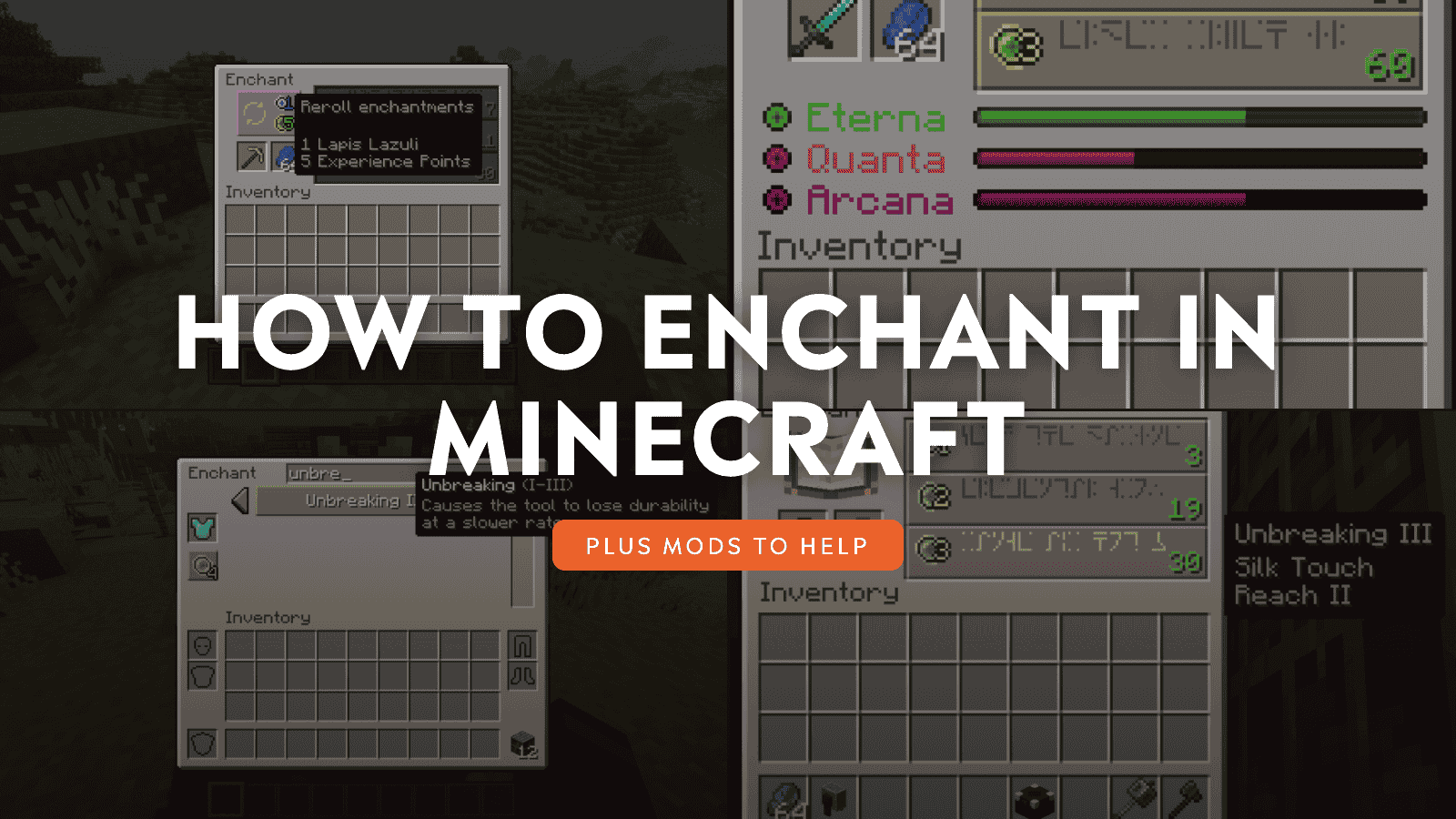
Enchanting is one of the main ways Minecraft turns basic gear into long-term equipment. A plain sword, pickaxe, or armor set can become much more useful once the right bonuses are added, but the system is not always obvious when you first open the enchanting table.
Between bookshelves, lapis lazuli, XP levels, random options, and enchanted books, there are a few moving parts to understand before you start spending resources. This guide walks you through how enchanting works, how to set up your table correctly, and which mods can make the process clearer, more flexible, or less random.
What You Need to Start Enchanting
There are a few prerequisites you need to meet before donning your magician hat:
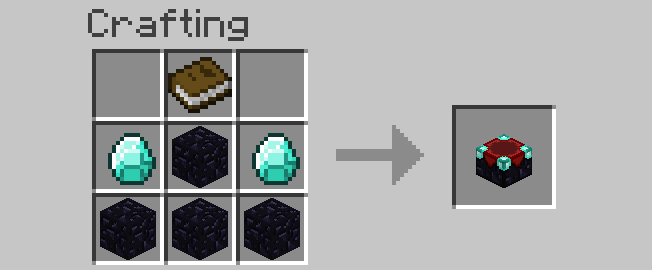
- Enchanting table: Crafted from 4 obsidian, 2 diamonds, and 1 book. Place the book in the top-center slot, diamonds in the middle-left and middle-right slots, one obsidian in the center slot, and three obsidian across the bottom row. Obsidian requires a diamond pickaxe or stronger to mine.
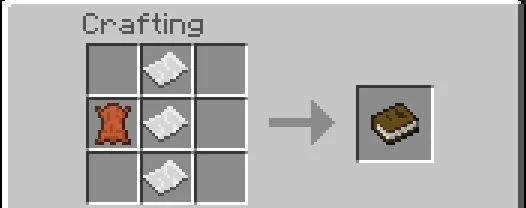
- Book: Crafted from 3 paper pieces and 1 leather. Paper is crafted from 3 sugar canes, while leather usually comes from cows, horses, llamas, or other leather-dropping mobs. Since books are needed for both the enchanting table and bookshelves, a small cow farm and sugarcane farm make the setup much easier.
- Lapis lazuli: Found between Y=-64 and Y=64 in the Overworld, most commonly around Y=0. Each enchanting attempt costs 1 to 3 lapis depending on the tier you choose.
- XP (Experience): You earn XP from killing mobs, mining certain ores, smelting, trading with villagers, and fishing. The enchanting table requires a minimum XP level for each tier.
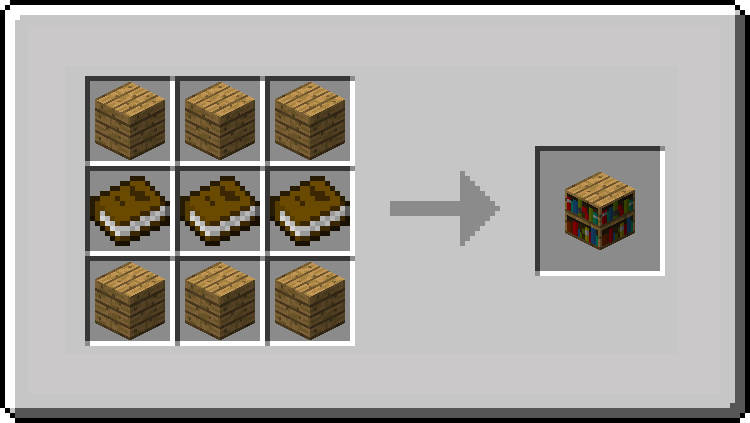
- Bookshelves: Crafted from 3 books and 6 wooden planks. Bookshelves expand which enchantments are available and how powerful they can be. Without bookshelves, you're limited to low-level enchants. With 15 bookshelves arranged correctly, you unlock the full level-30 enchant pool.
How to Properly Set Up Bookshelves
Bookshelves need to be placed one block away from the enchanting table with a clear line of sight – no blocks between the bookshelf and the table. The optimal arrangement is a ring of bookshelves around the table at the same height and one block above, leaving gaps for access.
Important: You need exactly 15 bookshelves to reach the maximum level-30 enchantment options. Adding more beyond 15 does nothing. The standard layout is two rows of bookshelves forming a U-shape or a complete ring, with the enchanting table in the center.
How Enchanting Works in Minecraft
To begin:
- Right-click the enchanting table to open the user interface.
- Place an item in the left slot and lapis lazuli in the right slot.
How the Three Enchantment Options Work
After you place an item and lapis lazuli into the enchanting table, three enchantment options appear on the right side of the GUI. These are not three guaranteed enchantments – they are three tiers you can choose from.
Each option has three things to understand:
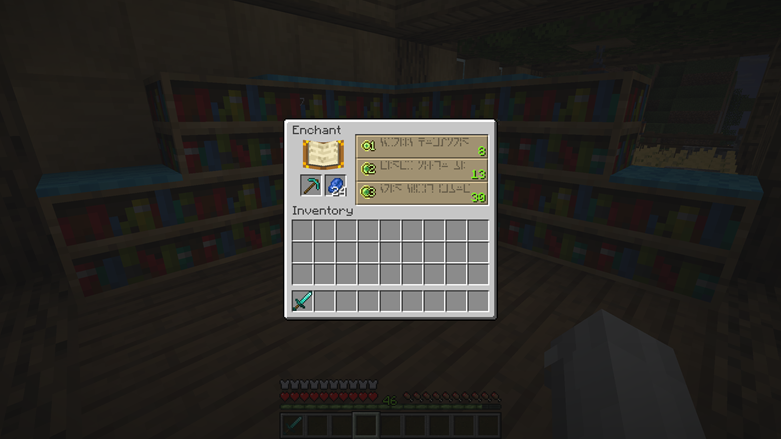
- Tier: The top option is the lowest tier, the middle option is stronger, and the bottom option is the strongest.
- Cost: The cost is based on the tier going from 1, 2, or 3 lapis lazuli and also on spending 1, 2, or 3 XP levels when selected.
- Required level: The green number shown on the option is the player level you need before you can choose it. With 15 properly placed bookshelves, the strongest option can require you to be level 30 or higher, but selecting it only spends 3 XP levels, not all 30.
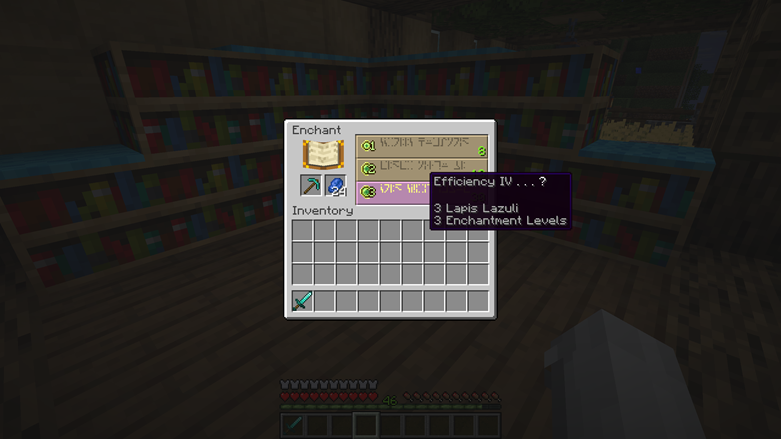
The enchantment name shown on the right is only a preview. It tells you of the enchantment that is about to be applied, but the final result can include extra enchantments, too. For example, a pickaxe option might show Efficiency IV, but after selecting it, the item could also receive Unbreaking or Fortune if the roll allows it.
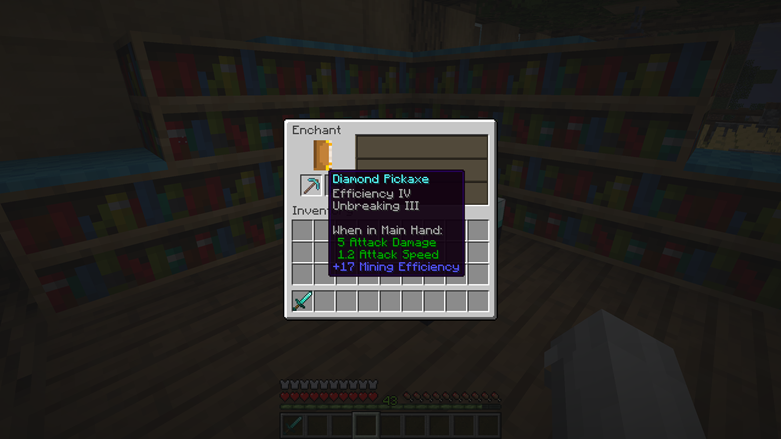
That is why level-30 enchanting can feel unpredictable. You might get one strong enchantment, or you might get several useful enchantments together. Once you click an option, the required lapis and XP levels are spent, and the enchantment is applied.
Which Enchantments Should You Go For?
Enchanting works differently for different item types, but we feel that there are a few enchantments worth prioritizing in any playthrough:
- Mending repairs items using XP orbs. It's a treasure enchantment and won't appear in the enchanting table – you can get it from fishing, librarian villager trades, or loot chests. It's arguably the most valuable long-term enchantment in the game.
- Unbreaking III reduces durability loss per use. Almost every tool and piece of armor benefits from it.
- Fortune III increases item drops from mining. Invaluable for diamonds, coal, and any ore you mine at scale. Conflicts with Silk Touch.
- Silk Touch makes blocks drop themselves instead of their normal drops – leaves drop leaf blocks, stone drops stone instead of cobblestone, and so on. Useful for building and collecting specific blocks. Conflicts with Fortune.
- Efficiency V makes mining significantly faster. Essential for any pickaxe you use regularly.
- Protection IV reduces incoming damage broadly. Goes on all armor pieces.
- Feather Falling IV reduces fall damage – one of the most important boot enchantments for survival.
How to Work With Enchanted Books
Enchanting books gives you an enchanted book rather than applying the enchantment directly to gear. Using enchanted books is the main way to put specific enchantments onto specific items, especially when the book comes from villager trading, fishing, or loot.
To pass an enchantment from an enchanted book onto an item, combine both the book and that item on an anvil.
Tip: Librarian villagers are the most consistent source of specific enchanted books. Under the normal villager trading rules, you can lock a librarian to a particular book by trading with them once, then they will keep that trade. This is how most players build end-game gear in “Survival” mode.
Mods That Expand How Enchanting Works
Vanilla enchanting works well once you understand bookshelves, XP, and lapis, but it still leaves a lot to chance. Mods can keep that basic system in place while making it easier to preview results, reroll unwanted options, or choose the enchantments you actually want.
The mods below approach that problem in different ways: some improve the standard enchanting table, some remove random rolls, and others turn enchanting into a deeper progression system built around new bookshelf stats and extra tools.
Easy Magic
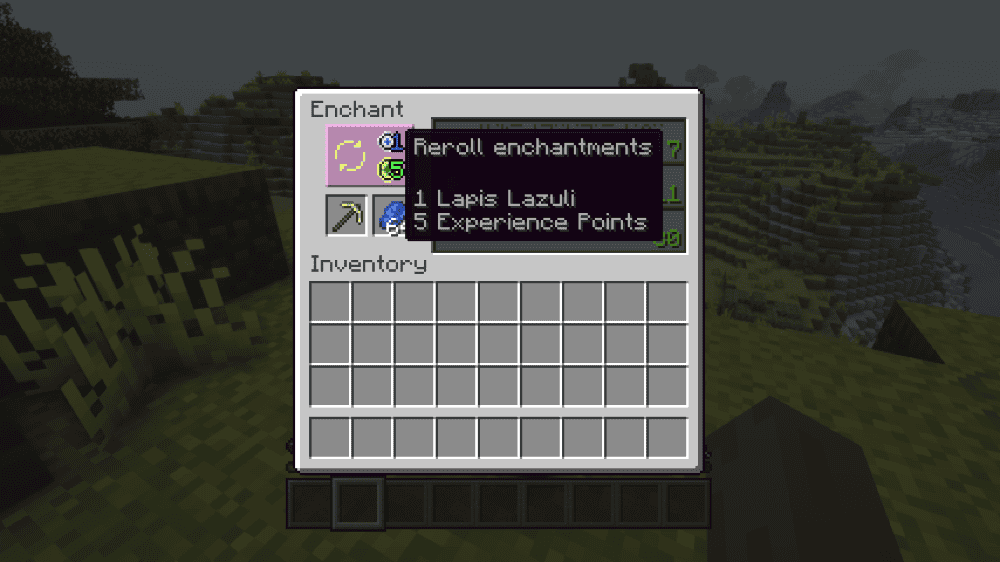
“Easy Magic” improves the vanilla enchanting table without replacing the whole enchanting system. Items and lapis can stay inside the table after you close the interface, and the mod renders them floating around the block, which makes the setup feel more polished and less annoying to use.
The main practical feature is the reroll button, which lets players refresh the offered enchantments for a small cost in lapis and experience points rather than repeatedly enchanting throwaway items.
With this mod, you can also preview how many enchantments an item will receive, adjust bookshelf requirements through the configuration file, and allow non-colliding blocks like torches or tall grass between bookshelves and the table. It’s worth noting that “Easy Magic” is not compatible with “Apotheosis” or the “Quark Oddities” Matrix Enchanter, so it works best in modpacks that keep the vanilla enchanting table mostly intact.
Apothic Enchanting
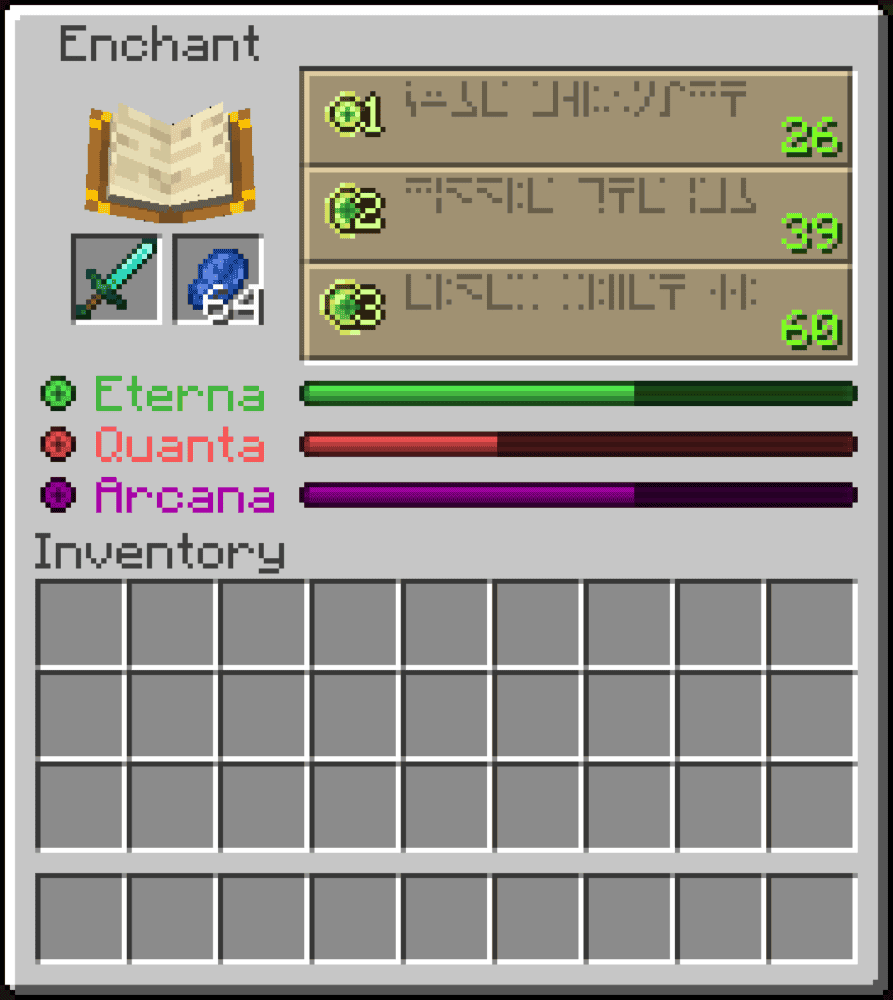
“Apothic Enchanting” is a full overhaul of Minecraft’s enchanting system. Instead of relying only on 15 standard bookshelves, the mod adds enchanting stats provided by bookshelves and other valid blocks around the table.
Eterna affects enchantment strength, Quanta changes how much randomness is involved, and Arcana increases the chance of extra or rarer enchantments. It also raises the enchanting table’s maximum level to 100, which makes enchanting more involved than vanilla’s level-30 setup.
The mod also adds several tools that make enchantment management deeper. Tomes can target enchantments for specific item types, while scrapping and extraction tomes can remove enchantments from gear, with the Tome of Extraction keeping the original item intact. The Enchantment Library gives players a place to store enchanted books, search through them, and extract specific enchantments when needed.
Enchanting Infuser
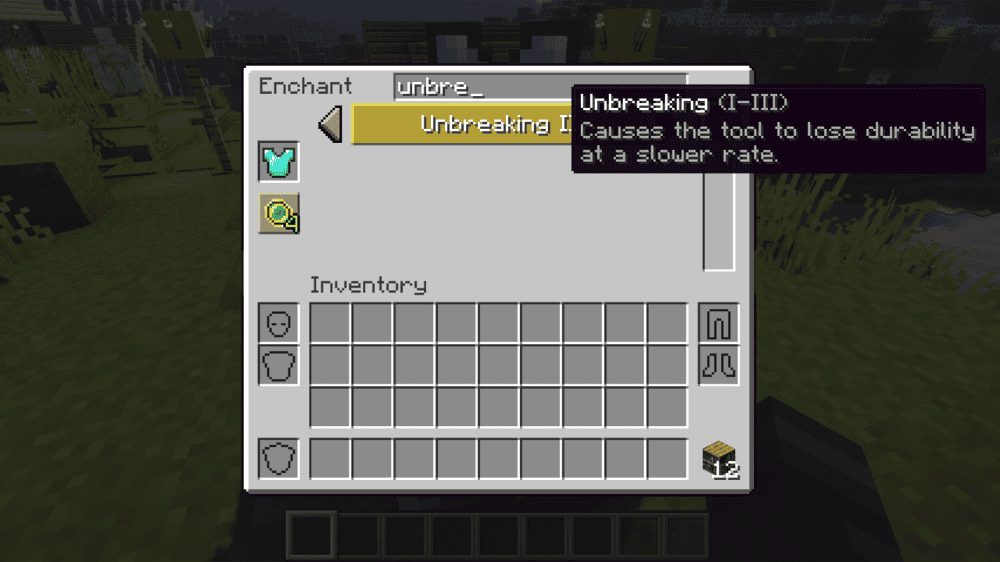
“Enchanting Infuser” adds a new enchanting block that lets players choose which enchantments to apply instead of relying on the vanilla table’s random options. The basic Enchanting Infuser offers the enchantments normally found through an enchanting table, with better enchantments and higher levels unlocked through bookshelves. Treasure enchantments such as Mending are not available through the basic system, so it still keeps some vanilla progression limits.
The mod also includes an Advanced Enchanting Infuser, which can modify already-enchanted gear, repair items using levels, and return XP when disenchanting equipment in a way similar to the grindstone. Since costs and available enchantments are configurable, it can fit both lighter survival worlds and modpacks that want more control over enchanting balance.
Show Me The Enchantment
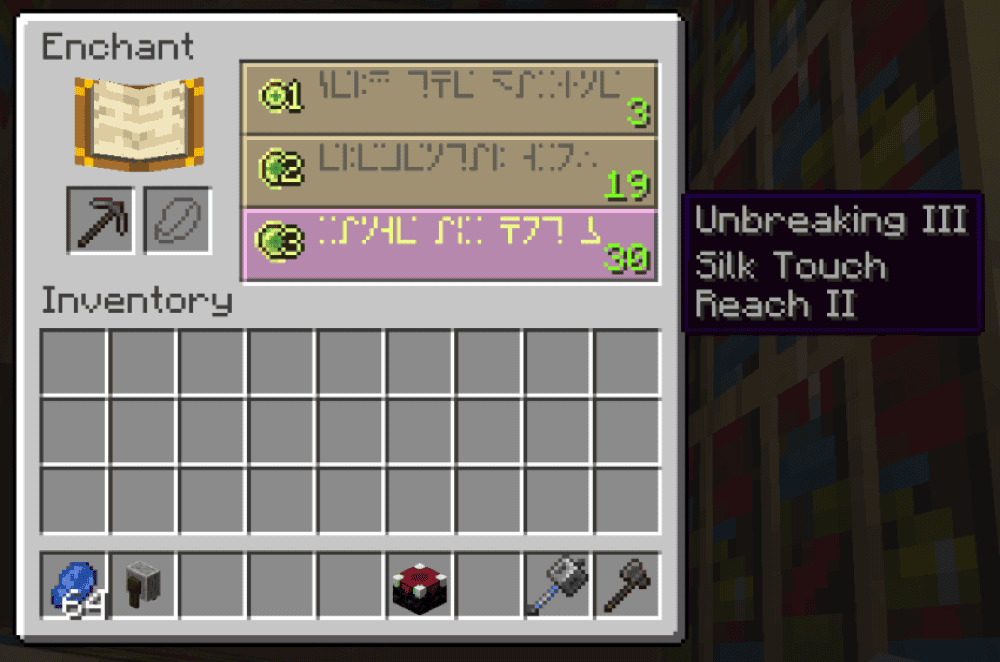
“Show Me The Enchantment” is a lightweight client-side mod that changes the vanilla enchanting table GUI so you can preview the full enchantment result before spending XP and lapis. Instead of seeing only a question mark or one partial enchantment clue, you can check every enchantment and what it will apply before committing.
The mod keeps the vanilla enchanting system intact, so it is best for players who still want normal enchanting but with clearer information. It should also show enchantments added by other mods, but it may not work correctly with mods that heavily overhaul the enchanting table, such as “Apotheosis” or “Easy Magic”.
How to Install Minecraft Mods
You can install the above mods automatically using the CurseForge app or manually by placing the mod files within your game's mods folder. Both methods let you add custom features and enhancements to Minecraft.
If you want to learn more, you can read our detailed guide on how to install Minecraft mods.
Common Issues and Quick Fixes
The enchanting table only shows low-level options
Your bookshelves are likely placed incorrectly. The table needs 15 bookshelves arranged around it with one empty block of space between the table and each shelf – no other blocks in that gap, including torches or carpets.
Each incorrectly placed bookshelf doesn't count toward the total. Check the arrangement and confirm nothing is blocking the connection between the shelves and the table before retrying.
The enchantment I want never shows up
Vanilla enchanting is random and some enchantments are rarer than others. If you need something specific like Silk Touch or Fortune, the most reliable approach is trading with a librarian villager and locking in that specific trade, then using an anvil to apply the book.
Mending is a treasure enchantment and won't appear in the table at all – fishing, librarian trading, or loot chests are the only ways to get it.
My XP runs out before getting useful enchantments
Set up a mob farm or an XP-generating activity before your enchanting session. A basic spawner trap or a smelting operation running in the background will keep your XP income steady.
Enchanting costs 1 to 3 lapis and spends 1 to 3 XP levels depending on the option you choose. The level-30 option requires you to have 30 levels available, but selecting it spends 3 levels, not all 30. We recommend planning ahead for multiple sessions if you're enchanting a full set of gear.
Show Me The Enchantment isn't showing the full enchantment names
Confirm that the mod is installed client- and not server-side. Additionally, confirm you're running NeoForge as this mod doesn't support Fabric or Forge. If the mod is installed correctly and you're still seeing garbled text, it may be conflicting with another mod that’s designed to modify the enchanting table GUI.
My game crashes after adding an enchanting mod
A startup crash usually means that the mod file does not match your Minecraft version, the file was made for a different loader, or a required dependency is missing. Check that every mod matches your profile’s loader, such as Forge, Fabric, NeoForge, or Quilt, then confirm the dependency list on each mod page.
If the crash has occurred after you’ve added several mods, remove the newest mods one by one and launch the game after each change. When the game opens normally, the mod you removed last is probably the culprit. Reinstall that mod with the correct Minecraft version, loader, and dependencies before testing again or consider skipping it altogether.