Bundles in Minecraft let you put multiple items in one inventory slot, allowing you to drag these items inside the bundle and retrieve them at any time. While the bundles don't have a defined limit for how many unique items they can carry, they are still limited by how much a single inventory slot can normally hold. That being said, here’s the gist:A bundle is full when it contains 64 points. Different items take up different amounts of "space" based on how they normally stack:
- Standard items (like Dirt): 1 point each.
- 16-stack items (like Ender Pearls): 4 points each.
- Non-stackable items (like Swords): 64 points each.
This guide will cover how to make a bundle, what you need for the recipe, and how its capacity works in practice. What takes a bit more time to understand is how a bundle fills up, because it doesn't behave like a normal container.
What You Will Need
- 1 string.
- 1 leather.
Getting String
String is easy to find early in the game. Breaking cobwebs with a sword is the fastest method when you're near a mineshaft or abandoned structure. Spiders drop string on death, and it also shows up in loot chests, as a fishing catch, through cat gifts, and in bartering. You just need one piece, so any of these routes work.
Getting Leather
Cows are the standard source – an adult cow can drop anywhere between 0 and 2 leather pieces. Horses, donkeys, llamas, and hoglins also drop leather. If mob hunting is slow, fishing produces leather as junk loot occasionally, and piglin bartering can yield it, too.
There's also a crafting route to this if you've been killing rabbits lately: 4 rabbit hides crafted together in a 2x2 pattern gives 1 leather. Rabbits spawn in deserts, snowy plains, and a few other biomes, so if you're already in one of those areas, it's worth picking up their drops.
Learning the Crafting Recipe
This one fits in your 2x2 inventory crafting grid, so you don't even need a crafting table:
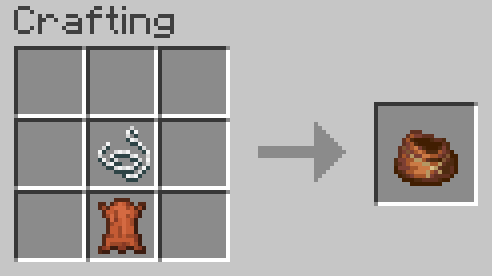
The recipe goes as follows: string on top, leather underneath, same column. This makes one bundle per craft. Bundles don't stack, so you'll craft them individually as you need them.
How a Bundle Works
How Much Can a Bundle Hold?
A bundle holds the equivalent of one full stack, or 64 units of capacity. The catch is that not every item type takes up the same space:
- Items that stack to 64 (like sticks or cobblestone) use 1 unit each, so you can fit 64 of them.
- Items that stack to 16 (like ender pearls or snowballs) use 4 units each, so you can only fit 16 of them.
- Unstackable items (like tools, weapons, or armor) use all 64 units by themselves, so one item is enough to fill the whole bundle.
That's why a bundle with 8 ender pearls takes up the same space as 32 sticks. The bundle isn't being wasteful – the pearls just have a smaller max stack, so each one costs more capacity. Keep this in mind when deciding what to put in: bundles work best with items that stack to 64.
What to Store Inside a Bundle
Most normal items go in just fine. The main restriction worth knowing is that shulker boxes cannot be placed inside bundles. The reverse works though – bundles can go inside shulker boxes, and bundles can even be nested inside other bundles.
Nesting bundles together sounds clever but it won’t provide extra capacity, which still remains 64 units. When you place one bundle inside another, the outer bundle counts the inner bundle as 4 units of space plus its contents. For example, an inner bundle containing 20 sticks would take up 24 units of the outer bundle's total space (4 for the bundle + 20 for the sticks), meaning nesting actually uses more space than simply storing items inside a single bundle.
That means nested bundles are useful for organization, not expansion. You can use one inner bundle for cave junk and another for food or mob drops, but the outer bundle still fills up based on the combined total.
Putting Items In and Out
The controls below focus on Minecraft Java Edition. In Java Edition, bundle interaction happens through the inventory screen in the following ways:
- Left-click an item onto the bundle to insert it.
- To take something out, hover the bundle so its tooltip is visible, use the scroll wheel to cycle through the visible item types, then right-click to pull out the selected type.
The tooltip shows all stored item types if the bundle has fewer than 12 item types inside. Once it has 12 or more, the tooltip only shows the top three rows – at least 8 visible item types – and hides the rest.
Using a Bundle From Your Hotbar
If you're holding a bundle in your hand and right-click, it dumps the most recently added item type onto the ground in front of you. Holding right-click empties more. It's a fast way to offload a specific item when you're out in the field and don't want to open your inventory.
Where Bundles Actually Help
Caving and Mining Runs
The best use for a bundle during a mining session is as a junk sponge. Keep one in your hotbar and pack in the low-value mixed drops as you go – andesite, diorite, granite, dirt, seeds, loose string. Your actual ores and valuables stay as normal stacks where you can see them clearly, and the clutter that usually starts eating your hotbar slots by the second cave gets consolidated into one spot.
Looting Structures
Structures like dungeons, shipwrecks, and temples drop a lot of distinct items in small quantities – a few books here, some food there, the odd junk tool. That's exactly what fills up a bundle efficiently, since you're packing different types rather than huge quantities of one thing. Use it to sweep up the small stacks from chests and keep your main inventory slots open for full stacks of blocks and gear.
Mods That Go Beyond Bundles
Bundles are great for light inventory management, but they hit their ceiling fast. If you're after real portable storage with more capacity, upgrades, or a bigger inventory altogether, these mods are worth checking out.
Sophisticated Backpacks
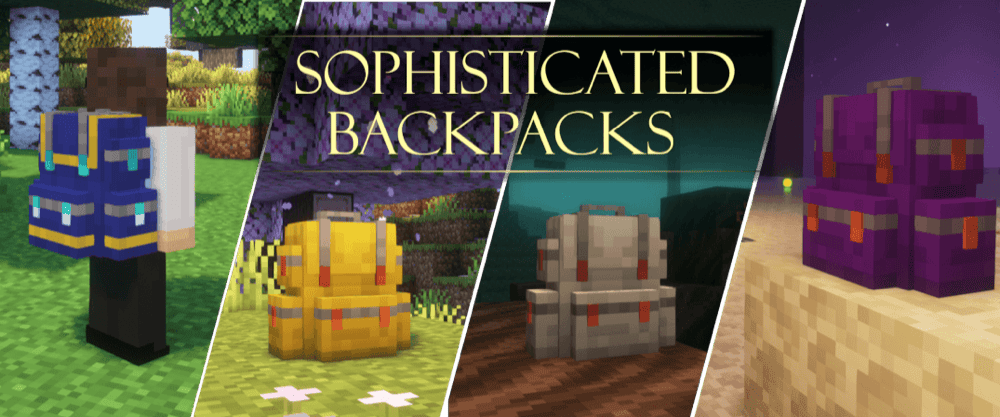
Sophisticated Backpacks adds tiered portable storage that feels like a full upgrade path from vanilla bundles. It gives you backpacks that can be worn, opened directly from your inventory, or placed in the world like a block, which makes them much more flexible than a bundle once you need real storage instead of simple inventory cleanup.
It also goes far beyond basic storage with dyeable color combinations, six backpack tiers from Leather to Netherite, and a long list of upgrade options for things like item pickup, filtering, compacting, crafting, feeding, smelting, and restocking. That makes it a strong fit if you want portable storage that keeps growing with your world.
Traveler's Backpack
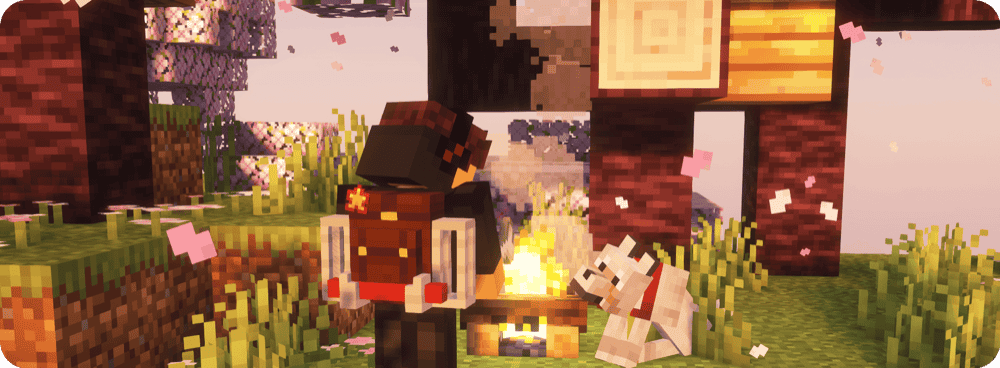
Traveler's Backpack adds upgradeable portable storage that feels much closer to a full backpack system. It can be opened in your hand, equipped on your back, accessed with a keybind, or placed in the world as a block, which makes it a strong fit for longer mining trips, exploration runs, and general inventory-heavy play.
It also gives you five backpack tiers, over 45 custom backpack styles, and a wide set of upgrades for things like tanks, crafting, feeding, magnets, pickup, voiding, and furnace functions.
Dank Storage
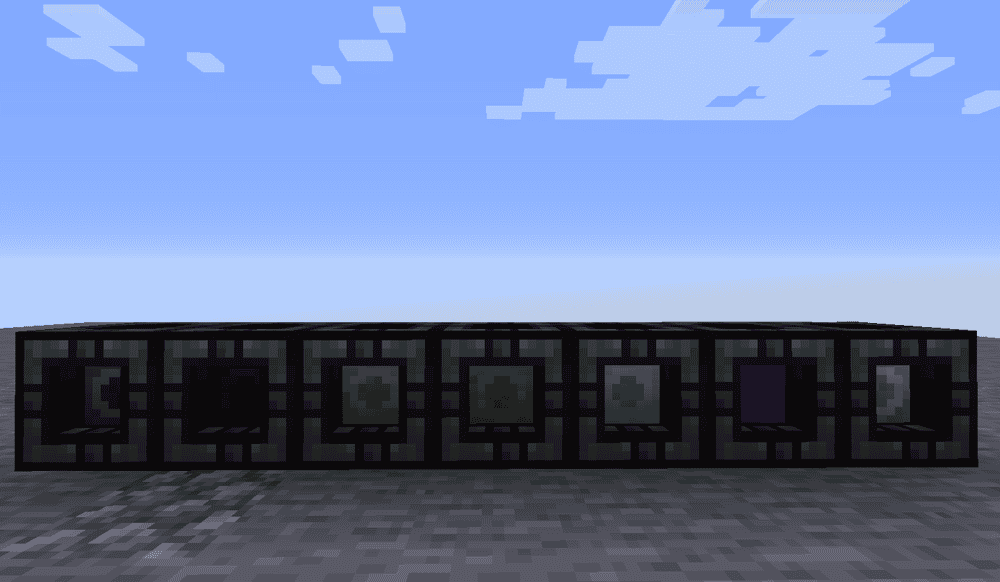
Dank Storage adds portable storage items called danks that go far beyond what a vanilla bundle can hold. Giving you seven storage tiers, it lets each slot hold much more than a normal stack, with the highest tiers scaling to extremely large capacities that make bundles look tiny by comparison.
It also has two main modes, Bag and Construction, so it can work like a backpack or a building tool depending on how you use it. A Dock block lets danks interact with hoppers and other storage systems, which makes the mod a strong fit if you want inventory expansion that also plugs into larger storage setups instead of just giving you one more bag to carry.
Extra Inventory
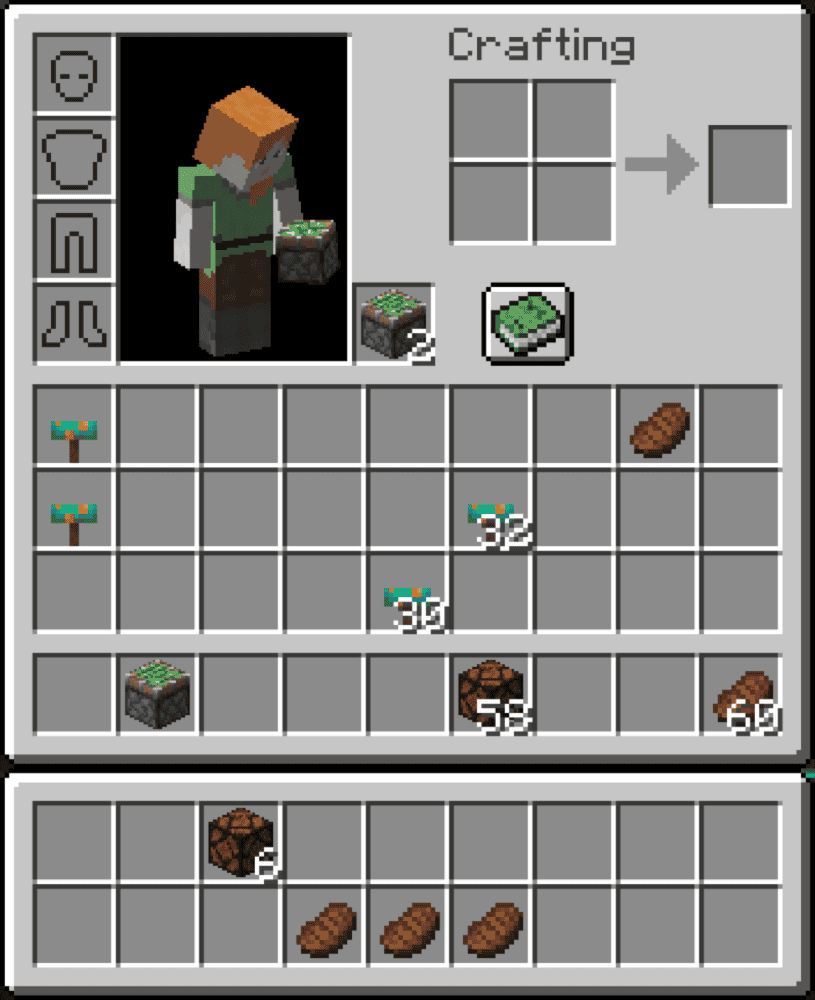
Extra Inventory adds two more rows to your player inventory, making it the simplest storage option in this list. It keeps the whole system close to vanilla while still giving you much more room for cave junk, loot, and everyday supplies.
Inventory Expansion
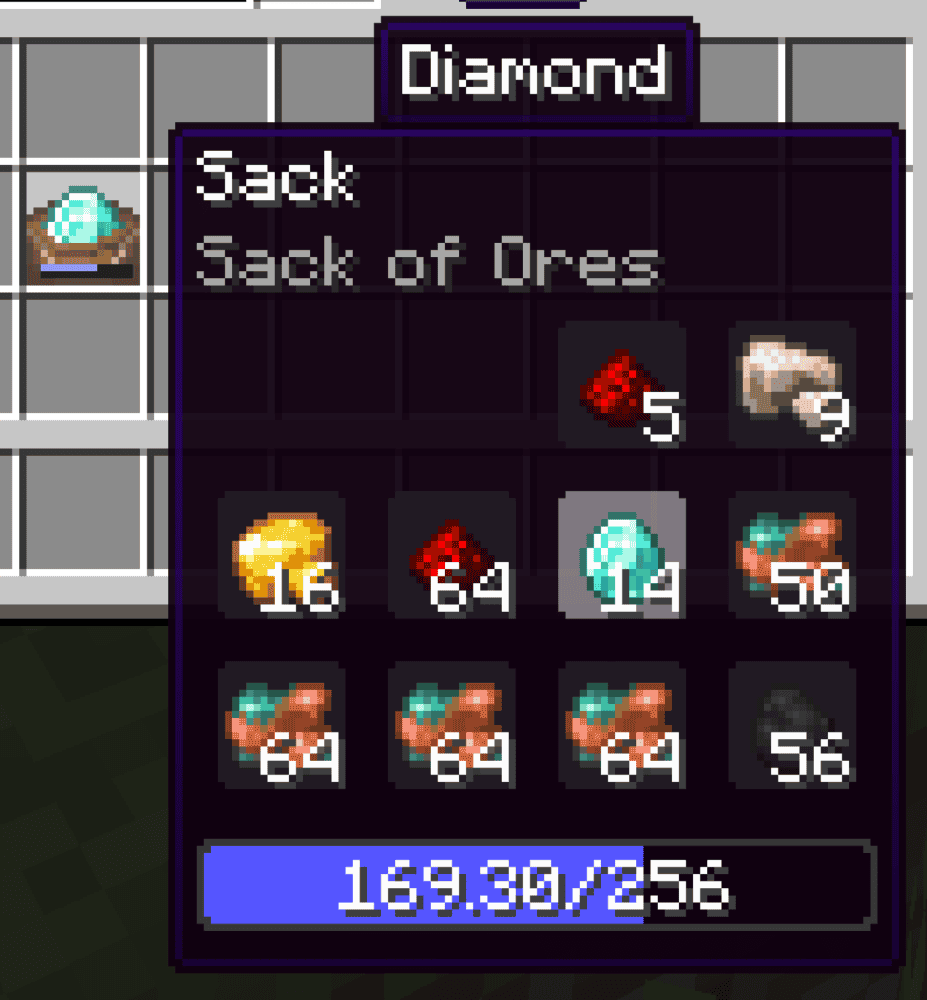
Inventory Expansion adds sacks and quivers that help keep your inventory cleaner without turning into a full backpack system. Sacks can hold around four stacks of similar items, automatically pick up more of the same item type after one is added, and let you use stored items directly with the scroll wheel. Quivers store eight assorted stacks of arrows and let bows fire from them directly, while picked-up arrows go back into the quiver automatically.
How to Install Minecraft Mods
You can install the above mods automatically using the CurseForge app or manually by placing the mod files within your game’s mods folder. Both methods allow you to easily add custom features and enhancements into your vanilla Minecraft experience.If you want to learn more, you can read our detailed guide on how to install Minecraft mods.
Common Issues and Quick Fixes
Bundle fills up immediately
A bundle still only holds one slot’s worth of total capacity, so it works more like mixed-stack organization than true extra storage. Items that stack to 16, like ender pearls, snowballs, and eggs, use 4 capacity each, while an unstackable item fills the whole bundle by itself.
I can’t put a certain item into the bundle
That is usually a restriction rather than a bug. Shulker boxes cannot go inside bundles, even though bundles can go inside shulker boxes.
I can’t see everything from the tooltip
If a bundle has fewer than 12 item types, the tooltip shows all of them. Once it has 12 or more, it only shows the top three rows, with at least 8 visible item types, so heavily mixed bundles get harder to read at a glance.
Using outdated bundle controls
Some older videos show prototype bundle controls. In current Java Edition, left-clicking inserts items, right-clicking removes the top item type, and scrolling plus right-clicking removes different visible item types while the tooltip is open.
My bundle dropped all of its contents
A bundle item entity drops its stored contents if the bundle itself is destroyed, such as by fire or cactus. That makes it more like a soft container than a protected storage block.
I experience mod issues after install
Most startup problems come down to using the wrong Minecraft version, the wrong loader, or a missing required library. Server-side issues can also happen when a storage mod is carrying unusually large amounts of item data, especially on dedicated servers. Checking the project’s files and dependencies on its CurseForge page usually clears up the problem.