A lever is one of the most useful redstone components in the game. Unlike buttons, which send a short pulse and then turn off, a lever stays on until you click it again. That persistent signal is what makes it the go-to switch for anything you want to stay open or active until you decide otherwise – hidden doors, base entrances, light systems, and farm toggles included.
Here's how to craft a lever, how it works, and what you can do with it.
How to Craft a Lever: The Basics
You will need two ingredients:
- 1 stick
- 1 cobblestone
Place the stick in the center of the crafting grid and the cobblestone directly below it – this gives you one lever. Sticks come from planks (two planks stacked vertically gives four sticks), and cobblestone is what you get from mining stone without the Silk Touch enchantment.
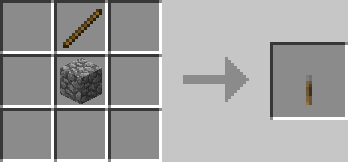
That's the full recipe. No table needed – the 2x2 crafting slots in the inventory will work just fine.
How to Place and Use a Lever
You can right-click the top, side, or bottom of most full solid blocks to place the lever, giving you flexibility with where it fits in a build.
When a lever is on, it outputs a redstone signal strength of 15 – the maximum in-game amount. Redstone dust loses 1 strength for each block it travels, so longer redstone lines need a repeater to refresh the signal. A repeater is a redstone block that boosts a weak signal back to full strength and passes it forward in one direction, which makes it useful for long-distance wiring.
Example of a Simple Lever Redstone Setup
For a basic circuit, place a lever on a block and run redstone dust from that block toward the component you want to control. When you flip the lever on, the redstone line will stay powered until you turn the lever off again.
If the line runs farther than 15 blocks, place a repeater in the redstone path to refresh the signal. Repeaters only pass power forward, so make sure the two small torches on top are facing the direction the signal needs to travel.
Lever vs. Button: When to Use Each?
The main difference is in signal behavior:
- A lever holds its signal on until you click it off. Use it for anything that needs to stay in a particular state – a door you want to leave open, a light you want on all night, or a mechanism you want to set and forget.
- A button sends a brief pulse and then turns off automatically. Stone buttons stay on for about 1 second, while wooden buttons stay on for about 1.5 seconds. Use buttons for single-action triggers, like opening a door just long enough to walk through, firing a dispenser once, or starting a pulse-based redstone circuit.
Tip: If you're building a hidden base entrance, a lever is usually the better pick because it lets you control exactly when the door opens and closes. A pressure plate or button works for quick access but doesn't give you that level of control.
Ideas for What to Build with Levers
Arguably the most common use is wiring levers to piston doors, iron doors, or trapdoors. Iron doors require a redstone signal to open – they can't be pushed with a right-click like wooden doors – so pairing one with a lever gives you a lockable entrance that regular players can't open by accident.
Levers also work well for:
- Lighting systems: connect a lever to redstone lamps spread around a build to toggle all of them at once.
- Farm on/off switches: many automatic farms need a way to stop item flow or disable collection; a lever wired into the circuit gives you that control.
- Multi-mechanism toggles: one lever can power a long redstone line that can control several things at once, as long as the signal stays above 0 before it reaches each component.
If you want to hide the lever itself, which is a common goal for secret rooms and base entrances, that's where the mods below come in!
Mods That Work Well with Levers
Wireless Redstone
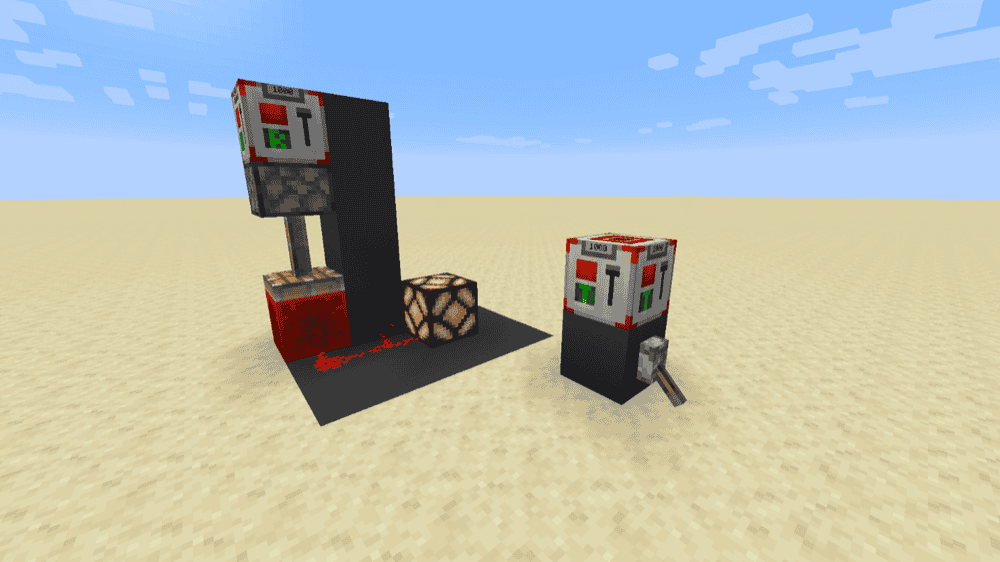
Wireless Redstone adds transmitter and receiver blocks that let redstone signals work remotely. Simply power a transmitter, and any receiver set to the same frequency will turn on too.
It also has P2P transmitters and receivers, which you connect directly with a Linker item. This is useful when you want one specific transmitter to control one specific receiver without worrying about frequency overlap. The mod also adds tools like a Remote, Frequency Tool, and Frequency Sniffer for setting frequencies, copying frequencies, and finding active transmitters.
SecretRooms-Unofficial
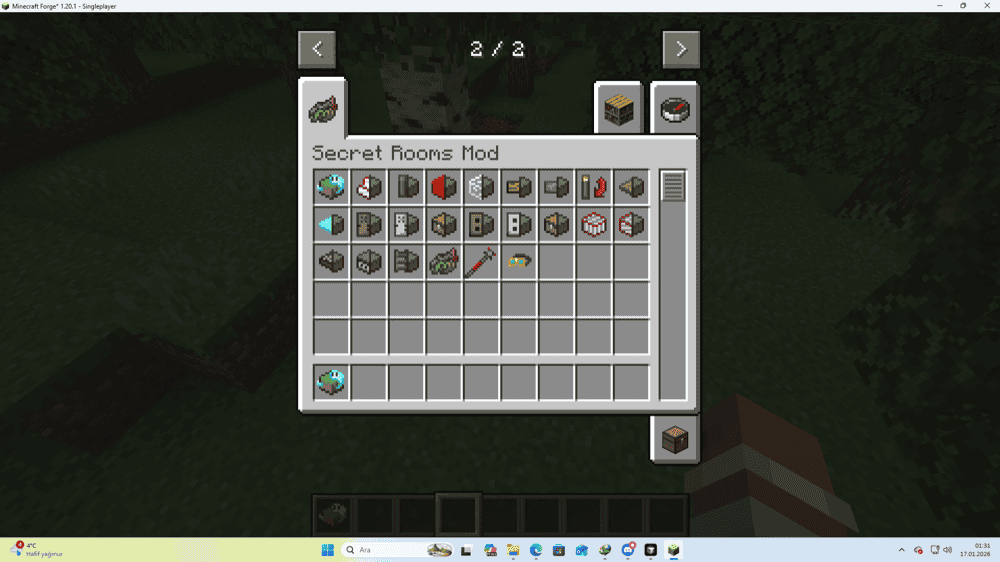
SecretRooms-Unofficial adds camouflage blocks and hidden redstone pieces for secret base builds. Its main features include Ghost Blocks that look solid but can be walked through, One-Way Glass, Secret Levers and Buttons, Secret Clamber blocks, and Secret Redstone for hiding power lines inside a build.
The mod fits lever-based redstone builds because it lets controls blend into the surrounding blocks instead of sitting out in the open. A Secret Lever or Secret Button can trigger a hidden door, piston entrance, or storage room while looking like part of the wall.
How to Install Minecraft Mods
You can install the above mods automatically using the CurseForge app or manually by placing the mod files within your game's mods folder. Both methods allow you to easily add custom features and enhancements into your vanilla Minecraft experience.
If you want to learn more, you can read our detailed guide on how to install Minecraft mods.
Common Issues and Quick Fixes
The lever isn't powering anything
Check that the lever is connected to the circuit, not just placed nearby. A lever can power nearby redstone dust, adjacent redstone components, and the block it is attached to. If there is a gap between the lever and the mechanism, add redstone dust to bridge it. Also check that the lever is in the “On” position – it is all too easy to turn it off by mistake while testing.
The door opens but won't stay open
You're using a button instead of a lever, or you have a pulse circuit somewhere that is shortening the signal. A lever holds its signal indefinitely, so if you've wired a lever and the door still closes on its own, something in the redstone circuit between the lever and the door is likely converting the steady signal into a pulse, If this happens, check for observers, comparators, or other components that might be creating that behavior.
The lever signal isn't reaching far enough
Redstone dust loses 1 strength per block and stops at 15 blocks from the source. Add a repeater to reset the signal back to 15. Repeaters also only pass signals in one direction, so make sure yours is pointing toward the destination, not back toward the lever.
Wireless Redstone transmitter and receiver aren't connecting
First confirm that both blocks have the same frequency set. If you're using the default mode, open each block's interface and verify the frequency number matches exactly. If you're using P2P mode, make sure you've linked them with the Linker item – P2P pairs don't share a public frequency, they only connect to each other. Also check that both blocks are in the same dimension as the mod's wireless signal doesn't cross between the Overworld, Nether, and End.
My game crashes after adding a mod
A startup crash after adding a mod usually means the file does not match your setup. Check that the mod supports your exact Minecraft version and loader – Forge, Fabric, NeoForge, or Quilt – then check the mod page for required dependencies. If it still crashes, remove the newest mod you added and launch again to confirm whether that mod was the problem.