Minecraft modding continues to grow rapidly, and platforms like CurseForge have made discovering and installing modpacks easier than ever. Unfortunately, scammers are also exploiting the popularity and trust surrounding the Minecraft modding scene by disguising malware as legitimate modpacks.
Importantly, these attacks are not coming through CurseForge itself. Instead, scammers impersonate trusted community members and use Discord messages, fake modpacks, and social engineering to trick players into installing malicious files from untrusted sources.
Common Red Flags to Watch For
Most malicious “modpacks” follow similar patterns. Staying aware of these warning signs can help keep your accounts and devices safe.
Be cautious if someone:
- Sends ZIP files directly through Discord and asks you to import through the CurseForge app
- Pressures you to join a server quickly
- Claims a download is “required” to participate
- Shares unusually small “modpacks”
- Asks you to install files outside of the CurseForge app or website
- Uses emotional urgency or time pressure
Legitimate CurseForge modpacks are typically installed through official project pages or downloaded through the CurseForge app itself. We cannot scan or verify modpack files sent to you by your friends and imported via the CurseForge app, but we do scan all files that you download directly through our app or website for malware and malicious code.
Another major warning sign is the presence of unfamiliar JAR files in a modpack. If you see oddly named files, unexpected executables, or overrides that seem unrelated to the pack itself, stop and verify before launching anything.
Importing Modpacks - New Warning System
To help improve user safety, CurseForge recently added a feature that highlights potentially suspicious override files when importing ZIP-based profiles (modpacks).
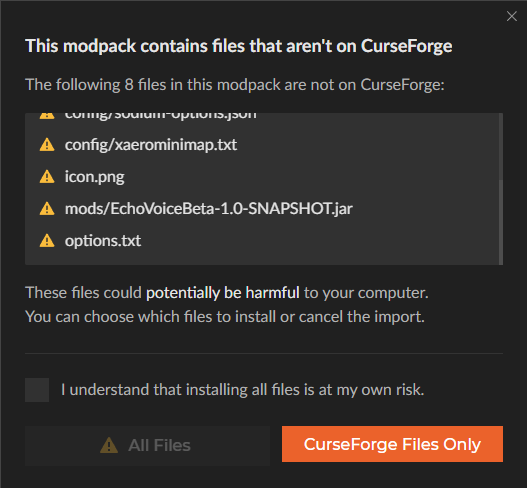
This system is designed to help users identify unusual files that may not belong in a normal modpack structure before anything is installed or launched. While not every override is malicious, the warning allows users to review imported content more carefully and avoid running unsafe files by accident.
This is especially important as scammers increasingly attempt to distribute fake “CurseForge modpacks” through Discord and other community platforms.
Players should still review imported files carefully, especially when downloading packs shared outside official CurseForge project pages. You can click “CurseForge Files Only” to only install verified, scanned files from CurseForge.
How to Protect Yourself
You can significantly reduce your risk by following a few simple precautions:
- Install modpacks through official CurseForge project pages whenever possible
- Use the CurseForge app to manage imports and review warnings
- Avoid ZIP files sent directly through Discord DMs - even if from someone you know!
- Scan suspicious files with tools like VirusTotal
- Review the contents of imported packs before launching them
- Be cautious of unknown JAR files or unusual filenames
- Never rush into installing something because of pressure from another user
If something feels suspicious, trust your instincts and verify first.
A Recent Example
Recently, a player reported being approached on Discord by someone claiming they needed help recording a surprise video on a private Minecraft server.
The attacker sent a small ZIP file presented as a required CurseForge modpack. Inside was a malicious JAR file named EchoVoiceBeta-1.0-SNAPSHOT.jar.
Analysis showed the file could detect the victim’s operating system, execute PowerShell or shell commands, and download additional payloads from a remote server. The suspected goal was to steal credentials, including Minecraft accounts, Discord tokens, browser cookies, and other sensitive information.
Fortunately, the player noticed suspicious behavior before installing the file and submitted it to VirusTotal for analysis.
Stay Vigilant
Scams targeting Minecraft players are becoming more convincing, especially within trusted community spaces like Discord servers and modding groups.
CurseForge continues to add safety features and improve visibility into imported content, but caution remains essential. Always verify downloads before installing them, stick to trusted platform workflows whenever possible, and report suspicious users or files to help protect the wider community.
A few extra seconds of caution can prevent stolen accounts, compromised devices, and lost data.