Minecraft nights can feel short when you're rushing back to base, but painfully long when you're stuck outside with mobs spawning around you. The game moves on a fixed day-night cycle, so every sunset, midnight, and sunrise happens on a predictable timer.
That timing matters for more than just avoiding monsters. It affects when you can sleep, when phantoms become a problem, how farms and travel plans feel, and how night-focused mods change the flow of the game. Here’s how the Minecraft night cycle works and what happens once the sun goes down.
The Full Day-Night Cycle
A complete Minecraft day lasts 20 real minutes – 24,000 game ticks in total. A tick is one cycle of Minecraft's game loop; under normal conditions, the game runs at 20 ticks per second, so one tick equals 0.05 seconds. These 24,000 ticks are split into four distinct phases:
- Daytime runs from tick 0 to tick 12,000 – exactly 10 minutes. Hostile mobs exposed to direct sunlight usually start burning during this phase, while surface areas are much safer than they are at night.
- Dusk runs from tick 12,000 to tick 13,000 – 50 seconds. The sun sets, light fades, and hostile mobs can start spawning as the light level drops low enough.
- Night runs from tick 13,000 to tick 23,000 – 8 minutes and 20 seconds. This is when it's dark enough for hostile mobs to spawn on the surface. Midnight falls at tick 18,000. If you're using an in-game clock, night starts at 19:00 in Minecraft time and ends at 05:00.
- Dawn runs from tick 23,000 to tick 24,000 – another 50 seconds. The sun rises and the cycle resets.
And here’s the answer most players actually want: one Minecraft night is 8 minutes and 20 seconds long, daytime is 10 minutes long, while the dusk and dawn periods are 50 seconds long each.
When Do Mobs Spawn?
Most common hostile mobs need very dark conditions to spawn, so surface spawns can become a real problem as dusk fades into night. In clear weather, outdoor monster spawning starts shortly after night begins, or around tick 13,000, and continues until the sky brightens near sunrise.
Note: mobs don't immediately stop spawning the second you sleep. When you use a bed to skip the night, the game skips right to dawn and any mobs that spawned during that night persist until they either burn in the sunlight or are killed.
Java vs Bedrock Edition Differences
The timing is identical on both editions. Java Edition and Bedrock Edition both run at 20 ticks per second with a 24,000-tick cycle, so the real-time lengths are the same.
The main differences are in sleeping rules and phantom behavior. In multiplayer, night skipping depends on the world or server’s sleeping settings. The "playersSleepingPercentage" gamerule controls what percentage of players in the Overworld must sleep to skip the night, so servers can make night skipping stricter or easier.
Phantoms are also slightly different. Both editions can spawn them after a player has not entered a bed for 3 in-game days, but their damage values differ between Java and Bedrock. If phantom management is a concern, sleeping consistently is the simplest fix on both editions.
Sleeping and Phantom Spawns
You can sleep once the game considers it late enough, which starts during dusk and lasts until the morning is close. Sleeping skips the remainder of the night and resets the phantom timer. Beds also set your spawn point, which is useful at a base but risky if you are only stopping somewhere temporarily.
If you go 3 in-game days without entering a bed, phantoms can start spawning overhead at night. They're not difficult to kill, but they become increasingly annoying the longer you ignore sleep. The easiest way to avoid them is to use a bed regularly, but they can also be disabled with "/gamerule doInsomnia false" if you prefer managing nights without phantom pressure.
Controlling Time with Commands
If you want to change the time or freeze the cycle, vanilla commands handle this:
- "/time set night" jumps to 19:00 (tick 13,000) immediately.
- "/time set day" jumps to early morning.
- "/gamerule doDaylightCycle false" freezes the sky wherever it currently is, stopping the cycle entirely until you turn it back on.
- /time add 24000 skips forward exactly one full day.
Mods That Change How You Experience the Night
Vanilla Minecraft assigns every night the same length, but mods can change what you do with that time. Some mods make sleeping more flexible by adding portable sleeping bags or hammocks, while others turn certain nights into special events with different risks, rewards, or atmosphere.
The two mods below focus on different sides of nighttime gameplay: Comforts gives players more control over sleeping without moving their spawn point, while Enhanced Celestials makes the night itself more eventful with lunar events like Blood Moons and Harvest Moons.
Comforts
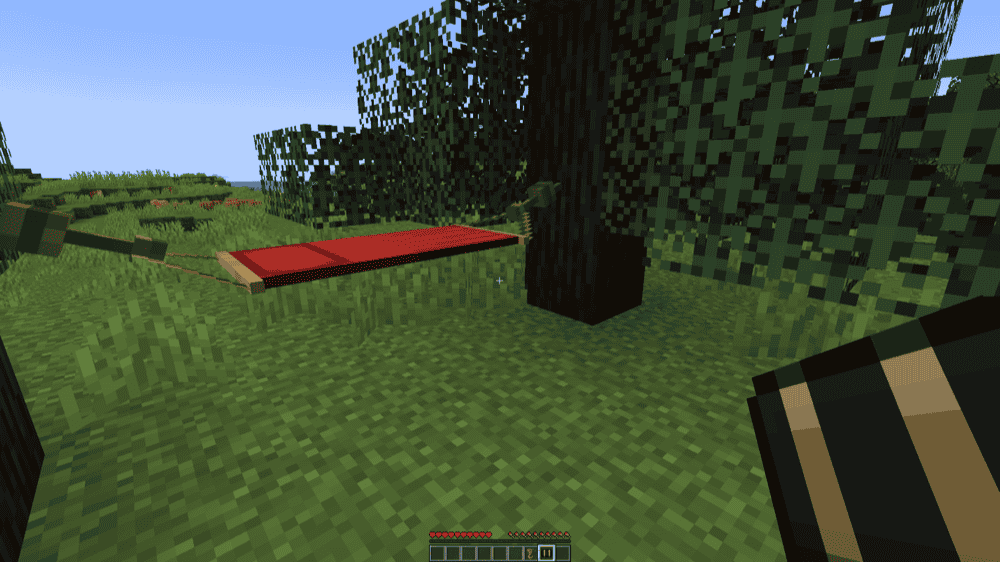
“Comforts” adds sleeping bags and hammocks to Minecraft, giving players more control over rest without replacing the normal bed system. Sleeping bags work like portable beds, but they do not set your spawn point when used. They can also be stacked and come in 16 colors, which makes them useful for long trips where you want to skip the night without moving your home spawn.Hammocks work in the opposite direction by letting players turn day into night instead of skipping night into morning. That makes the mod useful for players who want to reach nighttime faster for mob hunting, night farming, ambience, or testing night-based builds. “Comforts” also includes configuration options for features like hammock behavior, sleeping bag use, sleepiness, and insulated sleeping bags.
Enhanced Celestials – Blood, Blue, & Harvest (Super) Moons

“Enhanced Celestials – Blood, Blue, & Harvest (Super) Moons” adds lunar events that make some nights feel different from the usual Minecraft cycle. Instead of every night playing out the same way, the mod can introduce special moon events such as Blood Moons, Harvest Moons, Blue Moons, and Super Moons.These events are useful for players who want nighttime to matter more. A Harvest Moon can turn the night into a farming-focused event, while a Blood Moon creates a more dangerous night with a stronger hostile-mob focus. Blue Moon and Super Moon events add more variety to the sky and give players another reason to pay attention when the sun goes down.
How to Install Minecraft Mods
You can install the above mods automatically using the CurseForge app or manually by placing the mod files within your game's mods folder. Both methods let you add custom features and enhancements to Minecraft.
If you want to learn more, you can read our detailed guide on how to install Minecraft mods.
Common Issues and Quick Fixes
Night seems longer than 8 minutes
The 8-minute-20-second figure assumes the game is running at a full 20 ticks per second. If the server is under heavy load and the tick rate drops, ticks process slower and nights stretch out in real time. Check your server's TPS (Ticks Per Second) – anything below 20 will cause timing drift. Reducing entity counts, view distance, or loaded chunks usually helps on a busy server.
Phantoms are spawning even though I sleep regularly
In vanilla Minecraft, the phantom timer resets when you enter a bed. If you're using "/time set day" or another command to skip nights without resting, the timer may not reset. Use a bed regularly if you want to avoid phantoms, or use "/gamerule doInsomnia false" if you want to disable them entirely.
Sleeping isn't skipping the night in multiplayer on Java
By default, Java Edition uses a high sleeping requirement, so all Overworld players usually need to sleep unless the server has changed the setting. Use "/gamerule playersSleepingPercentage 50" to require only half the players to sleep, or set it to 1 to let any single player skip the night.
Blood Moon is active but beds still work
“Enhanced Celestials” configures Blood Moon behavior through datapacks. If beds aren't disabled during Blood Moon events on your instance, the data pack settings may have been modified, or the default behavior for your installed version differs from what you expected. Check the mod's configuration documentation for the"requires_clear_skies" and event-specific settings in the data pack files.
My game crashes after installing a mod
A startup crash usually means the mod file does not match your Minecraft version, the file was made for a different mod loader, or a required dependency is missing. Check that the mod matches your profile’s loader, such as Forge, Fabric, NeoForge, or Quilt, then confirm the dependency list on the mod page.
For example, “Enhanced Celestials” needs its required library files installed alongside the main mod, while “Comforts” should still match the exact Minecraft version and loader you are using.