After all these years, diamonds arguably remain one of the biggest milestones in Minecraft. They unlock stronger tools, better armor, enchantment setups, jukeboxes, and long-term survival upgrades, so it makes sense that players want to know exactly where to look for these shiny gems before spending hours underground.
The tricky part is that diamond mining changed after the Minecraft 1.18 “Caves & Cliffs” update. Older advice about digging near "Y" 11 does not tell the full story anymore, because modern Minecraft has deeper caves, deepslate layers, and a different ore distribution system.
In this guide, we’ll explain what level diamonds generate at now, how to check your "Y" level, why the old mining advice has changed, and which mods can help you see ore distribution or keep your depth visible on screen.
How to Check Your "Y" Level
On Java Edition, press "F3" to open the debug screen. The "X", "Y", "Z" coordinates will appear in the top left. The middle number is your "Y" level – that is your current depth. For this article, the important thing to remember is that negative "Y" levels mean you are deep enough to be in modern diamond territory.
On Bedrock Edition, go to "Settings" → "Game" and turn on "Show Coordinates." Your coordinates will then appear permanently in the top left corner of the screen during gameplay. Again, the "Y" value is what you're looking for.
Tip: If you would rather not open the debug screen every time, installing a HUD or coordinate mod can keep your "Y" level visible at all times while you mine. But more on that later.
Where Diamond Ore Actually Generates
Most diamond hunting in current Minecraft (any version post 1.18) happens in the deepslate layer – the darker stone that replaces regular stone below "Y" 0. You will recognize deepslate diamond ore by its appearance: it has the same blue diamond flecks, but they are embedded in darker grey-black deepslate instead of regular stone.
Diamonds generate in small clusters, so finding one block usually means it is worth checking the blocks around it. They can appear in cave walls as well as inside solid stone, so you may still spot diamonds while exploring large cave systems. However, modern diamond ore has reduced air exposure, which means many diamonds are buried rather than visible on open cave walls.
Two things affect how many diamonds you actually find while mining. First, deep lava can interrupt your route and make some areas harder to mine safely. Second, caves expose more blocks at once, but because diamond ore has reduced air exposure, many diamonds are still hidden inside solid deepslate rather than sitting openly on cave walls.
Diamond Ore vs. Deepslate Diamond Ore
Since the cave generation overhaul introduced in the 1.18 update, diamond ore found below "Y" 0 appears as deepslate diamond ore rather than regular diamond ore. With that said, both versions drop diamonds when mined with an iron, diamond, or netherite pickaxe.
The main difference is that deepslate diamond ore takes longer to mine and has a darker texture. And in case you’re wondering, the Fortune enchantment also works the same way on both variants.
Best Pickaxe Enchantments for Diamond Mining
Finding diamond ore is only half the job. To get the most out of every vein, you also need the right pickaxe enchantments.
- Fortune is arguably the most important enchantment if you want more diamonds from each ore block. Fortune III in particular can increase the yield of diamonds you get when mining diamond ore by up to 4 at a time. If you find diamonds before you have Fortune, you can mark the spot and come back later with a better pickaxe.
- Efficiency is the next major upgrade. It does not increase diamond yield, but it lets you mine it much faster. This is especially useful for mining deepslate diamonds, which can take quite a bit of time. Pairing Efficiency with the Unbreaking and Mending enchantments is an exceptionally good combo as it makes your pickaxe last much longer during long mining trips.
- Silk Touch is useful for a different reason. It lets you collect the diamond ore block itself instead of breaking it into diamonds. That can be helpful if you want to bring the ore home, save it for decoration, or mine it later with a Fortune-enchanted pickaxe. Since Silk Touch and Fortune cannot normally be used on the same pickaxe, the best setup is to keep two separate pickaxes: one Fortune pickaxe for maximum diamond output and one Silk Touch pickaxe for collecting ore blocks and other fragile blocks when needed.
Tip: For efficient diamond mining, we recommend bringing at least an iron pickaxe or better, a water bucket for lava, food, torches, and some spare blocks. Once you get there, mine through straight, well-lit branch tunnels, keep an eye on your "Y" level, and check around diamond ore before breaking it so lava does not destroy your drops or trap you underground.
How Diamond Generation Changed in Version 1.18
Before the 1.18 "Caves & Cliffs" update, diamond ore was generated in the old lower underground range, and many players used "Y" 11 because it kept them inside the diamond range while staying safer around lava. If you're playing on a pre-1.18 world or version, that original range still applies.
From 1.18 onward, the whole ore distribution system changed. Diamond generation shifted deeper, so the old "Y" 11 advice no longer applies to modern worlds. The world also expanded downward, which is why modern diamond mining happens far below the old underground range.
Mods That Show Diamond Levels and "Y" Coordinates
Vanilla Minecraft gives you the basic diamond range, but mods can make that information much easier to use. Some mods show ore generation graphs so you can see where diamonds spawn in your world or modpack, while others keep your "Y" level visible on screen so you do not have to keep opening the debug menu.
Together, they help you mine more efficiently as all the useful information is right in front of you instead of constantly having to guess your depth or rely on outdated mining advice.
Xaero's Minimap
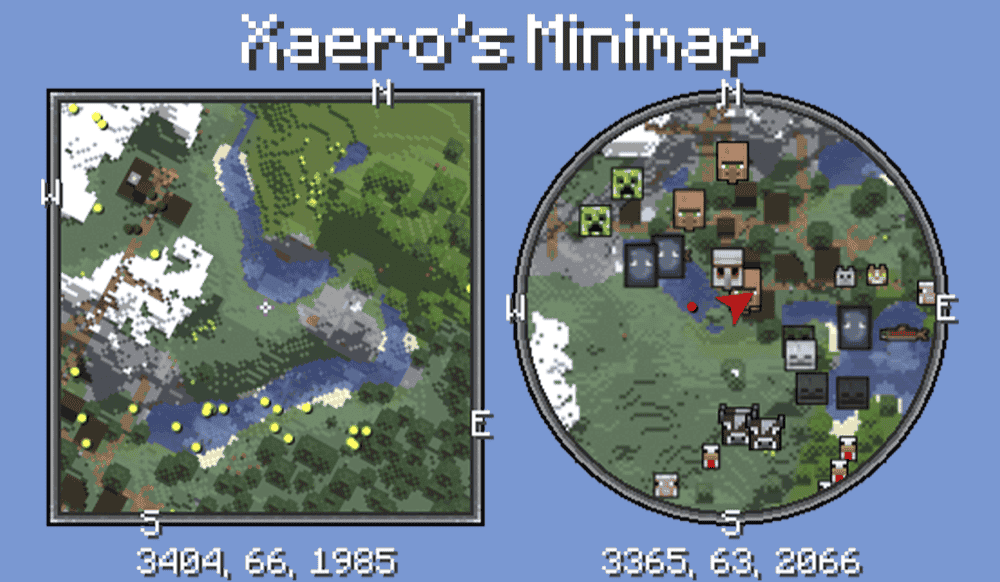
“Xaero's Minimap” adds a small map to the corner of your screen that shows nearby terrain, players, mobs, items, and other entities depending on your settings. For diamond mining, its most useful feature is the coordinate display under the minimap, which lets you keep your "Y" level visible while you dig. That makes it easier to stay in the right depth range without opening the debug screen every few minutes.
The mod also supports waypoints, cave mode, zoom settings, different minimap shapes, and optional entity radar settings. Waypoints are especially helpful when you find a promising cave entrance, a deep mining route, or a diamond branch mine you want to return to later, which makes the mining trip easier by helping you track your location, depth, and marked points underground.
EMI Ores
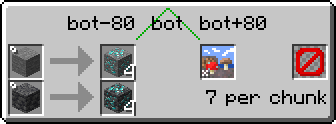
“EMI Ores” adds ore generation information directly inside the EMI recipe viewer. For diamond mining, that means you can open EMI, look up diamond ore, and view a graph that shows its "Y" level distribution, along with extra details like vein size, vein count per chunk, and biome restrictions. In short, instead of guessing whether your world follows normal diamond generation, you can check the ore data in-game.
The mod is especially useful in modpacks because it gathers its data from datapack-configured world generation features. That helps modded ores display correctly in most cases without extra configuration, which is important when a pack changes where ores spawn.
Coordinates Display
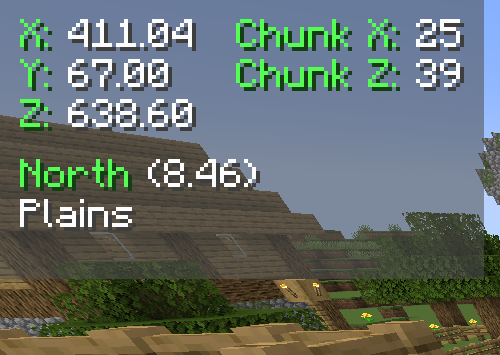
“Coordinates Display” adds a simple coordinate HUD to Minecraft, making it easy to keep your "X," "Y," and "Z" positions visible while you play. For diamond mining, the "Y" value is the important part because it tells you exactly how deep you are without opening the "F3" debug screen or checking settings. This makes the mod useful for staying in the right depth range during long branch mines or cave routes.
The mod also includes multiple display modes, HUD positioning options, configurable text colors, keybindings, biome information, chunk coordinates, direction display, death position saving, and position marking.
How to Install Minecraft Mods
You can install the above mods automatically using the CurseForge app or manually by placing the mod files within your game's mods folder. Both methods allow you to easily add custom features and enhancements into your Minecraft experience.
If you want to learn more, you can read our detailed guide on how to install Minecraft mods.
Common Issues and Quick Fixes
I’m not finding any diamonds even deep underground
Check that you are actually in the lower deepslate layers. If the stone around you is still the normal lighter color, you are not deep enough to reach the clustered diamond ores. Difficulty does not change ore generation, so “Peaceful mode” will not stop diamonds from spawning.
If a world feels wrong, the more likely causes are old chunks generated before 1.18, custom world settings, or a modpack that has changed your world’s ore distribution ratios.
The "F3" debug screen won't open
On some laptops and keyboards, you may need to hold the "Fn" (Function) button and press "F3" at the same time. If neither works, check your key bindings in the Java Edition settings menu under "Controls."
On Bedrock, "F3" doesn't apply – instead, make sure to use the "Show Coordinates" toggle under "Settings" → "Game."
I’m hitting lots of lava while mining for diamonds
Lava is common at deeper levels, so mine carefully and keep a water bucket nearby to turn lava flows into obsidian. If lava keeps interrupting your route, move a few blocks higher or use safer branch tunnels instead of digging straight ahead into unknown space. The separate article we have on the best diamond mining level covers that depth trade-off in more detail.
Xaero's Minimap coordinates aren't visible
If the coordinates are not showing, the display option may be disabled in the minimap settings. Press the minimap's settings key, or check your key bindings under “Xaero's Minimap” in "Controls," then look for the coordinates display option.
My game crashes on startup after installing mods
A startup crash usually means one of five things:
- The mod file does not match your Minecraft version.
- The mod was made for a different loader or another version of its loader.
- A required dependency is missing.
- Some of your mods are incompatible with each other.
- If you’re playing on Forge or NeoForge with an AMD graphics card and frequently experiencing crashes, your GPU driver might be outdated. If that’s the case, we recommend installing the latest drivers from the official AMD website.
Additionally, check that you installed the correct Forge, Fabric, Quilt, or NeoForge file for your profile, then look at the mod page for any required files, especially for Fabric API on Fabric profiles and for Quilted Fabric API on Quilt profiles.
Also note that Minecraft mod loaders are their own separate systems, so a Fabric file will not work in a Forge profile, with the same being true for NeoForge or Quilt builds.