Enchantments are one of the easiest ways to make Minecraft gear feel stronger, but they also make old tools harder to throw away. A sword with the wrong enchantment, a nearly broken pickaxe with Mending, or a random loot drop with mixed enchantments can all leave you wondering what can actually be saved.
While Minecraft does give you a way to clear enchantments, the base game disenchanting system has its limits. This guide explains how disenchanting works, what you get back, what the grindstone cannot recover, and which mods can turn lost enchantments back into usable books.
How to Craft a Grindstone
Materials needed:
- 2 sticks
- 2 wooden planks (any type)
- 1 stone slab
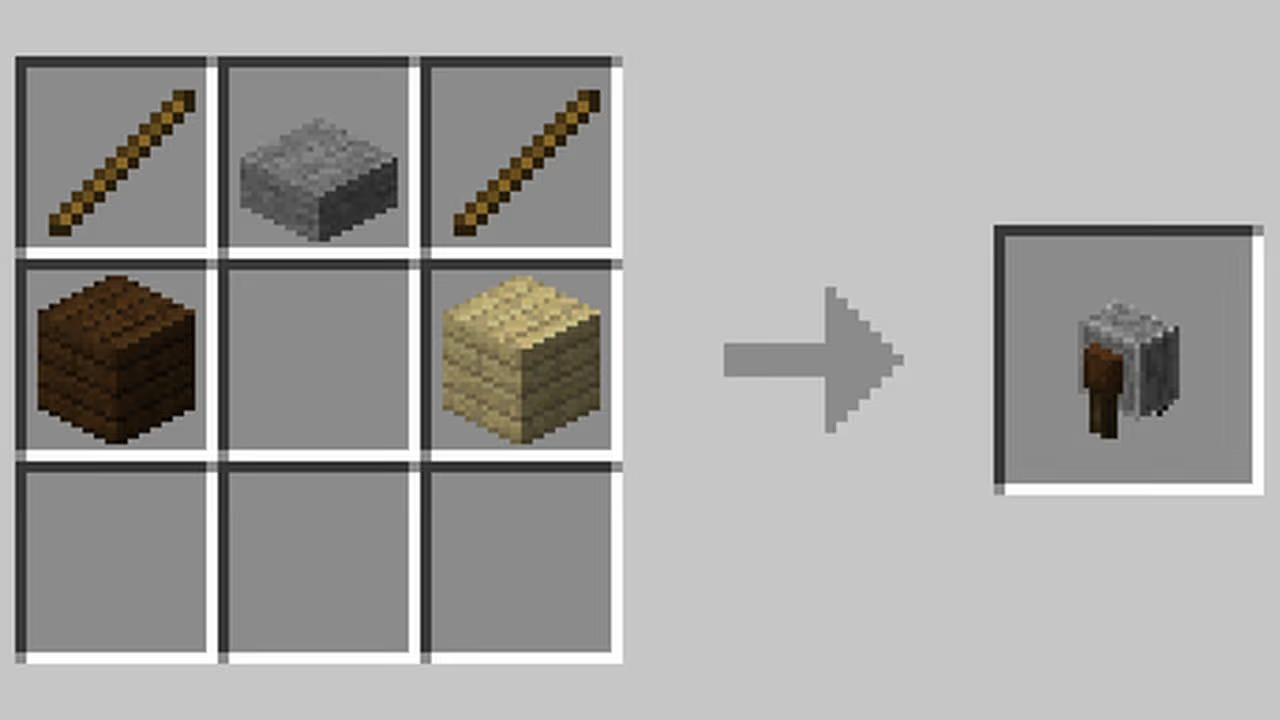
The idea here is simple. Place the two sticks in the top-left and top-right corners of the crafting grid, the stone slab in the top-center, and the two planks in the middle-left and middle-right slots. This gives you one grindstone.
Tip: Grindstones also generate naturally in village weaponsmith buildings, so you don't necessarily need to craft one if you've found a village.
How to Use the Grindstone to Disenchant
- Right-click the grindstone to open its interface.
- Place an enchanted item in either of the two input slots on the left side. The output slot on the right will then show the disenchanted version.
- Take the item from the output slot to complete the process.
Note: When you remove the item, you receive a small amount of experience (XP) based on the enchantments that were removed. The enchantments themselves are destroyed – they don't transfer to a book or anywhere else.
Also, keep in mind that a grindstone won't remove Curse of Binding or Curse of Vanishing. If you put a cursed item in the grindstone, the curse stays on the output item even after the normal enchantments have been stripped away.
When Vanilla Disenchanting Is Worth Using
Stripping enchantments with no means to recovery sounds like a waste, but there are situations where it makes sense.
- Clearing a mismatch: If you accidentally enchanted an item with something you don't want – let’s say you have the Bane of Arthropods enchantment which prevents your sword from being enchanted with Sharpness – the grindstone lets you clean the problematic enchantment, allowing you to finally add Sharpness to your sword.
- Resetting an item before re-enchanting: If an item already has the wrong enchantment combination, the grindstone lets you clear it and try again. It also resets the item for a cleaner enchanting path if you want to rebuild it from scratch.
- Recovering XP from a worn out item: If you have a damaged item that's no longer worth repairing, you can strip it from its enchantments to get some XP back before you throw it away. Don’t expect any major gains here, though.
- Cleaning up low-value loot: Enchanted items from loot chests, fishing, or mob drops often have random, low-value enchantments. Grinding those for XP is a small but consistent leveling source.
What the Grindstone Won't Do
One crucial thing you need to remember is that the grindstone doesn't save enchantments. If you had, say, a Mending book that ended up on a helmet you're upgrading, and you want Mending on the new helmet instead, you can't extract it. You'd need another Mending book from a trade, loot chest, or fishing. Luckily, this is a gap that the mods below are designed to fill.
Java vs Bedrock Differences
The core grindstone function is the same on both editions: it removes normal enchantments, gives some XP back, and leaves curses in place. There can be small version-specific differences, but the main limitation is the same – you do not recover specific enchantments as books in vanilla Minecraft.
Note: Enchantment recovery mods are compatible with Java Edition only. Bedrock Edition doesn't support the mod types described below.
Mods That Recover Enchantments as Books
Vanilla disenchanting is useful, but it is intentionally limited. A grindstone can clear unwanted enchantments and give you back some XP, but it does not save those enchantments for later use.
This is where disenchanting mods come in. The options below focus on recovering enchantments as books, either through the familiar anvil-based system or a dedicated disenchanting table. They are especially useful for saving valuable enchantments from old tools, nearly broken gear, or items you no longer want to use.
Dis-Enchanting Table
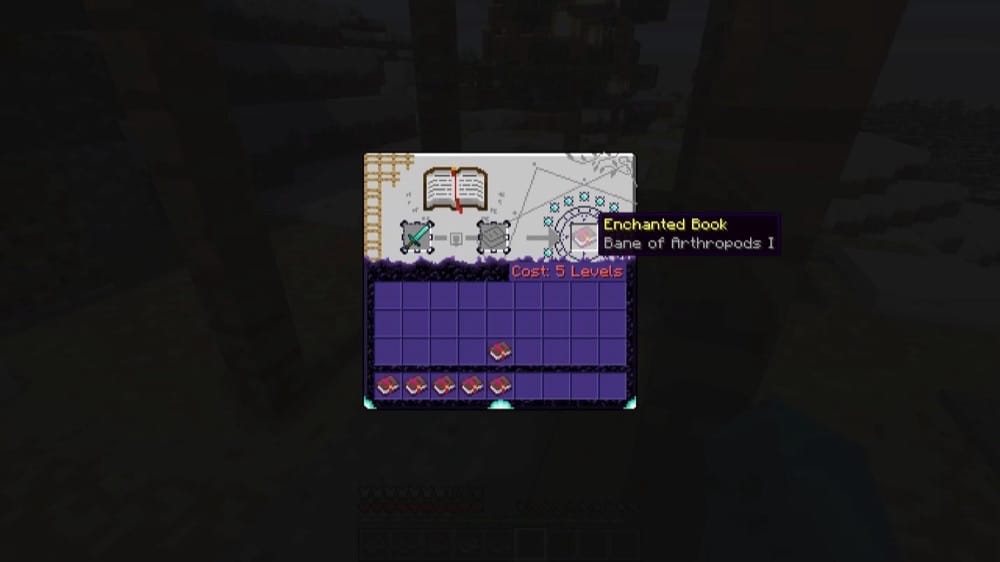
“Dis-Enchanting Table” adds a new workbench for recovering enchantments from enchanted items or books. Instead of losing enchantments through the vanilla grindstone, you can place an enchanted tool, weapon, armor piece, or book into the table and imprint its enchantments back onto a book.
The process always costs 5 experience levels, which makes the system predictable without making enchantment recovery-free. It is especially useful when an item is almost broken, outdated, or no longer worth using, but still has valuable enchantments you want to keep for another piece of gear.
Easy Disenchanting
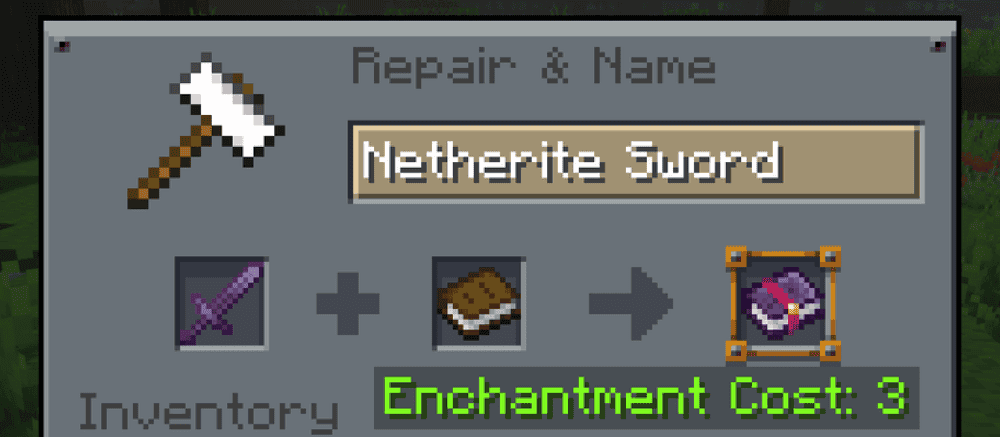
“Easy Disenchanting” lets players transfer enchantments from gear onto books using a vanilla anvil, without adding a new block or item. Simply place an enchanted item with a blank book in the anvil, and the enchantments will be extracted onto the book while returning the disenchanted item.
The mod can also transfer enchantments onto an already enchanted book when the book is placed in the first anvil slot, allowing you to combine enchantments in a similar way to normal enchanted book merging. By default, the XP cost follows vanilla-style anvil combining costs, and you can also adjust the cost and other parameters from the included config file.
How to Install Minecraft Mods
You can install the above mods automatically using the CurseForge app or manually by placing the mod files within your game's mods folder. Both methods let you add custom features and enhancements to Minecraft.
If you want to learn more, you can read our detailed guide on how to install Minecraft mods.
Common Issues and Quick Fixes
The grindstone isn't removing the curse
Curse of Binding and Curse of Vanishing cannot be removed by the grindstone. This is intentional vanilla behavior. Curse of Binding armor usually stays equipped until it breaks or the player dies, unless you are in “Creative“ mode. Curse of Vanishing works differently: it does not stop you from removing the item, but the item disappears if you die while carrying it.
The grindstone removed enchantments but I got almost no XP back
The XP return from grindstone disenchanting scales with the enchantment levels that were removed, but it's always a fraction of what was originally spent. Low-level enchantments return very little. This is expected – the grindstone is designed to clear items, not fully refund XP costs.
Easy Disenchanting isn't working at the anvil
Make sure you're placing the enchanted item into one anvil slot and a blank book into the other – not an enchanted book, as the blank book is what receives the enchantments. Also confirm that the mod is installed for your exact loader and Minecraft version.
The mod shows the resulting enchanted book in the output slot before you commit, so if nothing appears there, then the item/book combination likely isn't being recognized. To fix this, check the "Files" tab on CurseForge and verify that the .jar file matches your setup.
I don't have 5 levels for the Dis-Enchanting Table
The 5-level cost is fixed and can't be bypassed in survival without cheats. If you're low on XP, running through a mob farm or an XP-generating activity first is the quickest way to get there. Killing mobs near a spawner, trading with villagers, or mining ore at the right "Y" level are all reliable XP sources.
The enchantment book I got back has the wrong enchantments
Check whether the item had any enchantments you weren't previously tracking. Both “Easy Disenchanting” and “Dis-Enchanting Table” transfer all enchantments from the item onto the book – if something unexpected shows up, it was likely already on the item. Curses also transfer onto the book this way, so a cursed item will produce a cursed book.
My game crashes after installing a disenchanting mod
A startup crash usually means that the mod file does not match your Minecraft version, the file was made for a different loader, or a required dependency is missing. Check that the mod matches your profile’s loader, such as Forge, Fabric, NeoForge, or Quilt, then confirm whether the mod page lists a required library.
To check whether the newest mod caused the crash, remove or disable the last mod you added, launch the game again, and see if it opens normally. If it does, reinstall that mod with the correct Minecraft version, loader, and dependency files before testing again.