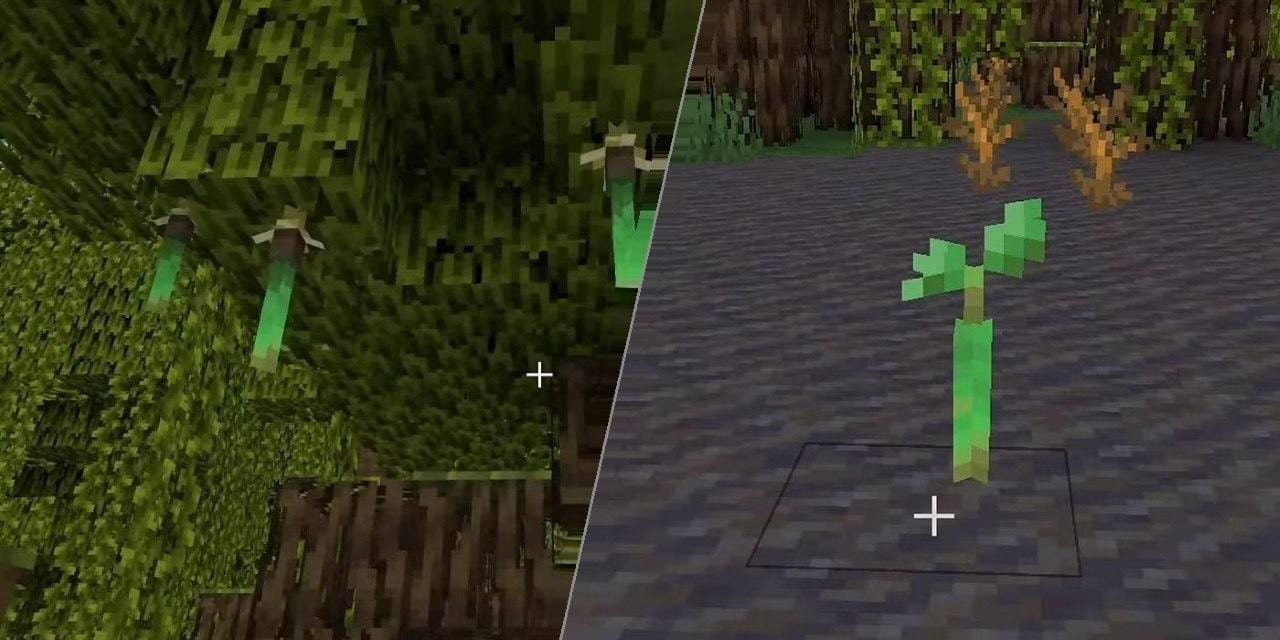
Mangrove trees work differently than most other trees in Minecraft. Instead of a sapling, you plant a propagule which is a small hanging growth found on mangrove leaves in mangrove swamp biomes. These eventually grow into tall, root-heavy trees with a wide footprint.
This guide covers how to plant propagules, what they need to grow, and the most common reasons they fail to take root.
What You Will Need
Before planting anything, you are going to need to grab the following:
- A propagule: found hanging from mangrove leaves in mangrove swamp biomes, or broken off with any tool. Leaves occasionally drop them, too.
- A valid soil block: mud, dirt, grass block, coarse dirt, podzol, mycelium, rooted dirt, moss block, farmland, muddy mangrove roots, or clay. Mangrove propagules can also be planted and grown underwater, including on clay.
- Light: you need a light level of 9 or higher above the propagule. Sunlight works fine outdoors, while torches can be used indoors.
- Space above: at least 6 clear blocks above the propagule, with enough horizontal room for the roots to spread. A roughly 5x5 area around the base helps.
- Bone meal (optional): not required, but it forces the tree to grow immediately and works even in low light conditions.
How to Grow a Mangrove Tree Step by Step
Step 1: Find or Grow a Propagule
Head to a mangrove swamp and look for the small green teardrop-shaped growths hanging under mangrove leaves. Break one off – it doesn't need a specific tool. You can also wait for leaves to decay naturally and pick up the propagule drops that way.
Step 2: Choose Your Planting Spot
Put the propagule on one of the valid soil blocks listed above. Outdoors in open terrain is the easiest setup since sunlight takes care of the light requirement. If you're planting indoors or in a tight space, place torches nearby to hit that light level 9 threshold.
Tip: Make sure there are at least 6 blocks of empty space directly above the propagule. Stone, concrete, and other solid overhead blocks can stop the tree from growing. Dirt above the propagule is an exception, and in Java Edition log and wood blocks above it are also treated as exceptions.
Step 3: Wait or Use Bone Meal
Once placed on valid soil with enough light and clearance, the propagule grows on its own over time – roughly at the same rate as other saplings as long as you are nearby and the game world chunk is loaded. If you’re not keen on waiting around, you can also use bone meal on it. This will speed up growth even without sufficient light.
Step 4: Let the Roots Spread
When the tree grows, it generates mangrove roots below and around the trunk. For the tree to generate properly, the roots need solid blocks nearby to land on below the propagule. Mud does not count as a solid support block here, so a mangrove planted over a large hollow space or over unsupported mud may fail to grow.
So, to recap: You need a propagule placed on valid soil, light level of 9 or above, 6 blocks of empty space above the tree, then simply wait or use bone meal to speed up growth.
Mangrove Growth Tips for Stress-free Planting
- A 5x5 area is a good minimum target for consistent growth. Mangrove roots can spread up to 5 blocks away from the propagule, and the tree’s full blueprint can get much larger than the trunk alone. If you are planting in an enclosed build and the tree doesn’t want to grow, widen the space around the base instead of only raising the ceiling.
- Dirt above the propagule does not stop the tree from growing. In Java Edition, log and wood blocks above it are treated the same way, but in Bedrock Edition those blocks still prevent growth. Solid overhead blocks like stone or concrete will block the tree.
- If you need a lot of mangrove wood, planting several propagules in a row with spacing between them is faster than replanting one at a time. Each propagule grows independently, so you can bone meal them all in one quick succession.
What to Build with Mangrove Wood
Mangrove wood has a distinct reddish-orange color that's one of the warmer tones in the game. It works well in builds that use terracotta, red sandstone, or copper, and it pairs with mud bricks if you're going for a swamp or tropical look.
The full mangrove wood set includes logs, stripped logs, planks, slabs, stairs, fences, fence gates, doors, trapdoors, buttons, pressure plates, and signs – the same range as any other wood type. Mangrove roots and muddy mangrove roots are also part of the set and add texture variation when used as floor or accent blocks.
Mud bricks are worth mentioning here, too. You make them by crafting packed mud, which comes from combining mud with wheat. Four mud bricks go into mud brick blocks, slabs, stairs, and walls. They're a natural match for mangrove wood in swamp-themed builds.
Mods That Work Well with Mangrove Trees
If you want to change how trees grow in general, or get more mangrove biome variety in your world, these mods are worth checking out.
testHow to Install Minecraft Mods
You can install the above mods automatically using the CurseForge app or manually by placing the mod files within your game's mods folder. Both methods allow you to easily add custom features and enhancements into your vanilla Minecraft experience.
If you want to learn more, you can read our detailed guide on how to install Minecraft mods.
Common Issues and Quick Fixes
Your propagule isn't growing
Check the planting block, the light level, the space above, and the support below. Mangrove propagules need a valid planting block, at least 6 empty blocks above, and solid blocks below for the roots to land on. If you are growing one indoors, raise the light level to 9 or higher, or use bone meal. Mud works as a planting block, but it does not count as solid support for the roots.
Your propagule keeps popping off instead of growing
This happens when the block underneath isn't supported. Double-check that you're planting on dirt, mud, grass, clay, or one of the other accepted blocks. Stone and similar blocks won't work here, either.
The roots grew into a space they shouldn't
Mangrove roots spread outward from the base when the tree generates, and they can extend a block or two beyond from where you expected. If you're farming mangroves in a tight setup, leave a bit of empty buffer space around each planting spot.
Your tree grew but the wood is hard to harvest
Mangrove trees can get tall, with the trunk sometimes sitting on a platform of roots several blocks off the ground. You'll often need to pillar up to reach the main trunk before you can work your way through the wood. Keeping an axe on hand speeds this up considerably.
Mod-added trees aren't appearing after install
If you installed Dynamic Trees and the world still has vanilla-style instant-growth trees, check that the mod is installed on both client and server, and that you're not loading an existing world. Dynamic Trees replaces tree generation in newly loaded chunks, so chunks that already existed before installing the mod won't change.
Your mod does not load or crashes at startup
Make sure the mod file matches your exact Minecraft version and mod loader – Fabric mods will not load on Forge or NeoForge, and the wrong Minecraft version or loader can cause crashes. Install any required dependencies listed on the mod’s CurseForge page, and double-check that those dependency files also match your version and loader.