We’re starting to roll out a new beta version of the CurseForge Authors Dashboard, built to give mod authors clearer, more useful insight into how their projects are performing. One of the biggest additions is unique downloads, giving you a better sense of how many individual users are downloading your work.
This new dashboard is focused on practical data: cleaner KPIs, better project filtering, improved graphs, and more ways to understand download trends across games, projects, files, and modloaders.
A quick note on data availability: the new dashboard uses reliable historical data starting from mid-May, so all trend-based views and comparisons are counted forward from that point. As more data is collected over time, these views will become more complete and useful for longer-term analysis.
What’s new in the beta dashboard
The new Authors Dashboard introduces a refreshed set of download KPIs, each with a percentage comparison to the previous matching period:
- Yesterday vs. the same day last week
- Last 7 days
- Last 30 days
- Total project downloads
You can also toggle between:
- Projects you own
- Projects you are a member of
- All relevant projects
This should make it easier to separate your own projects from projects where you contribute as part of a team, while still giving you a full overview when you need it.

Downloads over time, now separated by game
The dashboard now includes a downloads over time graph broken down by game.
This means you can see how downloads are performing separately for each game, instead of having everything grouped into one general view. For authors managing projects across multiple games, this should make trends much easier to understand.
The graph also includes different time options, so you can adjust the view depending on what you want to check.
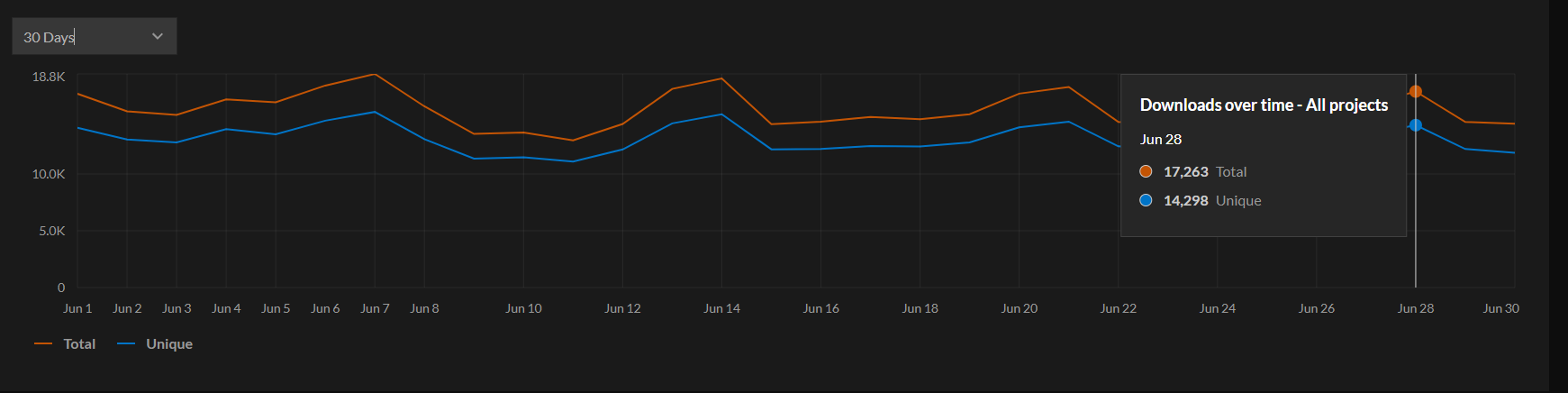
Total downloads over time, per project
Another new graph shows total downloads over time per project, with time filtering included.
This view also includes one of the most important additions in the new dashboard: a toggle between total downloads and unique downloads.
That toggle can help answer different questions:
- Total downloads show overall activity, including repeat downloads.
- Unique downloads give a clearer view of individual user reach.
Downloads per project, with file-level insights
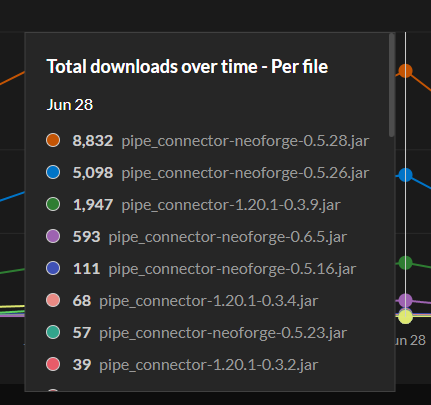
The new dashboard also includes a downloads per project graph over time.
From there, you can click into a project and see downloads per file. This gives you a much better understanding of which versions are performing best.
That can help you answer questions like:
- Did the newest version perform better than the previous one?
- Are users still downloading an older file?
- Did a specific update lead to a spike?
- Which release is getting the most traction over time?
For authors who publish frequent updates, support multiple versions, or maintain long-running projects, file-level visibility should make it easier to understand what is actually working.
Minecraft Java: downloads by modloader
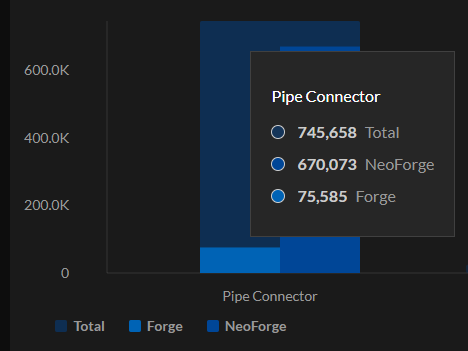
For Minecraft Java projects, the dashboard now includes downloads by modloader.
This gives Minecraft authors a clearer breakdown of how downloads are distributed across supported modloaders. It should be especially helpful for authors maintaining versions across loaders and trying to understand where their audience is most active.
The legacy dashboard is still available
Since this is a beta release, the legacy version of the dashboard will remain available.
You can access it using the button at the top of the dashboard.
We are not removing the legacy dashboard until we are confident that the new version is stable, useful, and accepted by the author community. The goal of this beta is to improve the experience with feedback from the people who use it most: authors.
Built for better author decisions
The new dashboard is designed to make project performance easier to understand, giving you better ways to read those numbers:
- Compare performance across meaningful time periods
- Separate owned projects from projects you contribute to
- Track downloads by game
- Review project performance over time
- Switch between total and unique downloads
- Filter specific projects
- Check downloads per file
- Review Minecraft Java downloads by modloader
This beta is a step toward a more useful, transparent, and flexible dashboard for CurseForge authors.
Try it out, compare it with the legacy dashboard, and let us know what feels useful, what feels unclear, and what would make it better.
Your feedback is needed!
Since the new dashboard is launching in beta, your feedback is a major part of the process.
We’d love to hear what works well, what feels unclear, and what would make things even more useful for your day-to-day project management.
You can share your thoughts with us in the CurseForge Authors Discord.
We’ll continue reviewing feedback throughout the beta and improving the dashboard before making any final decisions about the legacy version.