A compass feels like it should be one of Minecraft’s simplest tools, but it is easy to misunderstand it if you expect it to behave like a real compass. The compass is useful for early navigation, map crafting, and later-game lodestone setups, but it has a few rules that you need to keep in mind once you start traveling far from spawn.
In this guide, we will start with the basic recipe, then explain the main ways a compass can help you traverse vanilla Minecraft before moving into mods that make navigation more flexible.
How to Craft a Compass
You’ll need the following materials on hand:
- 4 iron ingots
- 1 redstone dust
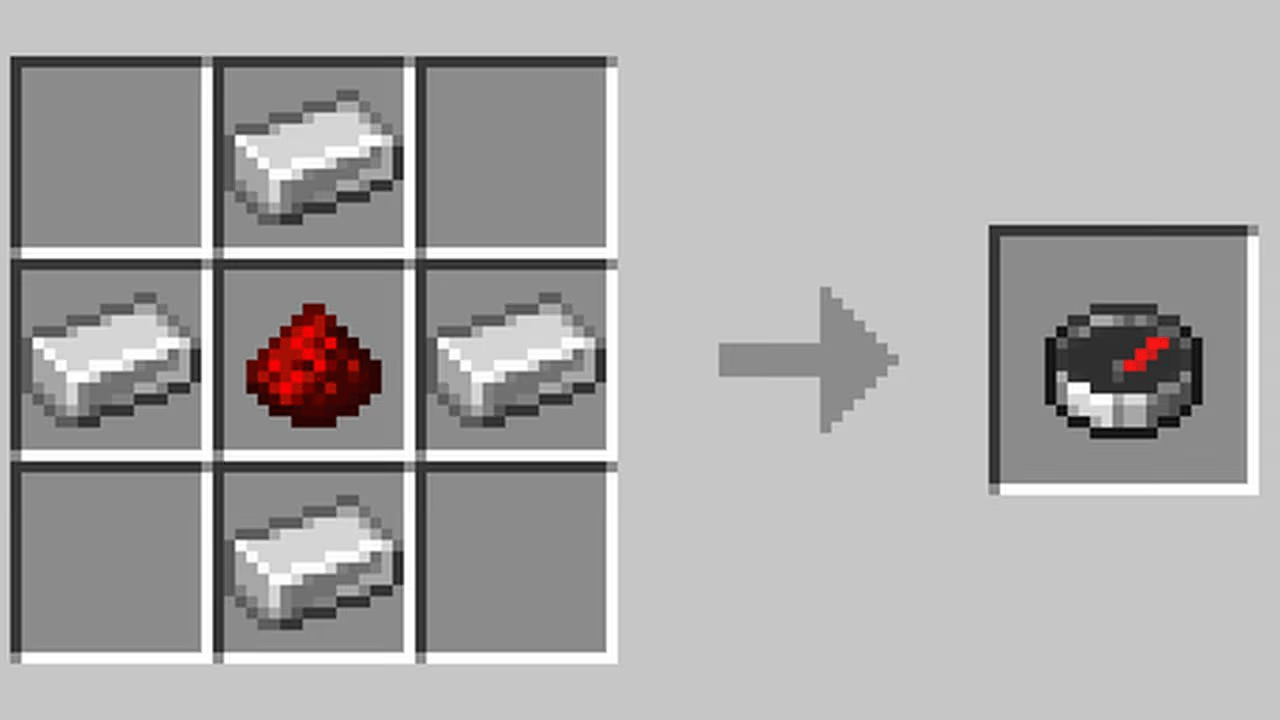
To craft one, place the redstone dust in the center of a crafting table, then put one iron ingot on each of the four cardinal sides – above, below, left, and right. This gives you one compass. The recipe doesn't work in the 2x2 inventory grid, so you’ll need a crafting table.
Iron ingots come from smelting raw iron in a furnace. Redstone dust is mined from redstone ore, which is usually found deep underground or in the surface of mountains in the Overworld.
What Does a Compass Actually Point Toward?
The compass needle points toward the world spawn – the fixed spawn point set when the world was created, so not wherever your bed is. If you've placed a bed and sleep in it, your personal spawn changes but the compass still points to the original world spawn. These are two different things.
In the Nether or the End, a vanilla compass behaves strangely. It spins without pointing to anything useful, because world spawn is an overworld-specific concept. If you need reliable navigation in those dimensions, a lodestone compass is the solution.
The compass also works in item frames. Mount one on a wall and the needle visibly tracks toward the world spawn from that fixed position, which can serve as a rough directional reference in a base.
Lodestone Compass
Place a compass on a lodestone block and it becomes bound to that specific lodestone. The needle then points to the lodestone instead of world spawn. You can create a lodestone compass in the Overworld, Nether, or End, but it only works properly while you are in the same dimension as the lodestone it is bound to. Lodestone compasses are how you create reliable destination markers in the Nether or mark a base you want to find your way back to.
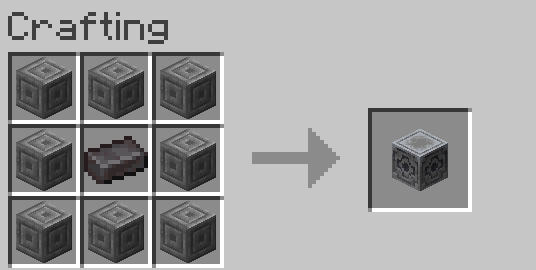
Lodestones are crafted from a netherite ingot surrounded by 8 chiseled stone bricks. They're expensive, which is why lodestone compasses tend to be late-game tools. If a lodestone is destroyed, the bound compass stops working and the needle starts spinning randomly.
A lodestone compass stacks only with other compasses bound to the same lodestone, so carrying several bound to different destinations means separate inventory slots for each.
Recovery Compass
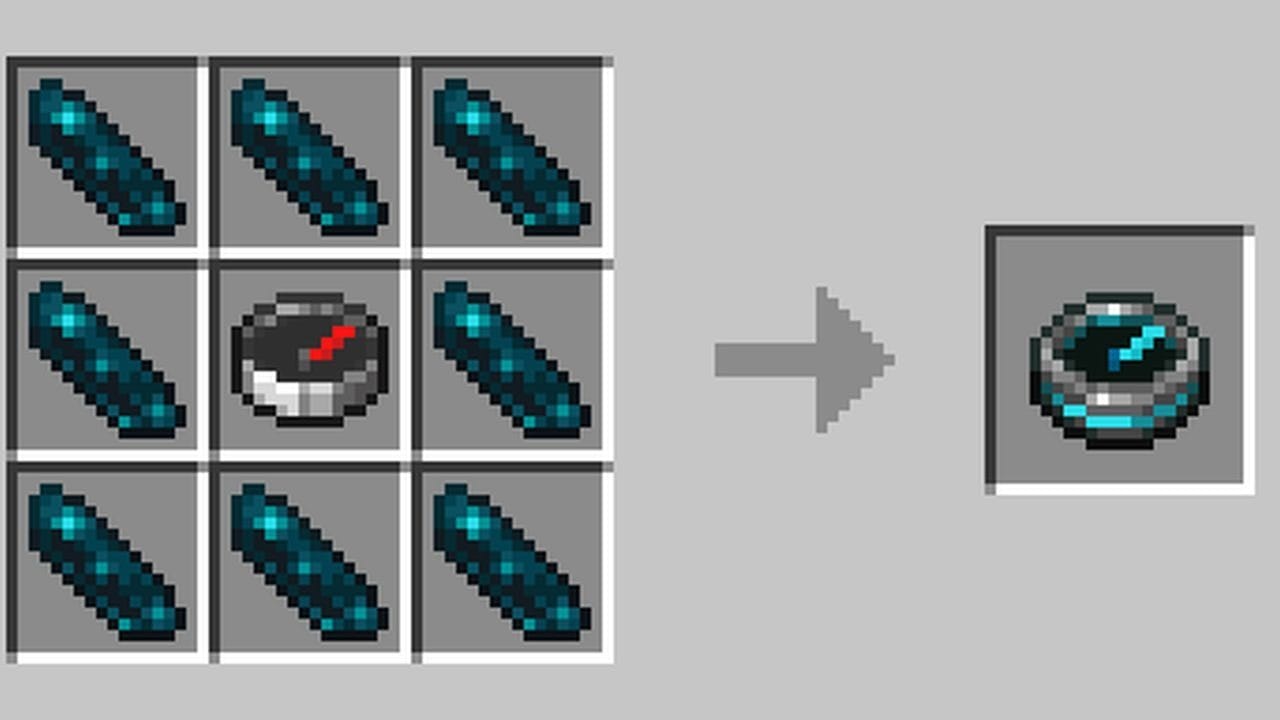
A recovery compass is a different item made from echo shards and a regular compass. It points toward the location where you last died – useful for recovering dropped items after a death in an unfamiliar location. Echo shards are found in ancient city chests. Note that the recovery compass doesn't need a lodestone and doesn't replace the vanilla compass – it's just a separate craftable item that uses one as a component.
Compass as a Map Ingredient
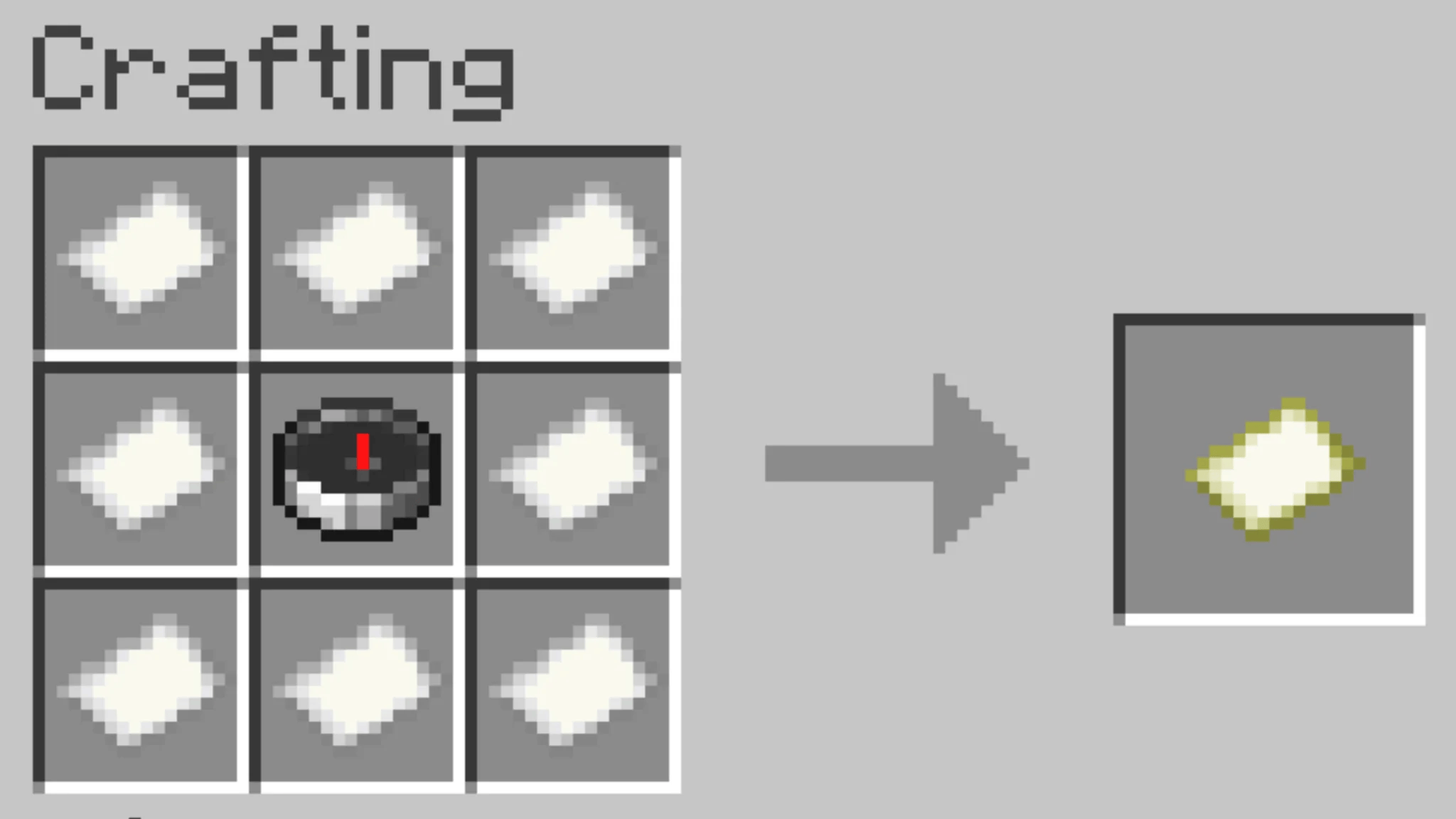
On Java Edition, crafting a map requires 8 pieces of paper placed around a compass. The resulting map shows your position as you explore. On Bedrock Edition, maps work a bit differently: a plain map made from 9 paper records terrain but doesn't show your position. Adding a compass to that map – either during crafting or through a cartography table afterward – converts it into a locator map that tracks where you are.
Java vs Bedrock Differences
The compass recipe and lodestone behavior are the same on both editions. The main difference is map behavior: Java maps track player position by default when crafted with a compass, while Bedrock distinguishes between plain maps and locator maps. Players who move from Java to Bedrock sometimes find their Bedrock map doesn't show their exact location – that's because they made a plain map instead of a locator map.
Mods That Expand What a Compass Can Do
Vanilla compasses are useful, but they stay fairly narrow unless you connect them to a lodestone. The mods below take the same navigation idea further – one gives you a full minimap with waypoints, one helps track down specific biomes, and another still points you toward generated structures.
Nature's Compass
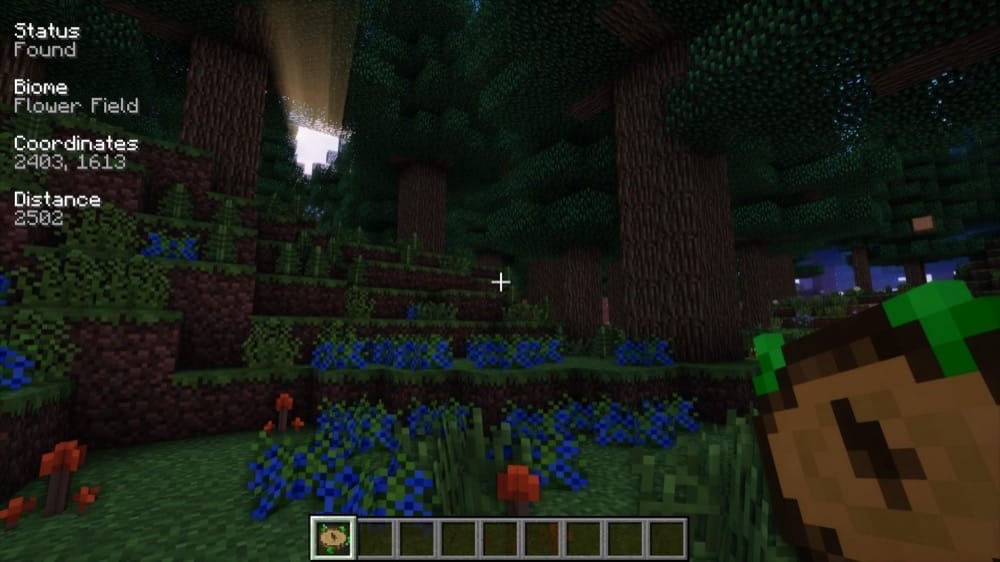
“Nature's Compass” adds a craftable compass item made for biome hunting. Right-clicking it opens a biome selection GUI where you can search for a biome, view information about it, and choose a target. Once a biome is selected, the compass points toward the nearest matching biome and shows useful information on the HUD as you travel.“Nature's Compass” works with vanilla and modded biomes, which makes it useful in large modpacks where finding one specific biome can take a long time. Simultaneously holding down “Shift” and right-clicking resets the compass, and when it is not actively tracking a biome, it points back toward world spawn like a normal compass.
Server owners or pack makers can also adjust settings such as blacklisted biomes and maximum search distance through the configuration file.
Xaero's Minimap
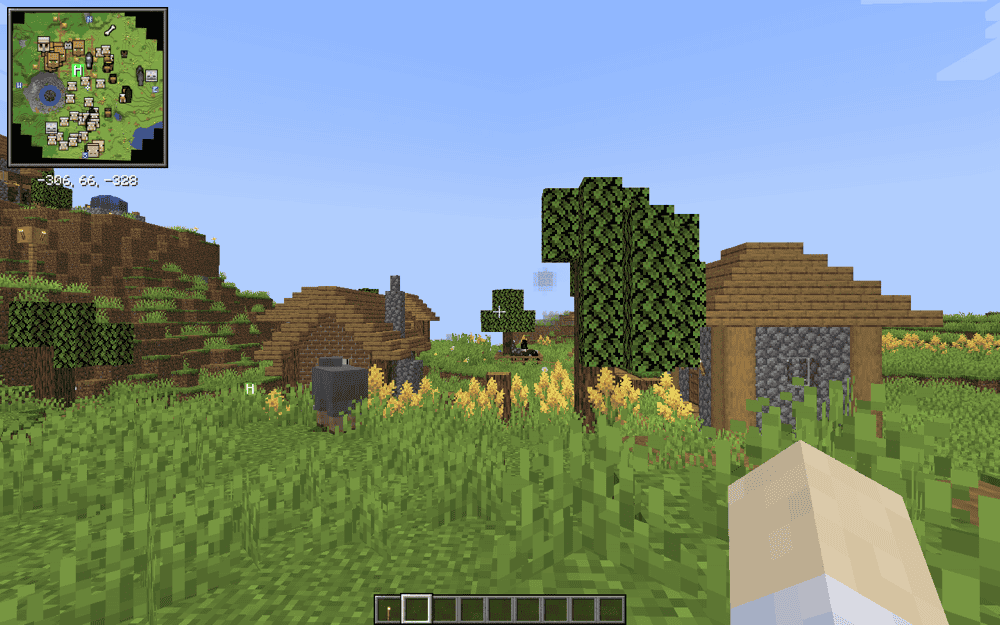
“Xaero's Minimap” gives you a live map in the corner of the screen, showing nearby terrain as you explore. It also shows your coordinates under the map and gives you a clear sense of direction without needing to hold a compass. The minimap can be square or circular, and you can either let it rotate with your view or lock it north.Waypoints are the main reason this mod can feel stronger than a vanilla compass. You can mark your base, a cave entrance, a village, or any place you want to return to later, then follow that marker on the minimap or in the world. “Xaero's Minimap” also includes zoom controls, deathpoints, optional biome and light-level readouts, cave mode, and entity display.
On multiplayer servers, some features may be limited by server settings, and a separate Fair-play Edition is available for players who want a version without entity radar or cave maps.
Explorer's Compass
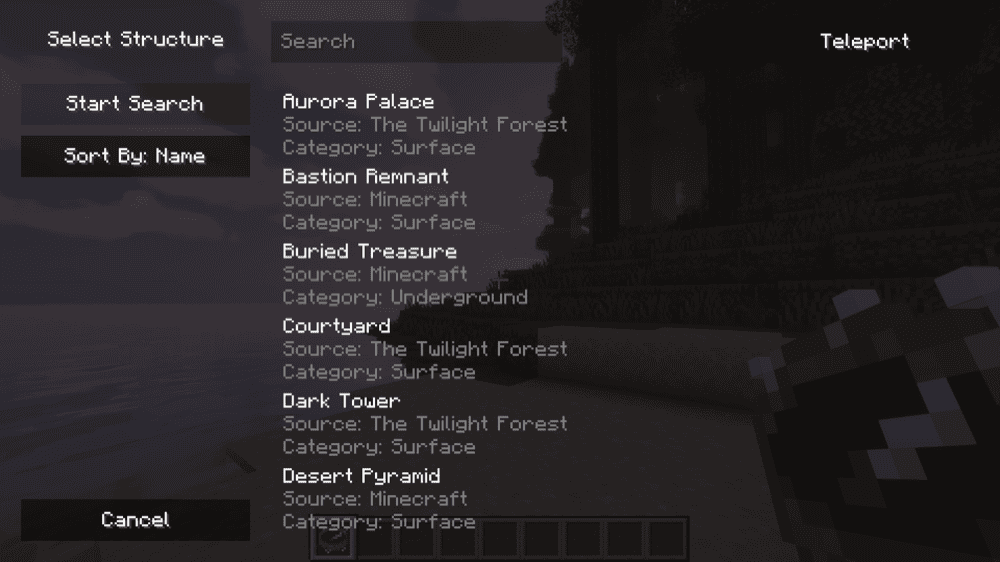
“Explorer's Compass” adds a craftable compass item for finding generated structures. Right-clicking it opens a menu where you can choose a structure or a group of structures to search for. Once selected, the compass points toward the nearest match and shows useful search information on the HUD while you travel.“Explorer's Compass” works with vanilla and modded structures, so it can help with places like villages, shipwrecks, strongholds, ancient cities, Nether fortresses, or structures added by a modpack. Holding down "Shift" and right-clicking resets the compass, and when it is not tracking a structure, it points back toward world spawn like a normal compass.
Pack makers can also adjust settings such as search radius, maximum samples, and blacklisted structures through the configuration file.
How to Install Minecraft Mods
You can install the above mods automatically using the CurseForge app or manually by placing the mod files within your game's mods folder. Both methods allow you to easily add custom features and enhancements into your vanilla Minecraft experience.
If you want to learn more, you can read our detailed guide on how to install Minecraft mods.
Common Issues and Quick Fixes
The compass isn't pointing toward my base or bed
This is expected behavior. A vanilla compass points to world spawn, not your personal spawn or any specific location. If you want it to point to your base, place a lodestone there and use the compass on it. The needle will then track that lodestone instead.
The compass spins randomly
You're in the Nether or the End, where a normal compass has no useful world-spawn target, so it spins. Use a lodestone compass instead – bind it to a lodestone placed in that dimension, and it will point back to that lodestone while you remain in the same dimension.
The lodestone compass stopped working
Either the lodestone it was bound to was broken, or you are in a different dimension from the lodestone. A lodestone compass can be created in any dimension, but it does not point across dimensions. Go back to the dimension where the lodestone is placed and make sure the block is still intact.
My Bedrock map doesn't show where I am
You made a plain map with 9 pieces of paper rather than a locator map. In Bedrock, plain maps record terrain but don't track position. You can fix this at a cartography table by combining your existing map with a compass, which converts it into a locator map without losing the terrain data already recorded.
My game crashes after installing a new mod
Check the Minecraft version, mod loader, and required dependencies first. A Fabric file will not work in a Forge profile, and a mod made for one Minecraft version can crash on another.
Open the mod's "Files" page and make sure the download matches your exact game version and loader, then check the "Relations", "Requirements", or "Dependencies" sections for any required library mods. If the game still crashes, remove the newest mod you added and relaunch it again to confirm whether that mod caused the issue.
Compass mods don’t track modded biome/structures
In most cases, “Nature’s Compass” and “Explorer’s Compass” are compatible with modded structures and biomes. However some mods, such as “Alex’s Caves”, intentionally prevent specific mods from tracking their biomes.
If this ever happens to you with another mod and suspect a bug rather than something intentional, we recommend contacting the developer of the mod about this issue.