Jack o'lanterns are one of the easiest blocks to overlook until you start building with pumpkins. They work as Halloween decoration, hidden lighting, underwater lighting, village details, and even golem heads, so they are more useful than they first may appear.
Before you can make one, however, you need to understand the small pumpkin routine behind it: finding or growing pumpkins, carving them the right way, and then turning the carved version into a light source. This guide walks you through the full process step by step.
Step 1: Get a Pumpkin
Pumpkins generate naturally in grassy biomes, often in small patches on the surface. You can harvest one directly – that's the fastest way to get started. They also appear in woodland mansions, pillager outposts, shipwreck supply chests, and some village structures.
If you want a renewable farm, craft the pumpkin into 4 pumpkin seeds at a crafting table first, then plant those on farmland near water.
Step 2: Grow Pumpkins
Pumpkin seeds planted on farmland grow a stem first. The stem needs a light level of 9 or higher to grow – sunlight or torches will both work for this. Once the stem is fully grown, it produces a pumpkin on one of the adjacent blocks, not on the stem itself. That adjacent block needs to be dirt, grass, farmland, podzol, mycelium, or similar surfaces.
Tip: One mature stem can keep producing pumpkins repeatedly as long as you harvest the fruit after each one appears. If a pumpkin is already sitting next to the stem, it won't grow another until you remove the existing one. Bone meal helps the stem grow faster but doesn't instantly generate the pumpkin.
Step 3: Carve the Pumpkin
Carving is not considered a traditional crafting table recipe. Instead, what you need to do is place the pumpkin in the world and use shears on the side you want the face to appear on. The pumpkin will then turn into a carved pumpkin, with the face appearing on whichever side you targeted. The shears will lose durability with each use, but will not break unless they are already at their last use.
Step 4: Craft the Jack o'Lantern
Open the crafting table and place the carved pumpkin on top and a torch directly below it. The output is a jack o'lantern.
The recipe requires a carved pumpkin specifically – a plain uncarved pumpkin won't work.
What Jack o'Lanterns Are Used For
- Lighting: Jack o'lanterns emit light at level 15 – the same as glowstone. That's stronger than a regular torch (14) and strong enough to melt nearby snow and ice. They keep producing light while underwater as well, which torches can't do.
- Golem building: Snow golems are built from two snow blocks stacked vertically with a carved pumpkin or jack o'lantern placed on top last. Iron golems are built from four iron blocks in a T-shape with a carved pumpkin or jack o'lantern placed on top last. In both cases, the pumpkin must go on last – placing it first stops the golem from spawning.
- Decoration: Jack o'lanterns face the player when placed, which makes them easy to orient for builds or to indicate a direction. They work well as lanterns in builds since they don't need any support block and can sit on any surface.
One caveat to keep in mind: Jack o'lanterns still count as solid blocks, so their top surface is not spawn-proof like glass, carpet, or slabs. The light usually prevents hostiles from spawning nearby, but if you're using them in a mob farm or enclosed build, make sure the top surfaces are not part of the spawnable area.
Key Java vs. Bedrock Difference to Watch Out For
The crafting recipe and light level are identical on both editions. The main difference is that carved pumpkins on Java Edition drop pumpkin seeds when you carve them with shears. On Bedrock Edition, carving works the same way, but it drops 1 pumpkin seed instead of Java Edition's 4. As for the jack o'lantern recipe itself, there's no meaningful difference.
Mods That Work Well With Jack o'Lanterns
Vanilla’s jack o'lanterns are simple once you know the pumpkin chain, but mods can make them a lot more fun for builders. Instead of using the same carved face every time, you can add custom patterns, extra pumpkin designs, carved melons, and more seasonal decoration options.
The mods below keep the focus on pumpkins and jack o'lantern-style builds. Haunted Harvest adds a deeper custom carving system with seasonal village features, while Kaupen's Carved Pumpkins gives you quick extra face designs for spooky builds and Halloween decorations.
Haunted Harvest
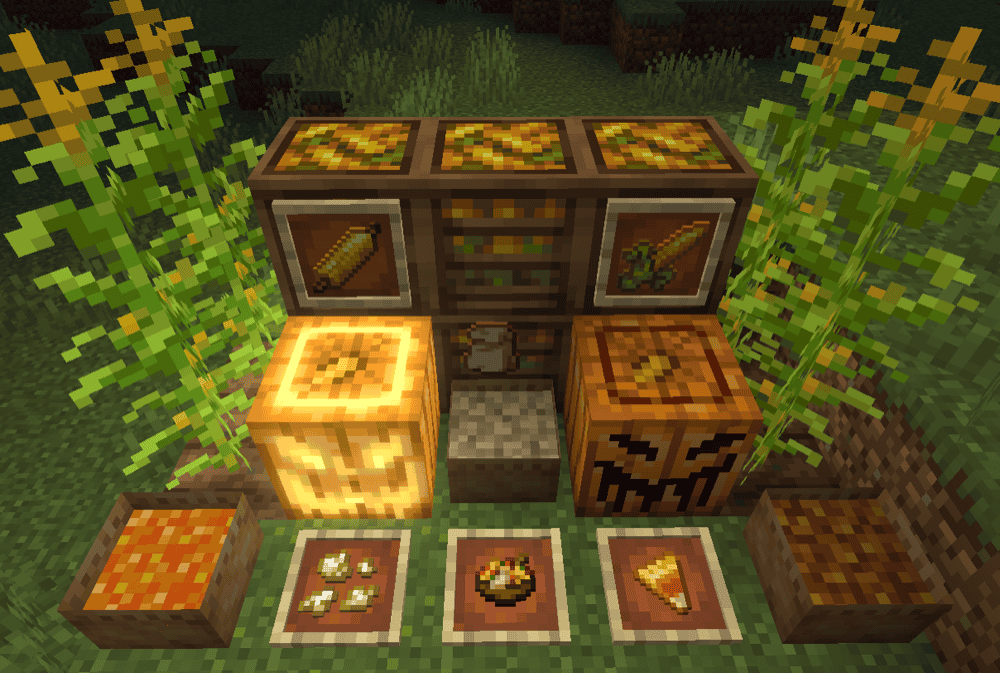
Haunted Harvest expands pumpkin carving into a fully customized design system. Instead of only using the single vanilla carved pumpkin face, you can:
- Carve placed pumpkins through a GUI or in-world with a sword or knife.
- Wax finished designs to stop further edits.
- Duplicate existing designs.
- Turn custom-carved pumpkins into jack o'lanterns by crafting or clicking them with a torch.
Haunted Harvest also adds corn, seasonal village decorations, baby villager trick-or-treating, candy, rotten apples, grim apples, splattered eggs, and compatibility with mods like Farmer's Delight and Autumnity.
Kaupen's Carved Pumpkins
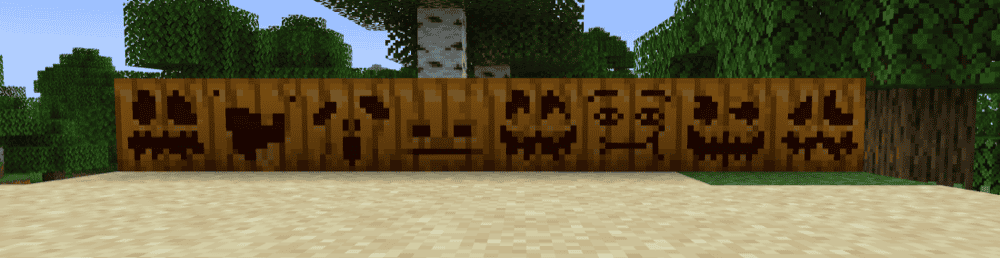
Kaupen's Carved Pumpkins adds 8 new carved pumpkin face designs and 2 carved melon designs, giving builders more Halloween-style decoration options beyond the single vanilla carved pumpkin face. After placing a carved pumpkin, you can right-click it with shears to cycle through the available patterns.
Kaupen's Carved Pumpkins does not change pumpkin farming or the basic jack o'lantern crafting process. It is simply a small cosmetic mod for players who want more carved faces for spooky builds, seasonal decorations, or themed paths and villages. The carved melon designs are a nice extra if you want the same idea executed with a different block look.
How to Install Minecraft Mods
You can install the above mods automatically using the CurseForge app or manually by placing the mod files within your game's mods folder. Both methods allow you to easily add custom features and enhancements into your Minecraft experience.
If you want to learn more, you can read our detailed guide on how to install Minecraft mods.
Common Issues and Quick Fixes
I can't carve the pumpkin at the crafting table
Carving is an in-world action, not a crafting recipe. Instead, place the pumpkin as a block in the world and then use shears on the side you want the face on. The carved pumpkin will then replace the old one. There's no crafting-table version of this step.
The jack o'lantern recipe isn't working
Make sure you're using a carved pumpkin and not a plain pumpkin as plain pumpkins don't combine with torches. If you haven't carved the pumpkin yet, place it, shear it, then try the recipe again.
My pumpkin stem isn't growing
Check the light level around the stem – it needs to be level 9 or higher. Additionally, confirm there's at least one valid adjacent block where the pumpkin can appear: dirt, grass, farmland, podzol, or similar. If all adjacent blocks are occupied or are of the wrong type, the stem will stay mature but not produce any fruit. Removing any pumpkin already sitting next to the stem resets its internal production counter.
The golem won't spawn no matter what I do
Remember that the carved pumpkin or jack o'lantern must be placed last. Build the body blocks first – snow blocks for a snow golem, iron blocks in a "T" for an iron golem – and then place the head on top. If you placed the head before completing the body, break it and replace it after the body is laid out correctly.
Kaupen's Carved Pumpkins patterns aren't cycling
Right-click the placed carved pumpkin while still holding your shears. The pattern only cycles on a carved pumpkin that's already placed in the world, not in your inventory. If the cycling still isn't working, confirm the mod is loaded correctly by checking the in-game mods list.
My game crashes after adding a mod
A crash after installing a mod usually points to a version mismatch, loader mismatch, or a missing dependency. Check that the mod file matches your Minecraft version and loader, then visit the mod page to see if there are any required libraries or APIs.
If you added several mods at once, remove the newest ones and add them back one at a time. That makes it much easier to find the culprit instead of just guessing your way through.