Building with stone in Minecraft usually starts simple, but it does not stay that way for long. Once you need stairs, slabs, walls, bricks, cut copper, or matching decorative pieces, the crafting table can feel slow and wasteful – especially during larger builds.
That is where the stonecutter becomes useful. In this guide, we’ll cover how to craft one, how to use it, which blocks it works with, and when it saves more materials than regular crafting. As a bonus, we’ll also look at some mods that take your stonecutter experience to the next level.
How to Build a Stonecutter
Materials needed:
- 3 stone
- 1 iron ingot
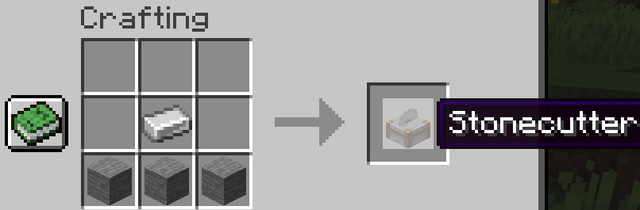
Place the iron ingot in the center of the top row and the three stone blocks across the middle row. This gives you one stonecutter.
Stone is obtained by smelting cobblestone in a furnace – not the same as cobblestone itself. For the stonecutter crafting recipe, you need stone and not cobblestone. Cobblestone can still be used inside the stonecutter later for cobblestone slabs, stairs, and walls.
Tip: Stonecutters also generate naturally in village stonemason houses, so if you've found a village, you may already have access to one without needing to make it from scratch.
How to Use the Stonecutter
Right-click the stonecutter to open its interface. There are two slots available: one on the left for your input block and one recipe panel in the middle showing all available outputs for that input. Simply click a recipe from the panel to get its output on the right side.
Each input block shows every variant it can be cut into. Stone, for example, can be cut into stone slabs, stone stairs, stone bricks, stone brick slabs, stone brick stairs, stone brick walls, and chiseled stone bricks – all from a single stone block, and you choose which one you want each time.
Why Use a Stonecutter Instead of a Crafting Table?
The main advantage is control and efficiency. For slabs, the ratio is usually the same as crafting, but the stonecutter lets you make smaller batches without filling a full crafting recipe. For stairs, it is simply more efficient: a crafting table turns 6 blocks into 4 stairs, whereas the stonecutter turns 6 blocks into 6 stairs.
More importantly, the stonecutter handles cuts that the crafting table doesn't expose directly. For example, you can cut stone directly into stone brick stairs without first making stone bricks as an intermediate step. You can also easily switch between different variants in a single step rather than going through multiple steps.
For large building projects where you're cycling through many slab and stair quantities, the stonecutter will save you both materials and time.
What Blocks Work With the Stonecutter?
The stonecutter is compatible with supported stone-type blocks and copper blocks – it won't cut wood, sand, gravel, dirt, or most other materials. The main block families it handles include:
- Stone: to be made into stone slabs, stairs, stone bricks, stone brick slabs, stone brick stairs, stone brick walls, and chiseled stone bricks.
- Cobblestone and mossy cobblestone: to be made into slabs, stairs, and walls.
- Cobbled deepslate: to be made into slabs, stairs, walls, chiseled deepslate, polished deepslate, deepslate bricks, and deepslate tiles.
- Tuff: to be made into tuff stairs, slabs, walls, chiseled tuff, polished tuff, tuff bricks, and related variants.
- Sandstone and red sandstone: to be made into cut, chiseled, smooth, slabs, stairs, and walls.
- Granite, diorite, and andesite: to be made into polished variants, slabs, stairs, and walls where available.
- Prismarine: to be made into prismarine bricks, dark prismarine, slabs, and stairs.
- Quartz: to be made into chiseled quartz, quartz bricks, quartz pillars, slabs, stairs, and smooth quartz cuts.
- Purpur: to be made into pillars, slabs, and stairs.
- Blackstone, basalt, and end stone bricks: to be made into their supported variants.
- Copper blocks: to be made into matching cut copper and copper grate variants, including waxed versions.
This recipe list continuously expands as Mojang updates the game, so available cuts can vary by version. In current versions, the stonecutter supports newer block families like tuff and copper alongside the older stone, sandstone, quartz, purpur, blackstone, and deepslate recipes.
Hiring a Stonemason Villager
An unemployed villager standing near a stonecutter will take the stonemason profession. Stonemasons trade stone-related blocks and have a progression of useful trades including polished andesite, dripstone blocks, emeralds for stone, and at higher tiers – quartz blocks, glazed terracotta, and other decorative stone materials. If you need a steady supply of specific stone variants without farming them manually, setting up a stonemason trader is worth the effort.
Mods That Enhance the Stonecutter
If you want the stonecutter to do more than what vanilla Minecraft allows, these mods take things up a notch. Some add automation, some unlock more stone variants, and others turn the stonecutter into a broader block-cutting station for wood and extra utility recipes.
Below, we picked mods that directly connect to cutting blocks, expanding recipes, or making building materials easier to prepare.
Create
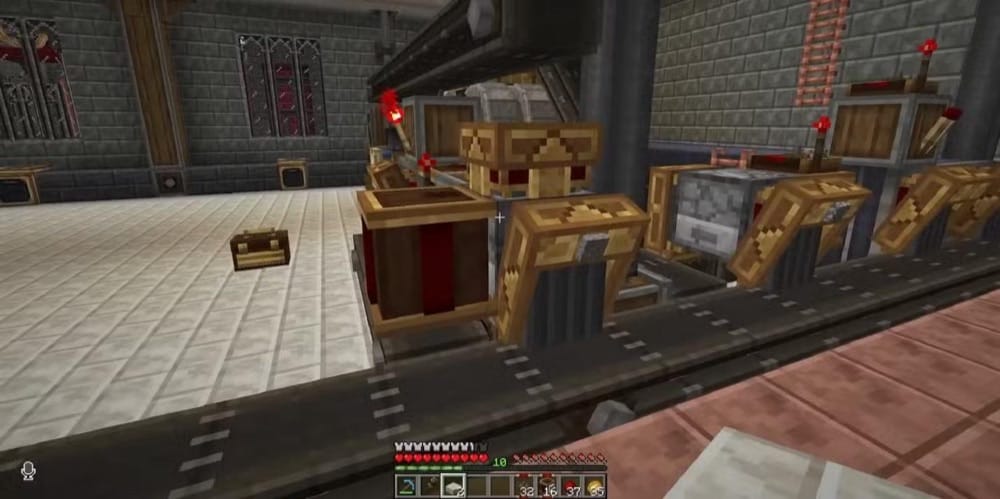
“Create” adds mechanical components, rotational power, and animated contraptions for players who want automation without turning Minecraft into a menu-heavy tech mod. For a stonecutter-focused setup, the important block is the Mechanical Saw. When placed with the blade facing upward and powered by Create's rotation system, it can process items dropped onto it using the vanilla stonecutter recipe pool.
Create's Mechanical Saw is useful for automated building-material production because it can turn supported blocks into cut variants without opening the stonecutter interface each time. If a block has multiple valid outputs, the saw cycles through them by default. We recommend adding a filter to lock the saw to a single result, such as stone brick stairs, so that the setup keeps producing the same block for a larger build.
Stoneworks
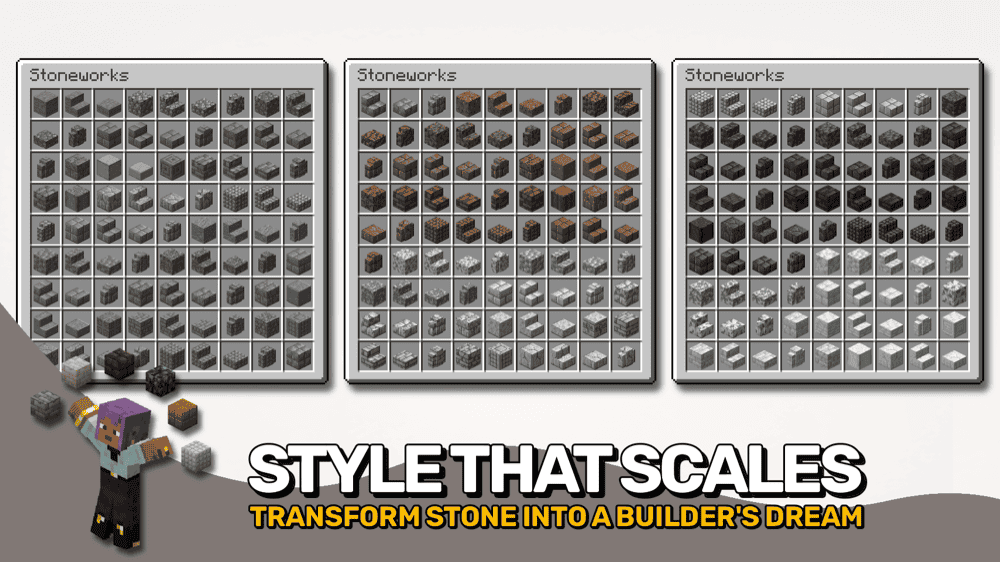
“Stoneworks” expands what you can do with vanilla stone by adding more variants for the stone types already found in the base game. It fills in missing options like cobbled variants, bricks, tiles, pillars, shingles, stairs, slabs, walls, and more, giving builders a much wider block palette without changing the basic stonecutter workflow.
The mod keeps the workflow simple by putting most of those new blocks directly in the stonecutter. Drop in a supported stone material and you can turn it into more decorative cuts for cottages, castles, paths, ruins, and larger survival builds without having to learn a new machine or crafting system.
Actually Useful Stonecutter
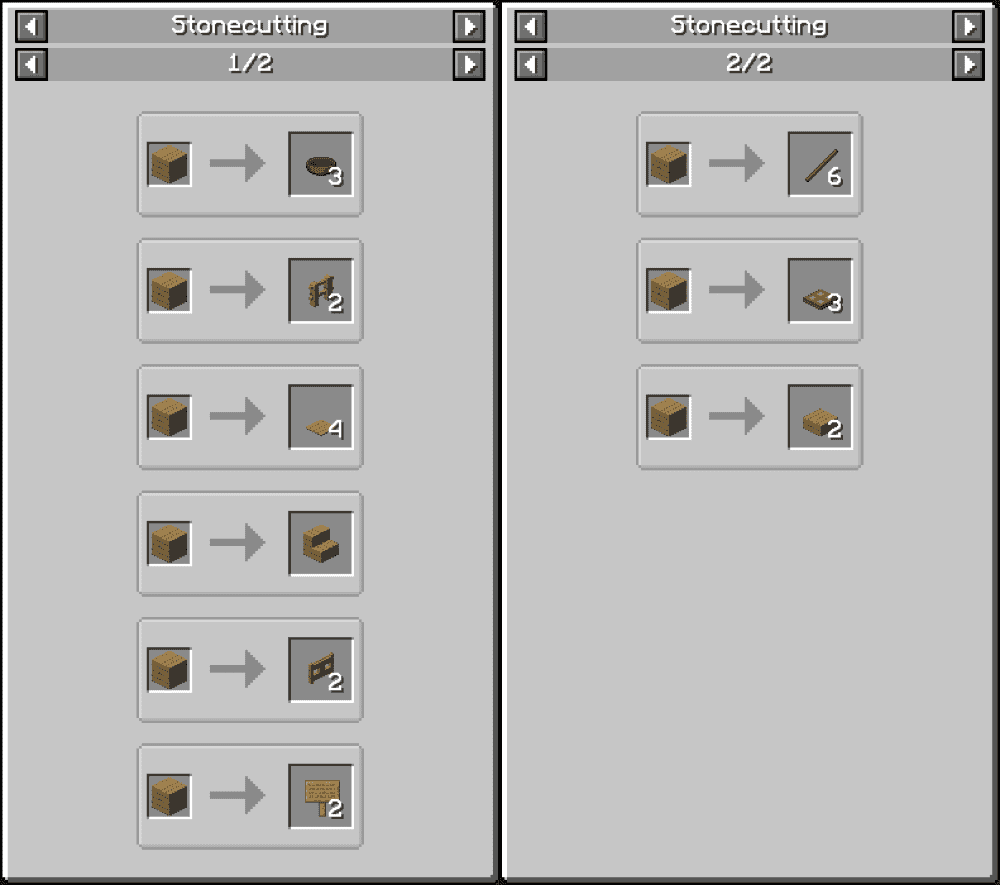
“Actually Useful Stonecutter” turns the vanilla stonecutter into a broader block cutter by adding a large set of extra recipes. Instead of only using it for stone-type blocks, you can now also cut wood into planks, fences, fence gates, signs, trapdoors, pressure plates, bowls, stairs, slabs, sticks, and more. It also adds utility conversions like brick blocks back into bricks, wool into string, and cobblestone into gravel.
We see this mod as the best pick if you want the stonecutter to become a general-purpose cutting station rather than just a stone-building tool. Some recipes can feel more powerful than those in vanilla, so it works best for players who want convenience, faster material prep times, and more use from a block that otherwise has a narrow role in the base game.
How to Install Minecraft Mods
You can install the above mods automatically using the CurseForge app or manually by placing the mod files within your game's mods folder. Both methods allow you to easily add custom features and enhancements into your Minecraft experience.
If you want to learn more, you can read our detailed guide on how to install Minecraft mods.
Common Issues and Quick Fixes
The stonecutter recipe says I need stone but I only have cobblestone
Cobblestone and stone are different items. Put cobblestone in a furnace with any fuel to smelt it into stone, then use that stone to craft the stonecutter. Cobblestone does not work as a substitute in the stonecutter crafting recipe, but it does work as a stonecutter input for cobblestone slabs, stairs, and walls.
The block I want to cut isn't showing any recipes
The stonecutter only works on supported stone-type materials and copper blocks. Wood, sand, gravel, dirt, and most other blocks don't have stonecutter recipes. If you're trying to cut a supported block and it still isn't showing recipes, check whether it's already in a processed form that the stonecutter doesn't recognize as an input. The idea here is that the stonecutter takes specific stages of each material, not every form of every block.
Create’s Mechanical Saw is spinning but not cutting anything
There are two likely causes for this: either the item isn't landing on the blade correctly, or the filter is set to a recipe that doesn't match your input. Make sure items are dropping directly onto the top of the saw blade and that the blade is oriented upright (not sideways).
If a filter is installed, check that it matches the actual output you want from the input block you're feeding it. Remove the filter entirely to confirm the saw cuts without it, then reintroduce the filter once you've verified the basic cutting works.
Create’s Mechanical Saw keeps cycling through different outputs
That's the default behavior when multiple valid cuts exist for the same input. To fix this, add a filter to the saw's filter slot set to the specific output you want (stone brick stairs, for example) and the saw locks to produce only that result. Without a filter, the saw will cycle through every valid recipe for that input block.
I placed a stonecutter near a villager but they didn't become a stonemason
Villagers only take an unclaimed workstation. If the stonecutter is already claimed by another villager, the one nearby won't switch. Check that there isn't a stonemason already in the area using that block. Additionally, make sure the villager is unemployed – villagers with existing professions won't switch unless their current workstation is broken.
The game crashes after adding a mod
A crash after installing a mod is usually caused by a Minecraft version mismatch, loader mismatch, or missing dependency. Check that the mod file matches your Minecraft version and loader, then look at the mod page for any required files.
If you added several mods at once, remove the newest ones and add them back one at a time. This makes it much easier to find the culprit instead of guessing which mod broke the setup.