Fireworks are one of those Minecraft items that start simple, then get way more interesting once you play around with them. They can be used for colorful displays, Elytra travel, redstone shows, and even crossbow tricks, depending on how you craft them.
Before you start stacking colors and effects though, it helps to understand what each ingredient changes. In this guide, we will walk you through the full process, from basic rockets to custom firework stars, Elytra boosts, crossbow use, and simple dispenser setups.
Step 1: Get the Ingredients
Before lighting up the night sky, you need to collect three key ingredients: paper, gunpowder, and dyes.
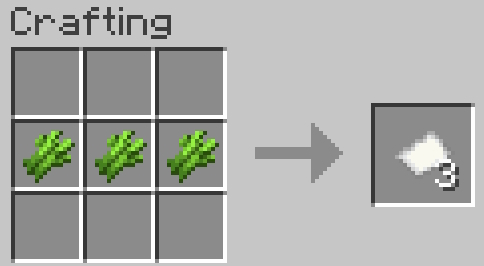
- Paper comes from sugar cane. Place three sugar cane in a row across any row of a crafting table to get three paper pieces. Sugar cane grows naturally along rivers, beaches, and ocean shores.
- Gunpowder drops from creepers, ghasts, and witches and shows up in various loot chests. There's no vanilla crafting recipe for it – you collect it through combat or exploration.
- Dyes determine the colors of your firework displays. Any dye works here, and you can combine multiple dyes into one firework star for a multi-color explosion.
Step 2: Craft a Firework Star
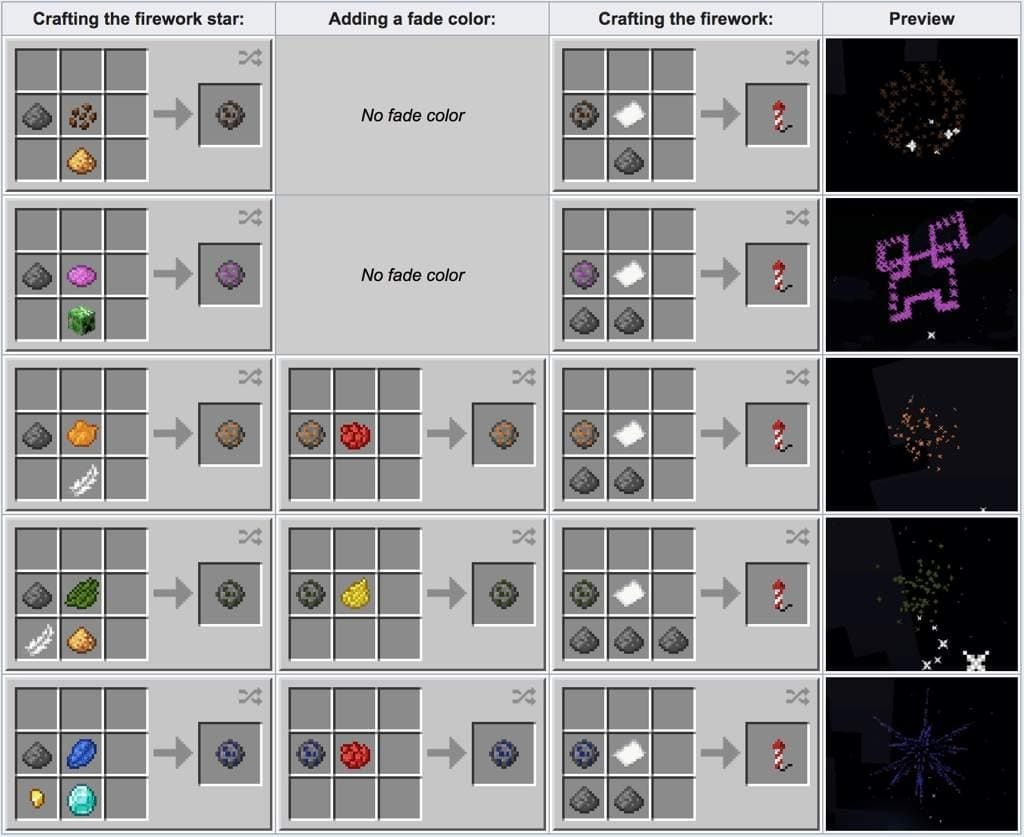
A firework star is the payload – it holds the explosion data. To create one, put gunpowder and at least one dye into any arrangement in the crafting grid. That's the minimum viable star: one gunpowder plus one dye gives you a small ball explosion in that color.
Optional additions to the same star recipe include:
- Shape modifiers (pick only one per star):
- Fire Charge → large ball explosion.
- Gold Nugget → star-shaped explosion.
- Feather → burst pattern.
- Any mob head or skull → creeper face explosion.
- Nothing extra → default small ball explosion.
- Effect modifiers (can combine these):
- Diamond → trail effect, where particles stream behind the explosion.
- Glowstone Dust → twinkle effect, where the firework crackles after exploding.
- Fade colors: After crafting a complete star, craft it again with one or more additional dyes. Those colors appear as the explosion fades rather than in the initial burst.
- Multi-color stars: Add multiple dyes to the same star recipe – all of them appear in the explosion simultaneously.
Step 3: Craft the Firework Rocket
Combine paper, gunpowder, and optionally firework stars in any arrangement in the crafting table.
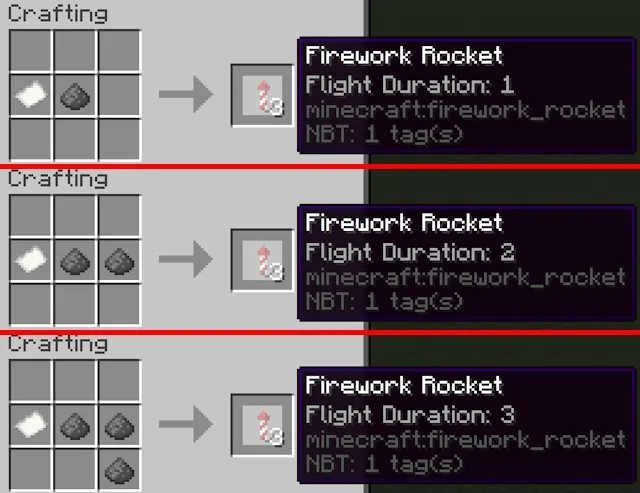
Gunpowder quantity controls flight duration:
- 1 gunpowder = short flight.
- 2 gunpowder = medium flight.
- 3 gunpowder = long flight (maximum duration achieved in vanilla).
Stars in the rocket control the explosion:
- No stars = rocket fires and disappears silently, no explosion.
- One or more stars = each star fires its explosion when the rocket peaks.
A single rocket can hold multiple stars. More stars in a combat rocket means more damage on impact. For pure travel use, leave the stars out.
Each crafting recipe produces 3 firework rockets at a time.
Farming Gunpowder for More Rockets
If you plan on using fireworks for Elytra travel, gunpowder becomes the ingredient you run out of the fastest. Creepers are the best vanilla mob to farm for it, since they drop gunpowder and can be pushed into automatic collection setups.
Most creeper farms use the same basic idea:
- Make dark platforms to spawn hostile mobs.
- Limit the height so taller mobs cannot spawn.
- Move creepers into a kill chamber.
On Java Edition, trapdoors on the ceiling are commonly used to keep the spawning space low enough for creepers while blocking taller mobs. Spiders can still be an issue, so many designs use carpets to stop 3-by-3 spider spawns.
Cats are often used to move creepers through the farm. Creepers run away from nearby cats, so placing cats safely in boats can push creepers toward water streams, drop chutes, campfires, magma blocks, or another kill setup. Hoppers can then collect the gunpowder.
For most players, the easiest reliable setup is a sky or ocean creeper farm. Building high above the ground or over deep water reduces the number of nearby caves and dark spaces that can steal mob spawns. More technical Java Edition farms can be built very low in the world for better efficiency, but those usually need heavy spawnproofing or a cleared perimeter to work well.
Farm mechanics can vary between Java and Bedrock Edition, so we recommend following a design that’s been tailor-made for your version. If your farm is slow, check the basics first: dark spawning platforms, correct ceiling height, spider prevention, cat placement, clear water paths, and whether nearby mobs are taking up the spawn cap – the game’s limit on how many mobs can exist in a certain category at once.
Using Fireworks for Elytra Travel
Rockets are the main way to maintain altitude and speed while flying with Elytra. Simply hold the rocket in your hand while gliding and use it to boost forward.
Important: Travel rockets should be starless! Rockets carrying firework stars deal damage when they explode, and that includes damage to you when you use them with Elytra.
To get the best of both words, you could keep two separate stacks: starless rockets for travel and decorated ones for displays or crossbow use.
For normal flying, 1-gunpowder rockets are usually easier to control because the boost is shorter. For long-distance Elytra travel, 3-gunpowder starless rockets give the longest boost per rocket.
Using Fireworks as Crossbow Ammunition
A crossbow loaded with a firework rocket fires it as a projectile. The rocket travels farther with more gunpowder, and it deals more damage with more firework stars. Unlike arrows, crossbow-fired fireworks are not affected by the Piercing enchantment as it does not work on rockets.
Fireworks fired this way can damage living creatures caught in the explosion, but they do not destroy blocks, so they are safe to use in combat without worrying about terrain grief. On Bedrock Edition, rockets fired from crossbows can pass through entities, so you may need to aim for where the explosion will land instead of relying on a direct hit.
Automating Firework Shows with Dispensers
A dispenser loaded with firework rockets and powered by redstone launches them automatically. For a show involving multiple rockets, set up several dispensers in sequence and trigger them with a redstone clock or repeater chain.
The simplest setup is one dispenser loaded with rockets and one button or lever to trigger it. Then, simply press the button each time you want a rocket. For repeated shows, replace the button with a redstone clock, repeater chain, or timed dispenser setup.
Common Color Combinations to Try
Any two dyes mixed into a star produce a firework with both colors showing in the burst. If you add red and white dye directly to the same firework star, the burst shows up as a mix of red and white – it does not become pink.
To get pink, light blue, purple, lime, cyan, or orange fireworks, you need to craft that dye first, then use the finished dye in the firework star recipe. The fade-color pass is separate: craft the finished firework star again with one or more dyes, and the explosion will fade into those colors after the first burst.
Mods That Work Well With Fireworks
Fireworks are already fun in vanilla Minecraft, but a couple of mods can make them feel even better. One leans into the crossbow side of fireworks, while the other makes Elytra takeoff less awkward when you are using rockets from the ground.
These mods do not replace the basic crafting steps, so you will still use paper, gunpowder, and firework stars the normal way. They just make fireworks more useful once you start using them for combat, movement, or flying.
Easy Elytra Takeoff
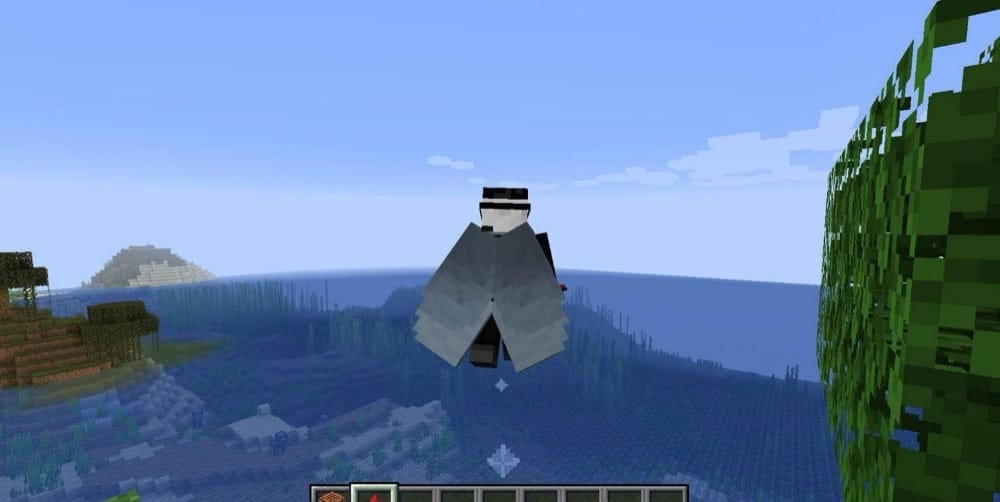
“Easy Elytra Takeoff” makes Elytra launches easier by letting you take off from the ground with a firework rocket without doing the usual jump timing. Hold a firework rocket, right-click an empty space, and you will fly off without needing to jump first.
This mod is especially useful on multiplayer servers where high ping can make ground takeoff feel inconsistent. It does not change how fireworks are crafted, how rockets work during normal Elytra flight, or how firework damage works. It simply makes the launch step smoother.
Firework Frenzy

“Firework Frenzy” overhauls how firework rockets work when fired from a crossbow. It makes rocket damage and knockback scale with the number of firework stars inside the rocket, lowers the base damage, adds a tooltip that shows maximum rocket damage, and keeps Elytra flight rockets unchanged.
It also adds rocket jumping, so firing a loaded crossbow at your feet can launch you upward with the explosion force. Every part of the mod is configurable through “Mod Menu” settings, making it a strong fit for players who want fireworks to feel more useful in combat and movement without changing normal Elytra travel.
How to Install Minecraft Mods
You can install the above mod automatically using the CurseForge app or manually by placing the mod file within your game's mods folder. Both methods let you add custom features and enhancements to Minecraft.
If you want to learn more, you can read our detailed guide on how to install Minecraft mods.
Common Issues and Quick Fixes
The rocket fires but no explosion appears
You likely crafted a rocket without a firework star. A starless rocket is still usable for Elytra travel and crossbow firing, but it has no visual explosion. Go back and craft a firework star first, then use it in the rocket recipe.
The star didn't get the shape I wanted
Check that you added the shape modifier – Fire Charge, Gold Nugget, Feather, or a mob head – during the star recipe itself, not after. You could also confirm you're only using one shape modifier per star. If you want multiple shapes, craft separate stars with different shapes and combine them into the same rocket recipe.
There's no fade color even though I added dye
Fade colors require a second crafting step. First, make the complete firework star, then craft that finished star again with additional dyes. If you added all the dyes in the first step, they all show in the initial burst rather than as a fade.
The creeper farm is not producing much gunpowder
If your creeper farm is slow, check the spawn conditions first. The platforms need to be dark, the ceiling height needs to match your edition, and spiders should be blocked with carpet or another spider-proof layout. Also, make sure cats are placed where they can scare creepers into the water stream or drop chute instead of letting them stand around on the platform.
If the farm design looks right but rates are still low, nearby mobs are probably taking up the spawn cap. Move your AFK spot to the correct distance, light up nearby caves if you built over land, or use a sky or ocean build where there are fewer dark spaces around the farm. Creepers are hostile mobs that spawn in dark areas, so controlling where mobs can spawn is the main trick behind making the farm work.
Elytra rocket is dealing damage when I use it
Your rocket likely contains firework stars. Stars cause an explosion when the rocket peaks, and that explosion can then damage you. For travel, use starless rockets – just paper and gunpowder, no stars included.
The game crashes after adding a mod
A crash after installing a mod is usually caused by a version mismatch, loader mismatch, or missing dependency. Check that the mod file matches your Minecraft version and loader, then look at the mod page for any required files.
If you added several mods at once, remove the newest ones and add them back one at a time. This makes it much easier to find the culprit instead of guessing which mod broke the setup.