Wolves have always been useful companions in Minecraft, but taking them into combat used to feel risky. A few bad hits from mobs, lava, or fall damage could end a long-running pet very quickly, which is why wolf armor became such a useful addition for survival players.
With armadillos and armadillo scutes now being part of the game, you can craft armor specifically for tamed wolves, repair it when it wears down, and even dye it to match your style. This guide will take you through the vanilla recipe first, then look at mods that add deeper pet protection, smarter wolf behavior, armor support, commands, and companion progression.
Crafting Your First Wolf Armor
- Materials you will need: 6 armadillo scutes
- Tool you will need: Brush
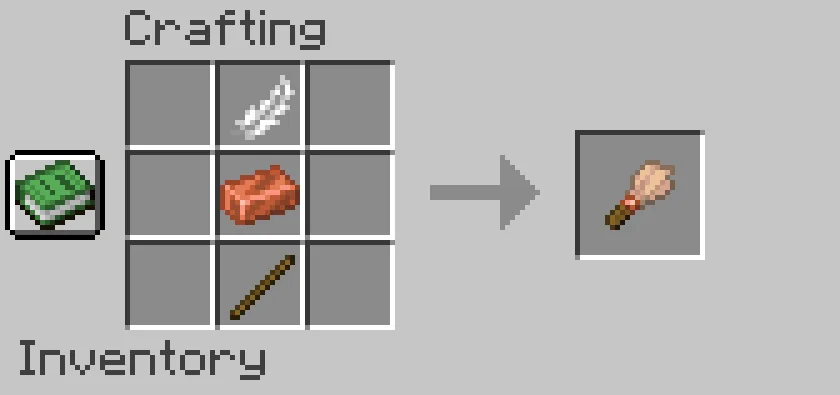
- To craft a brush, you will need 1 feather, 1 copper ingot, and 1 stick. Place the feather in the top-center slot, the copper ingot in the center slot, and the stick in the bottom-center slot.
- Armadillo scutes come from armadillos, which spawn in savanna and badlands biomes. When you brush an armadillo with a brush, it drops a scute.
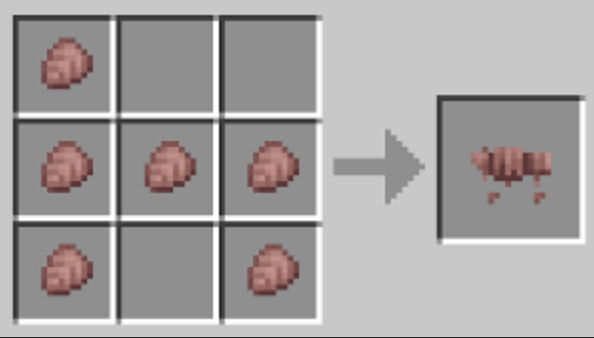
- To craft wolf armor, place six armadillo scutes in the crafting table: one in the top-left slot, three across the middle row, and two in the bottom corners.
How to Put Wolf Armor On a Wolf
Equip the wolf armor the same way you'd put gear on another animal – use the armor on a tamed wolf while holding it. The wolf needs to be tamed first, however, as wild wolves won't accept armor. Once equipped, the armor will be visible on the wolf's body and help reduce many kinds of incoming damage.
Wolf armor gives 11 armor points and helps protect a tamed wolf from many regular damage sources. It still has a durability rating, so it can break after absorbing enough damage.
How to Remove Wolf Armor
Use shears on the armored wolf to remove the armor. It drops as an item you can pick up and reuse, so you can repair it, re-dye it, or place it on another tamed wolf.
Repairing and Dyeing Wolf Armor
Wolf armor can be repaired at an anvil using armadillo scutes – the same material it was crafted from. Durability decreases as the wolf takes damage, so keeping repair materials on hand is useful for wolves you take into combat regularly.
Wolf armor can also be dyed like leather armor. Depending on your game edition (Java or Bedrock), dyeing and washing can work through the same kind of crafting table or cauldron system used for leather armor. You can mix colors, apply new dyes, and wash the armor back to its default color if you do not like the result.
Mods That Expand Wolf Armor and Wolf Behavior
Vanilla wolf armor gives tamed wolves a simple layer of protection, and it already covers the basics: crafting, dyeing, repairing, and removing the armor when needed. For players who want more than one armor type, smarter pets, companion commands, inventories, talents, or stronger survival tools, mods can push wolf companions much further.
The options below focus on mods that expand how wolves and other tameable pets work, either through armor support, pet progression, command systems, or better AI.
Domestication Innovation
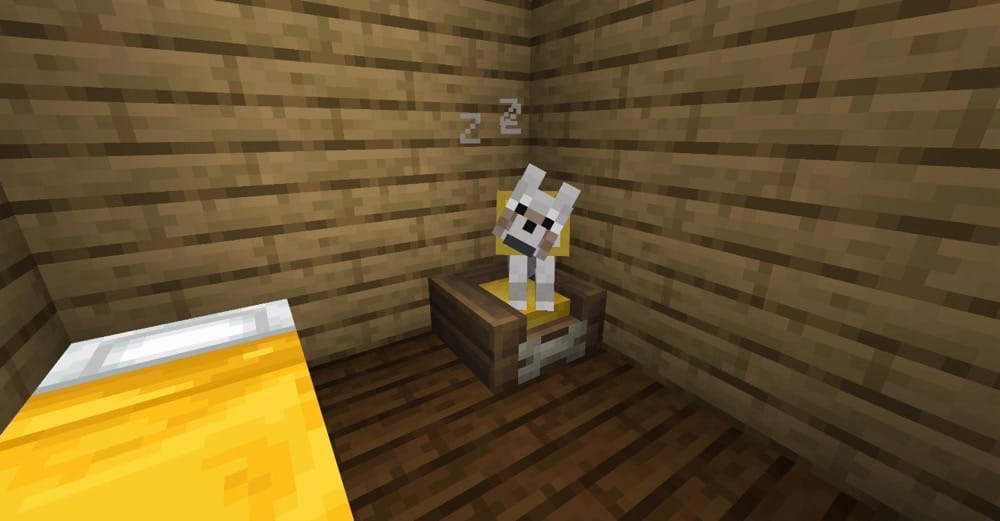
“Domestication Innovation” improves tameable mobs by giving pets more useful behavior, safer combat interactions, and extra progression systems. Wolves, cats, parrots, axolotls, rabbits, foxes, and frogs can all use command states like Wander, Stay, and Follow, while features like Swing Through Pets and Sweeping Edge protection help stop players from accidentally hitting their own companions during fights.
The mod also adds pet beds for respawning, a Wayward Lantern to help lost pets return, a Command Drum for group commands, and collar tags that can hold pet enchantments. These enchantments can add effects such as Health Boost, Fireproof, Deflecting, Linked Inventory, Total Recall, Tethered Teleport, and other utility or combat abilities.
Most features beyond the command system are designed to work with tameable mobs introduced by other mods as well, making it a strong option for players who want wolves and other pets to survive longer and do more than simply follow your tail.
Doggy Talents Next
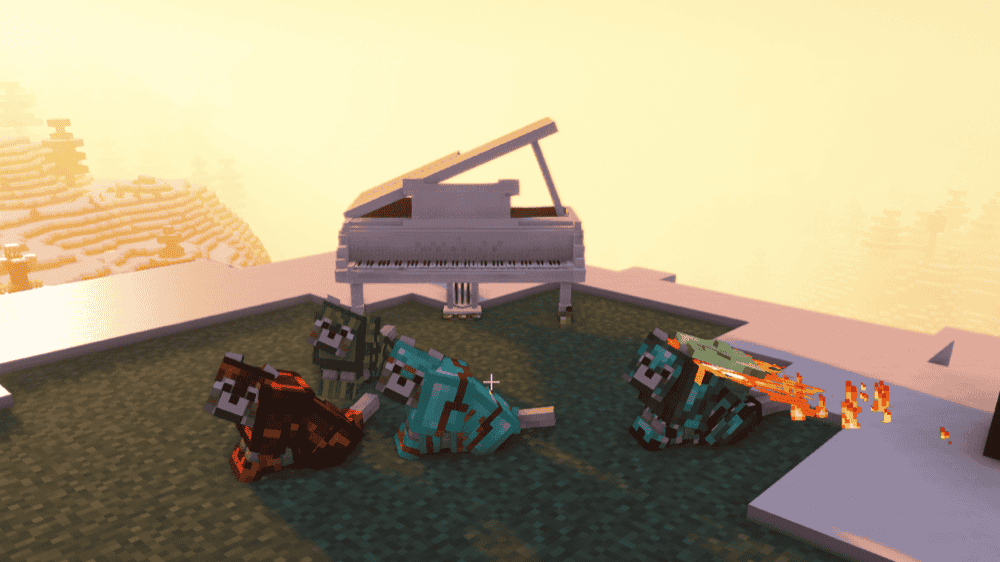
“Doggy Talents Next” is a wolf companion overhaul that makes dogs smarter, more customizable, and generally more useful throughout a survival world. It adds refined AI, better movement around hazards, a talent system for training dogs into different roles, and tools for commanding, tracking, and teleporting them so they are harder to lose during travel.
The mod also expands wolf protection beyond vanilla armadillo armor. Dogs can now wear all armor, including armor from other mods such as Extra Armor and Advanced Netherite. Alongside that, dogs can gain utility or combat talents, use cosmetic outfits and breed customization, and interact with systems like whistles, tracking items, mounts, food, and recovery after dangerous situations.
Protect My Pets!
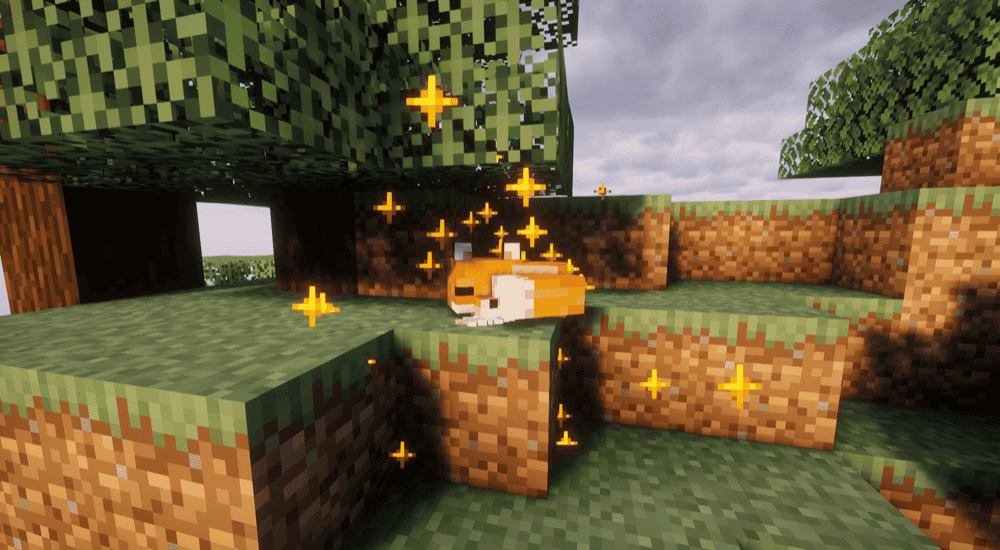
“Protect My Pets!” adds a new item named Golden Tag that aims to make your pet immortal! This new item can be crafted from a crafting table with two gold ingots (placed in the top middle and center right slots), one Netherite ingot in the top-right slot, one diamond in the bottom left slot, and one nametag in the center slot of your crafting table.
With the item equipped on your pet, they will be able to negate the next 1500 damage points, making them effectively invincible for a very long time. If needed, you can remove the Golden Tag with shears by pressing "Shift + Right-Click", while pressing the same keys with empty hands will allow you to view the remaining durability instead.
How to Install Minecraft Mods
You can install the above mod automatically using the CurseForge app or manually by placing the mod file within your game's mods folder. Both methods let you add custom features and enhancements to Minecraft.
If you want to learn more, you can read our detailed guide on how to install Minecraft mods.
Common Issues and Quick Fixes
My wolf won't accept the armor
The wolf needs to be tamed first. Right-clicking a wild wolf with wolf armor won't equip it as they don't have an equipment slot. Make sure you've completed the taming process and hearts appeared above the animal before trying to equip armor.
I can't find armadillos to get scutes
Armadillos spawn in Savanna and Badlands biomes. Both biomes generate in warmer regions of the world – Savanna tends to Border Plains and Deserts, while Badlands are rarer. If you're having trouble finding one, use a Biome Finder tool with your world seed to locate the nearest savanna biome. Once you find armadillos, you can lead them back with a lead and breed them with spider eyes for a renewable local source.
The wolf armor is about to break
Repair it at an anvil using armadillo scutes. One scute restores a portion of the initial durability. If your world or modpack allows for enchanted wolf armor, repairing it should preserve the armor instead of replacing it with a new piece. A completely broken wolf armor piece disappears like any other tool would.
Wolf armor dye looks wrong or mixed poorly
Wolf armor color mixing follows the same rules as leather armor – each dye application blends with the current color rather than replacing it. If the result isn't what you expected, use a water cauldron to strip the dye and start over with a clean piece.
Dog disappeared after teleporting or crossing dimensions
Vanilla wolves frequently get lost this way. With “Doggy Talents Next” installed, use the whistle item to summon the dog to your location. The mod also adds a tracking collar item that shows the dog's location.
If you're using vanilla wolves without the mod, note that wolves teleport to their owner when far away, but this can fail across dimension boundaries – always check if your wolf is in the same dimension as you before panicking.
My game crashes after installing a wolf or pet mod
A startup crash usually means one of three things: the mod file does not match your Minecraft version, it was made for a different mod loader, or a required dependency is missing. Check that each file matches your profile’s loader, then confirm the dependency list on the mod page.
If you added several mods at once, remove the newest ones one by one and launch the game after each change. When Minecraft opens normally, the last removed mod is probably the culprit. Reinstall that mod with the correct Minecraft version, loader, and dependencies before testing again.