
Eighty blocks into your tunnel, you're holding a stack of netherrack, a few gold nuggets, and a growing suspicion that you're digging in the wrong place. The block you came for is ancient debris, the ore Netherite is made from, and it's rare enough that the height you dig at is worth getting it right.
So, if you’re as confused as we were the first time we sought out ancient debris, read on for the ideal height to aim for, why ancient debris piles up there to begin with, and how to check that you're standing where you should be. We'll then round things up with two useful mods that keep your height in view and chart how ores spread across the world.
Pickaxe ready? Then down we go!
Which "Y" Level Has the Most Ancient Debris?
The best level for ancient debris is "Y" 16 in the Nether, the only dimension where it generates, and the practical place to stand is with your feet at "Y" 15.
A "Y" level is simply your height, counted in blocks. With your feet at "Y" 15, your head sits at "Y" 16, and a tunnel 2 blocks high uncovers about as much debris as it would with your feet at "Y" 16, so either works.
Hitting "Y" 16 exactly matters less than it sounds. Roughly 78% of all ancient debris sits between "Y" 8 and 24, and around half of it falls between "Y" 13 and 19, as outlined in the table below. Each of the first five rows includes the ones above it, so their shares overlap.
| Levels | Share of all ancient debris | Verdict |
|---|---|---|
| "Y" 16 | 8.4% | The single richest level. |
| "Y" 14 to 18 | 37.4% | Where the peak is strongest. |
| "Y" 13 to 19 | 49.0% | About half of all ancient debris. |
| "Y" 12 to 20 | 58.8% | Still strong, with lava getting more common toward the top. |
| "Y" 8 to 24 | 78.3% | Where most of it generates. |
| "Y" 32 and above | 20.1% | Spread thin across the upper Nether. |
| "Y" 0 to 7 and "Y" 25 to 31 | 1.6% | A sliver, since both ranges sit just outside the main cluster's "Y" 8 to 24. |
Note: Older guides that name "Y" 15 and a range of "Y" 8 to 22 describe the game as it was before Java Edition version 1.17 moved the peak up one level, and nothing about it has changed since.
Climbing higher won't help either, because at that point lava takes over: about 1 block in 13 is lava at "Y" 15 to 16, and around half of all blocks are lava by "Y" 24, while the debris thins out.
And in case you haven't activated a Nether portal yet, our guide on how to beat Minecraft walks you through opening your first one. Once you're there, the mining rules are the same in every Nether biome – Nether Wastes, Crimson Forest, Warped Forest, Soul Sand Valley, and Basalt Deltas – so the biome you dig under makes no difference.
Why Ancient Debris Piles Up at Around "Y" 16
In each chunk (a 16x16 column of blocks that runs the full height of the world), the game makes two attempts to place a cluster – a small group of ancient debris blocks sitting close together.
The Main Cluster Peaks at "Y" 16
The first attempt places a larger cluster of up to 3 blocks, and it can come up empty, too. The game picks the cluster's center anywhere from "Y" 8 to 24, and some heights come up far more often than others.
The chances climb in even steps from "Y" 8 up to "Y" 16, then fall back the same way down to "Y" 24, so "Y" 16 ends up being the likeliest level to encounter ancient debris, with the levels on either side of it sitting close behind.
The Small Cluster Adds Debris Higher Up
The second attempt places a smaller cluster of up to 2 blocks, and this one is equally likely to be centered at any height from "Y" 8 to 119. Spread over more than a hundred levels, it adds only a thin trickle to each of them, so the larger cluster alone decides where the richest rock is. The small one is still the reason you can find ancient debris far above the peak, though.
Why You Won't Spot It on a Cave Wall
Scanning cave walls for ancient debris won't get you far, because the game throws away any debris block that would touch air. You will almost never find one on an open wall or on a ledge along the lava ocean (the sea of lava whose surface sits at "Y" 31).
Instead, it hides inside solid netherrack, basalt, and blackstone – the only blocks it can replace – so digging is how you uncover it.
How to Check Your "Y" Level Before You Dig
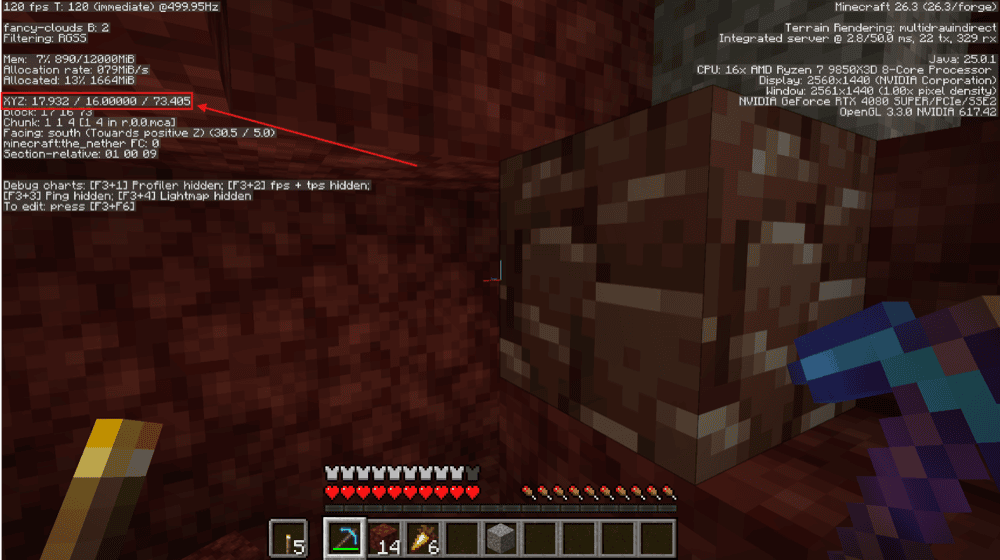
Knowing your level at a glance saves you from digging a long tunnel at the wrong height. Here are the steps:
- Press "F3" to open the debug screen.
- Find the "XYZ" line in the top-left corner.
- Read the middle number. It is your "Y" level, and it shows where your feet are.
The "XYZ" numbers carry decimals, so a reading anywhere from 15.0 up to just under 16 means your feet are at "Y" 15. The "Block" line underneath shows the same position in whole numbers, and our article on how to check coordinates in Minecraft explains the coordinate lines in more detail.
The Nether's bedrock floor starts at "Y" 0, so you can only line in the negative with a positive "Y" number, unlike the negative depths involved in mining iron in Minecraft. To reach "Y" 15, we recommend digging a staircase down, well away from the lava ocean, and checking "F3" as you go, since a staircase gives you a way back up if lava spills into your path.
Once you're standing at "Y" 15, you'll need a Diamond or Netherite pickaxe, because any other pickaxe will break ancient debris without dropping the material. Our guide on how to find ancient debris covers how to tunnel this layer, blast mine it, and handle the lava and piglins down there.
Mods That Help You Dig In All the Right Spots
Holding a straight tunnel at "Y" 15 over a long stretch of rock gets easier with a little help. The two mods below aim to keep your height in view and show how ores spread across every level.
GUI Compass
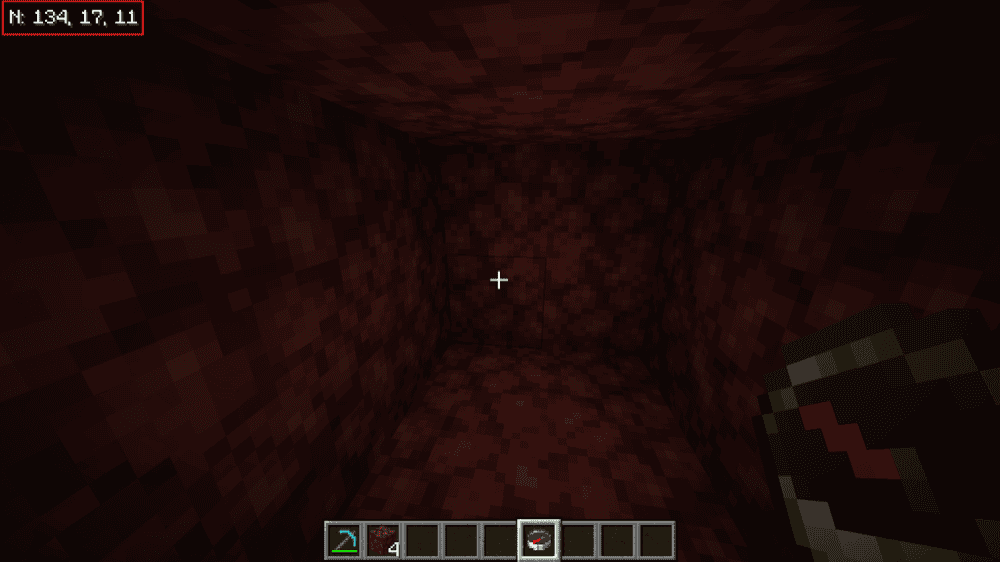
“GUI Compass” saves you from stopping every few blocks to open "F3" and check your height. With a compass in your inventory, the mod now shows the direction you are facing and your "X", "Y", and "Z" coordinates in the top-left corner of the screen, so one glance tells you whether your tunnel is still on level – or not.
The configuration file lets you move the readout to the left, center, or right of the screen, nudge it up or down, and pick which values it shows and the color of its text. You can also turn off the compass requirement, so the readout shows up even with no compass on you.
JEI / REI / EMI WorldGen
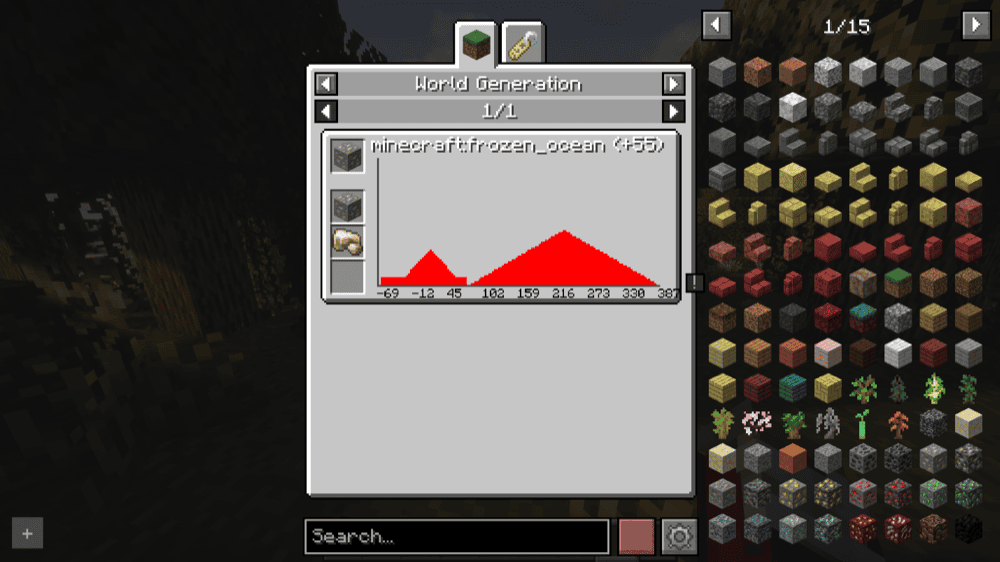
“JEI / REI / EMI WorldGen” lets you check which heights are worth digging without leaving the game.
It is a companion mod for the recipe viewers “Just Enough Items” and “Roughly Enough Items” (the in-game screens for looking up items and how to make them). With either one installed, the mod now adds ore generation pages, with graphs that plot each ore across the world's "Y" levels.
The mod also reads the world's own generation data, so ores added by other mods usually show up, too. On a server, we suggest installing the mod there as well, since that data comes from the server. Without it, the mod can only show what it remembered from your last single-player world.
How to Install Minecraft Mods
You can install the above mods automatically using the CurseForge app or manually by placing the mod files within your game's mods folder. Both methods allow you to easily add custom features and enhancements into your Minecraft experience.
If you want to learn more, you can read our detailed guide on how to install Minecraft mods.
Common Issues and Quick Fixes
I'm mining at "Y" 15 and still haven't found any ancient debris
First, we recommend pressing "F3" again, because bending a tunnel around a lava pocket is an easy way to drift a few levels off without noticing. If you are still at "Y" 15 or 16, the answer is simply to keep the tunnel going. A long bare stretch is normal at these odds, as our guide segment on "Why Ancient Debris Piles Up Around "Y" 16" explains.
I can't spot any ancient debris along the lava ocean or on cave walls
Ancient debris almost never generates touching air, so an open wall or a lava shore is the wrong place to look. The solution is to dig into solid rock at "Y" 15, where your tunnel walls do the searching for you, as covered in the "Why You Won't Spot It on a Cave Wall" section.
I'm at "Y" 16 in the Overworld and there's no ancient debris
Ancient debris only generates in the Nether, so digging at "Y" 16 in the Overworld will never turn it up. A tried and tested approach is to head through a Nether portal first, as covered under the "Which "Y" Level Has the Most Ancient Debris?" section of this guide.
My game crashes on startup after installing mods
A startup crash usually means one of five things:
- The mod file does not match your Minecraft version.
- The mod was made for a different loader or another version of its loader.
- A required dependency is missing.
- Some of your mods are incompatible with each other.
- If you’re playing on Forge or NeoForge with an AMD graphics card and frequently experiencing crashes, your GPU driver might be outdated. If that’s the case, we recommend installing the latest drivers from the official AMD website.
Additionally, check that you installed the correct Forge, Fabric, Quilt, or NeoForge file for your profile, then look at the mod page for any required files, especially for Fabric API on Fabric profiles and for Quilted Fabric API on Quilt profiles.
Also note that Minecraft mod loaders are their own separate systems, so a Fabric file will not work in a Forge profile, with the same being true for NeoForge or Quilt builds.