With no bed or anchor set, one wrong step on a Nether ledge sends you all the way back to the Overworld – a whole portal trip away from everything you dropped. A respawn anchor keeps you in the Nether instead: charge it with glowstone, set your respawn point on it, and your next death drops you right back beside it.
So, join us as we look at what goes into a respawn anchor, how to charge it and set your respawn point, and what happens when you try it in the wrong dimension. We will also check out three mods that give you more ways to set and find a respawn point.
Now, let’s give your next respawn a soft landing!
What You Will Need
Making a respawn anchor takes two ingredients and a crafting table:
- 6 crying obsidian (found in the frames of Ruined Portals, in the chests of Bastion Remnants, or bartered from piglins for gold ingots);
- 3 glowstone blocks (each made from 4 glowstone dust, which drops when you mine glowstone in the Nether);
- A crafting table.
Crying obsidian needs a diamond pickaxe or better to mine, and mining glowstone with Silk Touch gives you whole blocks and skips the dust step.
How to Make a Respawn Anchor Step by Step
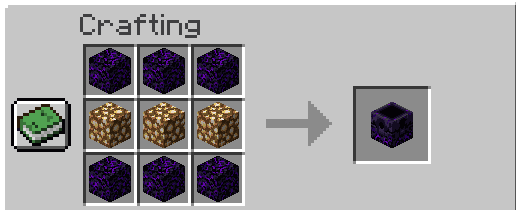
The recipe uses all nine slots, so it will not fit the 2x2 grid in your inventory and needs a crafting table. Here are the steps:
- Open the crafting table.
- Fill the three slots of the top row with crying obsidian.
- Fill the three slots of the middle row with glowstone blocks.
- Fill the three slots of the bottom row with crying obsidian.
Note: your new anchor starts with no charge, so you can't use it yet. Since respawn anchors do not generate naturally or show up in loot, you will be making your own.
Charging the Anchor and Setting Your Respawn Point
Before you add any glowstone, make sure that the anchor is placed in its final spot. Breaking it later resets its charges to 0 (and takes a diamond pickaxe or better to pick it back up), while pistons cannot move it at all. Once it is in place, follow these steps:
- Head to the Nether and place the respawn anchor where you want to wake up.
- Hold a glowstone block and use it on the anchor. That adds 1 charge, and the anchor starts to glow.
- Add more glowstone blocks the same way, up to 4 charges in total. A full anchor shines at light level 15 (light level measures how bright a block is, and 15 is the maximum).
- Use the anchor with anything other than a glowstone block in your hand once it holds at least 1 charge. A “Respawn point set” message will then confirm your new respawn point.
Tip: one charge is enough to make the anchor your respawn point, so topping it up to 4 can wait. Charging it to the max by hand does earn you the “Not Quite "Nine" Lives” advancement, though.
What Happens Once Your Anchor Is Set
Charges and What a Respawn Costs
Every time you respawn at the anchor, it loses 1 charge, no matter where you died. A full anchor therefore gives you 4 respawns.
The glow, on the other hand, tells you how many are left. A single charge gives light level 3, and each charge after that adds an extra 4, so it will grow to levels 7, 11, and 15 respectively. An empty anchor gives off no light, which makes taking a quick glance before a risky trip a good habit.
To top it back up, simply use more glowstone blocks on it the same way as before. Here, a dispenser loaded with glowstone and facing the anchor will recharge it, too.
Note: several players can share one anchor, and they all draw from the same charges. Because each respawn uses 1 charge no matter whose it is, a shared anchor runs dry faster.
Where You Wake Up
You reappear beside the anchor (or, as a last resort, on top of it), on a spot the game picks from the blocks around it. The smallest area it accepts is a space 1 block wide and 2 blocks tall, so a single open nook is usually enough.
If the anchor has been destroyed, has run out of charges, or has no open space left around it, you respawn at the world spawn (your world's default spawn point) instead, along with the message “You have no home bed or charged respawn anchor, or it was obstructed”.
An Important Note on Anchors and Beds
Anchors and beds share one respawn point.
You have one respawn point at a time, and it belongs to whichever bed or anchor you used last. Using a charged anchor in the Nether replaces any other spawn location you had, and sleeping in a bed, or even just clicking one in the daytime, replaces the anchor in return.
Neither one backs up the other, however.
Why a Respawn Anchor Only Works in the Nether
The respawn anchor is the Nether's respawn block – the same way the bed is the Overworld's – and the Nether is the only vanilla dimension where it works. In the Overworld and the End, it does something far less helpful.
Try to set your respawn point at a charged anchor in either of them, and the anchor explodes and is destroyed. The blast has a power of 5 (the game's measure of explosion strength, with TNT being at 4) and sets fire to the blocks around it.
A shield can block the blast, and if it kills you, the death message reads "was killed by [Intentional Game Design]" after your name, so the game is upfront about it.
Only a charged anchor explodes, while an empty one does nothing.
Mods for Setting and Finding Your Respawn Point
An anchor only helps once you have the crying obsidian for it and can find your way back to it. The three mods below aim to give you another place to set a respawn point, a way to use your anchor in the End, and a method to track down the one you already have.
Campfire Spawn and Tweaks
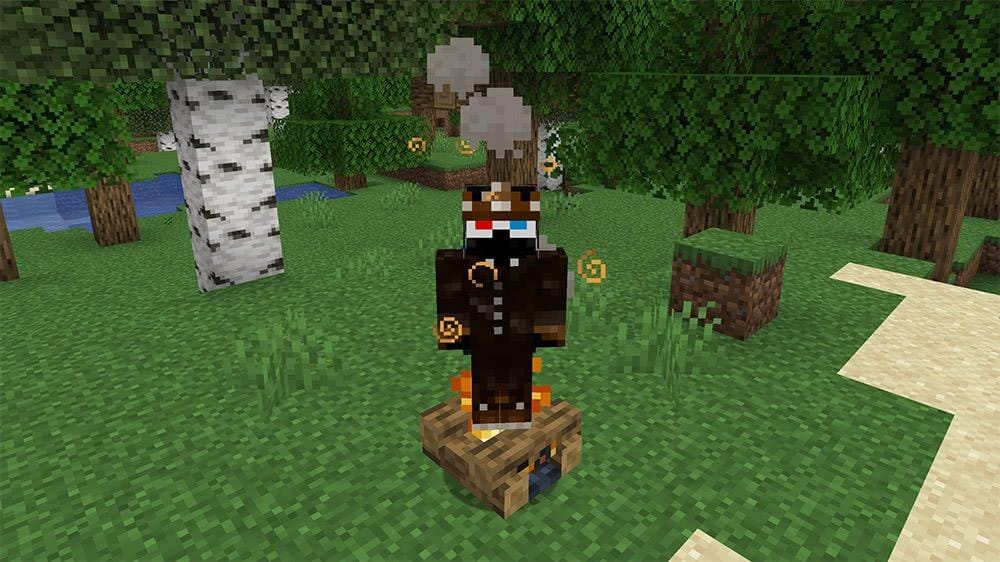
“Campfire Spawn and Tweaks” is for the days you want a respawn point without hunting down 6 crying obsidian. The mod works as an alternative to the anchor in the Overworld, the Nether, and the End, as well as modded dimensions. Simply light a campfire, and it now becomes your respawn point, with you appearing right on top of it. By default, you also get the Fire Resistance effect for 10 seconds when you respawn there.
Out of the box, campfires start unlit, so placing one sets nothing until you light it. Sleeping in a bed also overrides your campfire spawn, while sneaking (enabled by holding down "Shift") as you right-click a campfire clears the spawn point.
Additionally, the configuration file lets you change how long the effect lasts, and setting it to "0" turns the effect off and puts you next to the campfire instead of on top of it. Note that the mod runs server-side only, and the same file lets you switch off the messages it sends when a campfire spawn point is set, cleared, or missing.
Better Respawn Anchors
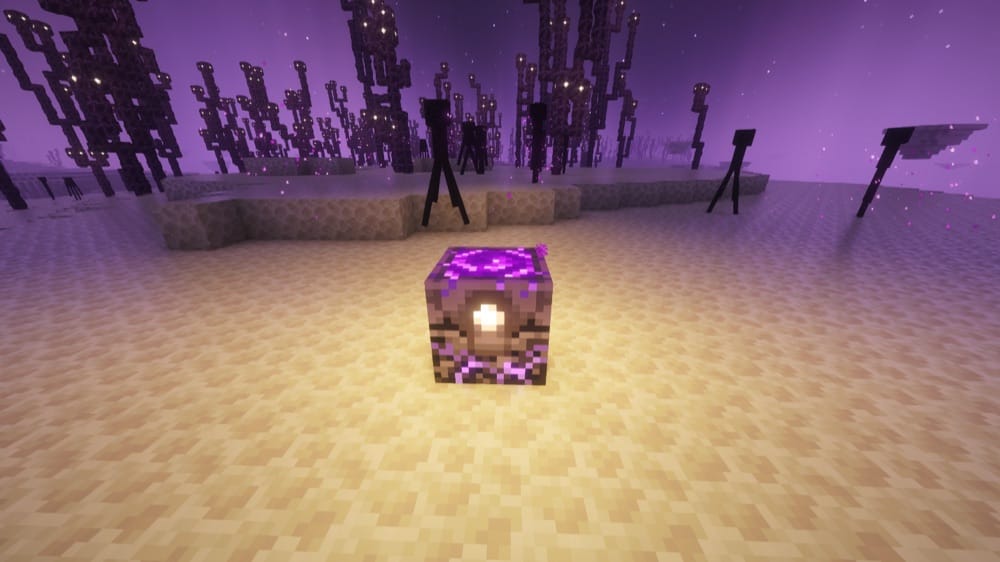
“Better Respawn Anchors” is of the type of mods that change how the vanilla itself behaves instead of implementing something new. In this case, it does so by letting respawn anchors work in the End. Charge one with glowstone blocks the usual way, and you can safely set your respawn point there.
The mod adds no new blocks or items, and the Nether and the Overworld keep their vanilla behavior, so it suits players who want a permanent End base without leaving the vanilla feel behind.
Respawn Compass
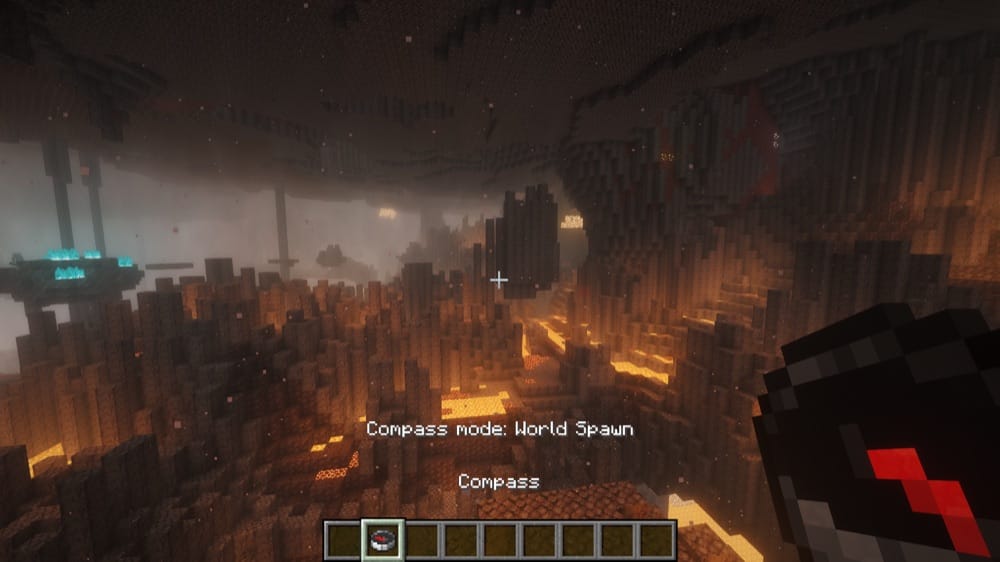
“Respawn Compass” helps when you have set an anchor and then wandered far enough to lose track of where it is. Instead of adding a new item, the mod lets the compass you already carry point to a second place. Right-clicking a normal compass in the air now switches it between "World Spawn", which is the usual compass behavior, and "Personal Respawn", which points at the bed or respawn anchor you set most recently.
The mod also shows a message above the hotbar that confirms the mode you picked and displays the respawn coordinates and dimension. Keep in mind that in another dimension, the needle acts the same way a lodestone compass (a compass linked to a lodestone block) does when its target is somewhere else. The mod does not change lodestone compasses, so you can still make and use them as usual.
How to Install Minecraft Mods
You can install the above mods automatically using the CurseForge app or manually by placing the mod files within your game's mods folder. Both methods allow you to easily add custom features and enhancements into your Minecraft experience.
If you want to learn more, you can read our detailed guide on how to install Minecraft mods.
Common Issues and Quick Fixes
My respawn anchor exploded
As covered in the "Why a Respawn Anchor Only Works in the Nether" section, a charged anchor blows up when you use it in the Overworld or the End. To stop it from happening again, make sure to use the anchor only in the Nether and sleep in a bed while you are in the Overworld.
If you place a charged anchor at home as a light source or decoration, we recommend leaving it unused there.
My respawn anchor won't set my respawn point
An anchor needs at least 1 charge, and a brand-new one starts with none. If yours gives off no light, try using a glowstone block on it first, then use it again with an empty hand or any other item. Also note that while you are holding glowstone, using an anchor that is not full only adds another charge.
You will know it worked when the “Respawn point set” message appears, although note that it won’t repeatedly appear if that anchor is already your respawn point.
My respawn anchor won't take a charge
A glowstone block adds a charge, but glowstone dust does not. The solution is to turn 4 dust into 1 block in a 2x2 grid. The other cause is a full anchor, which holds up to 4 charges and glows at light level 15.
I respawned at the world spawn or at my bed instead of my anchor
If you woke up at your bed, chances are you used it after setting the anchor, even if all you did was click it during the day, since the last one you use is the one that counts. To switch back, simply use the anchor again.
If you woke up at the world spawn, the anchor was most likely destroyed, out of charges, or blocked in. A tried and tested approach is to recharge it, clear a gap 1 block wide and 2 blocks tall beside it, and use it again to set your respawn point.
I left the End and ended up in the Nether
After the Ender Dragon falls, the exit portal sends you back to your respawn point, which is your anchor if it was the last one you set and it still has a charge and open space beside it. It costs no charge, since returning through the portal does not count as a respawn.
If you would rather arrive in the Overworld, we recommend setting a bed as your respawn point before you head to the End, while our guide on how to beat Minecraft covers the Ender Dragon fight itself.
My game crashes on startup after installing mods
A startup crash usually means one of five things:
- The mod file does not match your Minecraft version.
- The mod was made for a different loader or another version of its loader.
- A required dependency is missing.
- Some of your mods are incompatible with each other.
- If you’re playing on Forge or NeoForge with an AMD graphics card and frequently experiencing crashes, your GPU driver might be outdated. If that’s the case, we recommend installing the latest drivers from the official AMD website.
Additionally, check that you installed the correct Forge, Fabric, Quilt, or NeoForge file for your profile, then look at the mod page for any required files, especially for Fabric API on Fabric profiles and for Quilted Fabric API on Quilt profiles.
Also note that Minecraft mod loaders are their own separate systems, so a Fabric file will not work in a Forge profile, with the same being true for NeoForge or Quilt builds.